59.2.41.2 Ingest
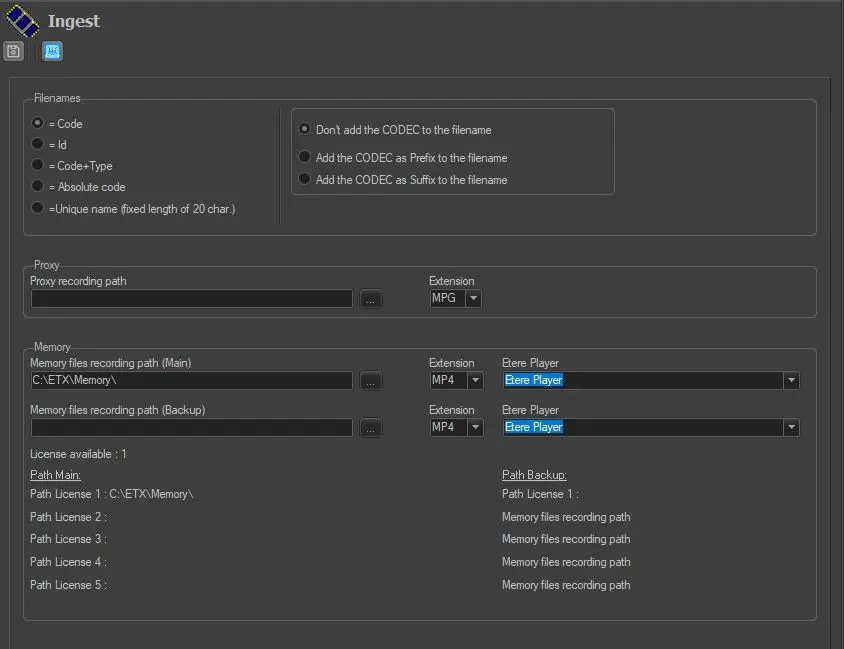
Under the "Ingest" section user can define the way video files would be named after their ingestion and where the proxy and memory versions can be found:
Ingest
Filenames
Set the naming criteria for ingested files by combining the options available in these two columns. Choose between naming ingested files based on the properties of the asset they are associated with:
Method - Code
Description: Name the ingested files based on the asset code; the code must contain only alphanumeric ( [A..Z], [a..z], [0..9] ) and underscore ( _ ) characters; otherwise, the filename would be similar to the asset ID.
NB: If files are stored on a device whose driver has filename restrictions (i.e. Imagine, Nextore, EVS, Pinnacle, Doremi, OmneonAPI), their name should have a maximum length of 8 characters (or 20 for other drivers); otherwise the filename will be similar to the asset ID.
Example: asset37
Method - ID
Description: Name the ingested files retrieving them from the univocal numerical asset ID.
Example : 35256
Method - Code + NewType
Description: Name the ingested files combining the asset code and asset type (i.e. concatenating).
Example: asset37COM
Method - Absolute code
Description: Name ingested files generating with the exact name specified in the asset code, including all its characters (regardless of its character types).
Example : *asset-37*
Method - Unique name (fixed length of 20 chars) (default)
Description: Name the ingested files using a hexadecimal algorithm to generate a 20-characters name that guarantees the unicity of each file managed in the system. Use this method to ensure that files are unique for each site or that you need to store multiple files with the same codec and related to the same asset in the same meta device.
Example : 02BD000000000000004A
Further options - Example
Further options - Don't add the Codec to the filename
Example: asset0005
Further options - Add the Codec as a prefix to the filename
Example: MXFasset0005
Further options - Add the Codec as a suffix to the filename
Example: asset0005MXF
NB: It's worth mentioning that these "further options" are valid only for naming files acquired through Etere Ingest.
Note
This section regards only the generation of filenames; for information on rules for generating new asset codes, please refer to Media Library > Codes.
File paths
Set the local/network paths to be used for storing ingested files from the following functions:
Function -- Parameters
Function - Proxy
Parameters: Recording Path - Set the cloud-device path in which lores media acquired through Etere Ingest would be stored.
Parameters : Extension - Select the file type for ingest. The available selection of media files with extension are: .MPG, .WMV, .MOV, .MPEG, .MP4, and .MXF.
NB: The path set here must be configured within a cloud device (under Etere Configuration > Resources Editor) to be usable by Etere Ingest.
Function - Memory
Parameters: File Recording Path - Set the cloud-device path in which lores media captured for video legal recording would be stored for the main and backup recording.
Parameters : Extension - Select the file type for ingest in Main and Backup path. The selection of media files with extension are: .MPG, .WMV, .MOV, .MPEG, .MP4, and .MXF.
Parameters: Etere Player - Specify the player to be used for previewing recorded media. Available players include Etere Directshow (e.g. for MPG files), Windows Media Player (e.g. for WMV files), Etere QuickTime (e.g. for MOV files) and Etere Player.
NB: The Memory paths are the same set in the Parameters Configuration of the Etere Memory module; if this parameter is changed in any of the two sections, its value is automatically updated on the other side.
NB: When running lowres recording in ETX resource, the paths settings is not required.
 Ingest