Secondary Events
84.2.4.8 HbbTV
The HbbTV secondary event allows to insert “DAS” type secondary event in the schedule.
HbbTV
Active: Enable this option to activate the feature.
Name: Enter a short descriptive name.
Execute command: Indicate the start time of the command, and set the criteria for the command to take place.
Json Command: Specify the JSON command string with the command value to manage the DAS type secondary events. The possible command values are 1 (Preset), 2 (Take) or 3 (Clear).
Upon confirmation, click <OK> button to submit the secondary event.
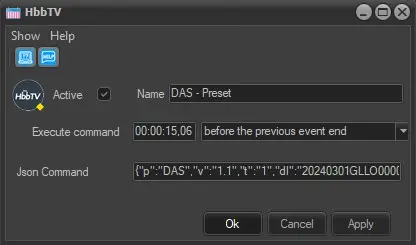 HbbTV
HbbTV