59.3.4.6 Censorship
Censorship_process__T-Workflows
Start the T-workflow execution and proceed to step 2.
1st permission level - The User Dept. Manager receives a task to approve/reject the download request:
Approved - The download is supported, and the T-workflow proceeds to step 3.
Rejected - The download is denied, and the T-workflow proceeds to step 7.
2nd permission level - The Archive Manager receives a task to approve/reject the download request:
Approved - The download is supported, and the T-workflow moves to step 3.
Rejected - The download is denied, and the T-workflow proceeds to step 7.
Transcode file to requested format - The system automatically transcodes the file to meet the requested form:
Done - The transcoding has been successfully performed.
The T-workflow proceed to step 5.
Aborted/ Error - The transcoding has not been completed (e.g. servers are out of order, etc.)
The T-workflow proceed to step 8.
Copy file to requested location - The system automatically copies the requested media file into a preset place (e.g. a shared FTP directory):
Done - The transfer has been successfully performed.
The T-workflow moves forward to step 6
Aborted/ Error - The transfer has not been performed (e.g. servers are out of order, etc.)
The T-workflow moves forward to step 8
SC Process completed - If the 1st or 2nd Permission Level has been granted, the result of the SC Process will be set as “completed”.
SC process not completed - If either the 1st or the 2nd Permission Level has been denied, the result of the SC Process will be set as “not completed”.
SC process unexpected - If an action (e.g. transcode file, copy file, etc.) returns an error, the result of the SC Process would be set as “failed”.
Send email Alert - The system automatically sends an email notification on the process result:
Completed - Rejected - Failed
The T-workflow proceed to step 9
End - The T-workflow execution ended.
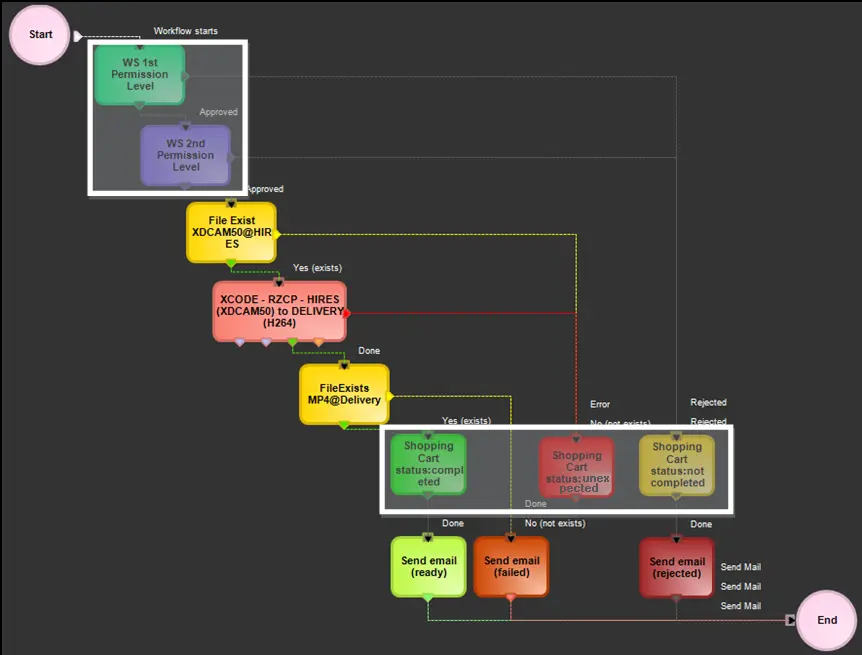 Censorship_process__T-Workflows