59.3.8.2 Batch Actions Renaming
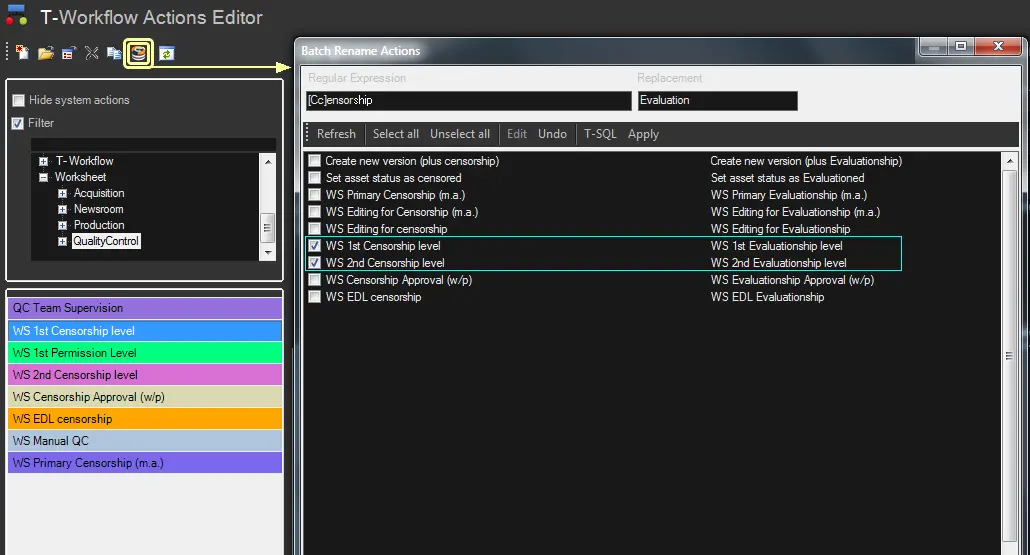
The [Batch action rename] button, available in the T-Workflow > Actions section for all actions, allows administrators to quickly replace the name of an action using the Data Replacement function:
Data_Replacement_function
1. Press the [Batch action rename] button.
2. Enter the regular expression (e.g. [Cc]ensorship) to be used as the search pattern for matching action names.
3. Enter the replacement string (e.g. Evaluation) to be set in place of matched strings.
4. Press the [Refresh] button to load the following columns:
Matched values - All entries (action names) match the regular expression. E.g. WS 1st Censorship (Video)
↓
Replaced values - All entries (action names) are updated with the replacement. E.g. WS 1st Evaluation (Video)
5. Select the entries (action names) to which apply the replacement. You can check them individually and use the [Select all] and [Select all] buttons.
6. Optionally, use the following functions if required:
[Edit] - Apply a custom replacement to the selected entry (action name).
[Cancel] - Remove all custom replacements, reverting replaced values to the set replacement
[T-SQL] - Copy in the clipboard the query generated by the system to perform the replacement.
7. Make sure replaced values are satisfactory, then press the [Apply] button to make changes take effect.
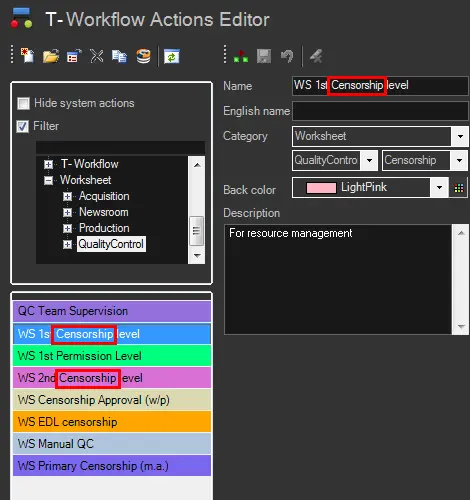
8. All selected entries (action names) will be immediately renamed. For instance:
renamed_selected_entries
 Data_Replacement_function
 renamed_selected_entries