59.6.2.15 Sony - Flexicart resource editor
The information displayed in the first part is merely descriptive and shows previously assigned data:
•Code: the path of the resource that you are editing is displayed
•Type: shows the resource type
•Number: indicates the ordinal number that identifies that resource in case others of the same type coexist.
The user must enter the following information:
•Name: description of the resource you are editing.
•Driver: fixed for the machine type: FLEXICART
Important:
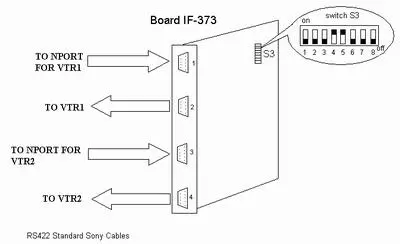
Inside the Flexicart, there is a board N° IF-373
In this board, you have a deep switch S3; the settings must be:
1 -------> Off
2 -------> Off (not important)
3 -------> Off
4 -------> On
5 -------> On
6 -------> Off
7 -------> Off
8 -------> Off
CPU-107 Board Settings:
•Deep switch S5 pin8 -------> On , all others Off
•The cable from the multiport to the VTR must be connected to the serial connection n° 2 of the Flexicart.
•Serial connection wire: SMPTE 207 (SONY standard)
board_N°_IF-373
Flexicart Resource Editor - User
After indicating which user and which software the resource has to be installed for, you have to set other data:
Com port setting:
Indicate the com number used.
 board_N°_IF-373