72.2.3.6 Insert into Schedule
The "Insert into schedule" function allows to protect an asset from being deleted (e.g. in case it is expected to go on-air), this, by "virtually" scheduling it across one or more broadcast television days.
In order to indicate the system that their deletion is forbidden, events protected using this function are placed in the Etere's scheduling level #702 (i.e. scheduled events protected from deletion), therefore, they won't be visible from the actual schedule (i.e. scheduling level #0).
Inserting an asset into the schedule
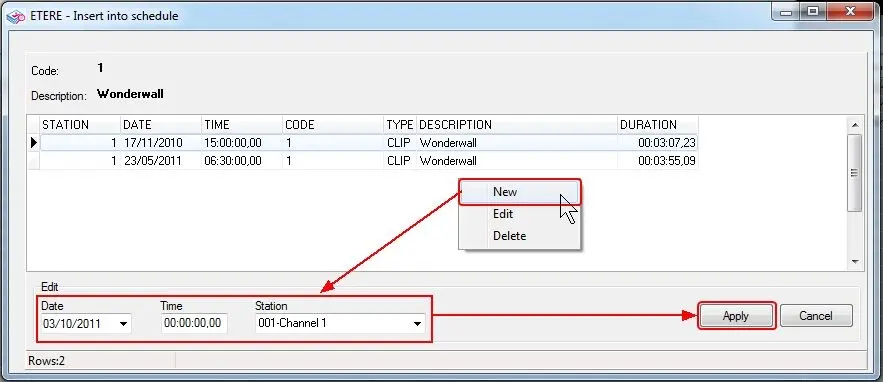
The insertion of asset's protected scheduled times can be performed just by following the next procedure:
Insert into Schedule
1. Make right-click on the list and select the "New" option,
2. Enter the date, time and station for which the deletion will be forbidden.
3. Press the [Apply] button to save changes into the database and finish the insertion.
NB: Please note that it is possible to create more insertions in case the asset is expected to be featured more than once on different days/times/stations just by repeating the previous steps.
 Insert_into_Schedule