59.3.9.73 Reset Duration
Action Description
The "Reset duration" action allows to automatically reset the duration of an asset, for example, after its media deletion, to either a null duration (i.e. one frame) or its former duration (i.e. scheduled duration).
NB: Please note that in case of resetting an asset without linked metafile/tapes, all the asset's EDL (1,2...9) and its quality check value (i.e., set to 0) will be reset.
Action Parameters
Under this section, it is possible to create new actions based on the following parameters:
•Name: Give a brief and self-descriptive name to the action (e.g. "Reset duration to 1 frame"),
•Set to Specify if the asset duration must be reset to either a null duration (i.e. one frame) or its former duration (i.e. scheduled duration).
How to use it
The "Reset duration" actions can be included in T-workflow -under the T-Workflow designer- to, for example, set the new duration of an asset subsequently to the deletion of its formerly linked media file:
Reset_Duration
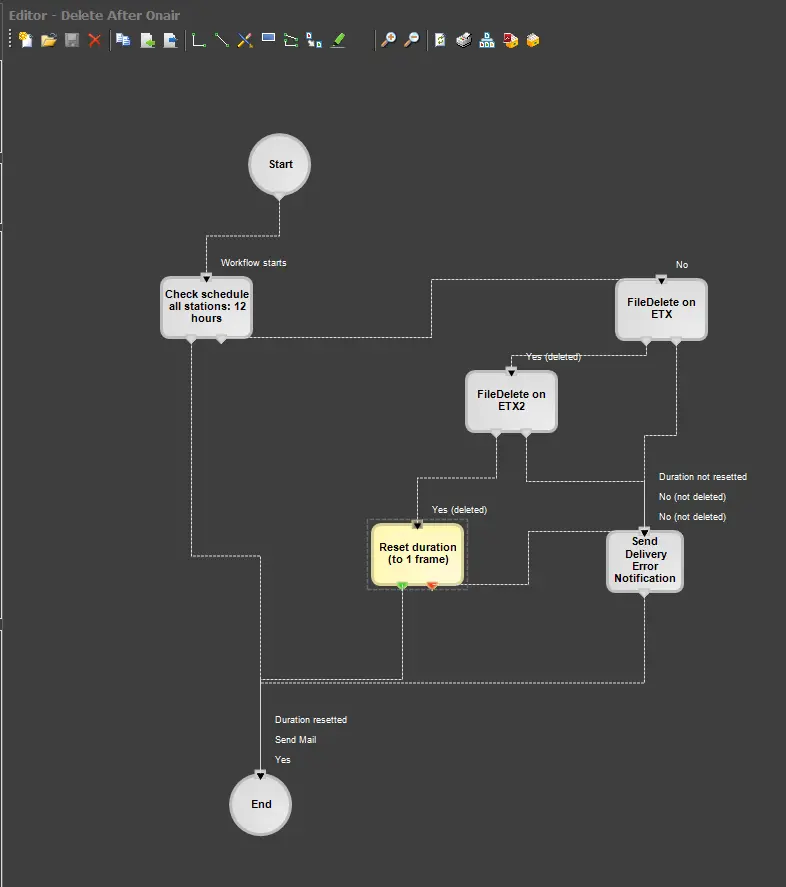 Reset_Duration