79.6.3 Using Etere Nunzio App
Once the pre-requirements and the installation have been complete, if everything have been configured correctly, we can start using Etere Nunzio App.
Once we start Etere Nunzio App for the first time, the System will require to have the working URL for the Nunzio Web Service previously installed and configured.
nunzio_android_web_service
insert he proper URL and press the APPLY button to confirm.
If the Web Service is working as expected, the system will redirect the user to the login page, required in order to access the App.
nunzio_android_login
Once there, insert User, Password and Domain. It worth mentioning that the Domain is taken by Etere Configuration and is not possible to insert it from scratch into Etere Nunzio App form.
If everything has been configured as it should, we would be redirected to the Etere Nunzio Tasks Landing Page.
We will have a look at each Nunzio App features in the next paragraphs.
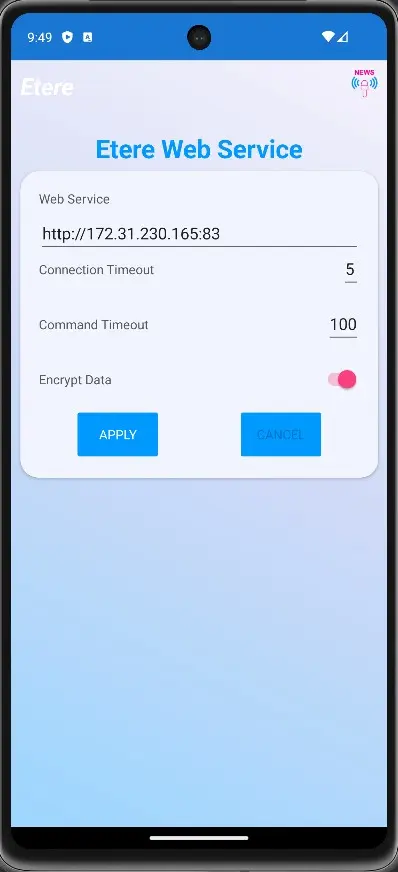 nunzio_android_web_service
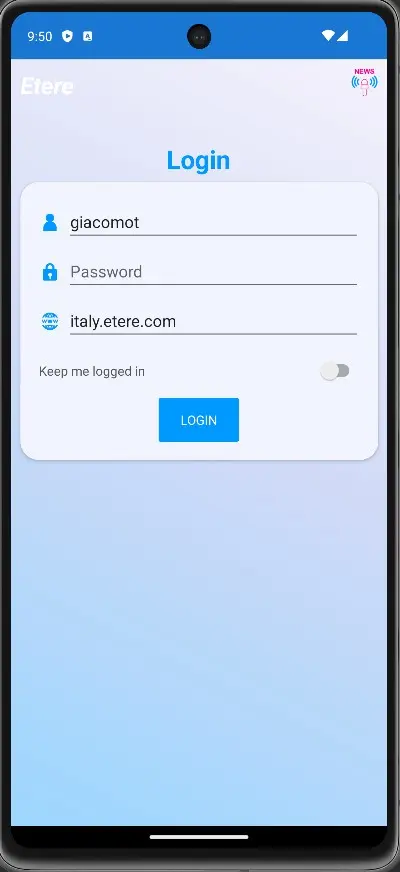 nunzio_android_login