59.2.16.3 Codes
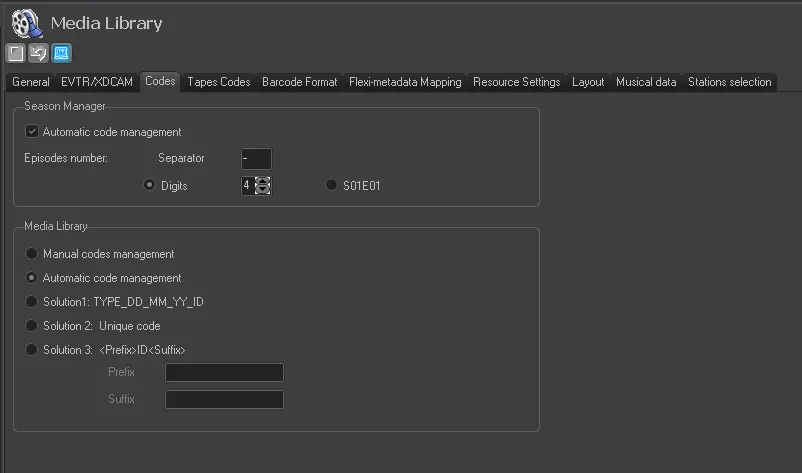
The Codes tab holds some parameters regarding how Etere will manage asset codes:
ml_codes
Season Manager (codes for the new episodes)
Automatic code management - If enabled, codes will be automatically generated when new seasons are created, based on the code layout set for the season type.
Moreover, this section indicates the separator and number of digits for generated codes. For instance: Supercar season - 0013.
Instead of digits, it's possible to choose the format SxxEyy, where 'xx' are 2 digits representing the season number and digits 'yy' represent the episode number.
NB: Code layouts are set in Etere Configuration > Settings > Codes and assigned to types in Etere Configuration > Settings > Types > Additional data > Automatic code management > Season Manager.
Media Library (codes for new assets)
Manual codes management - If selected, operators will compile codes manually (however, a code will be pre-compiled).
Automatic code management - If selected, codes will be automatically generated when new assets are created, based on the code layout set for the asset type.
NB: Code layouts are created in Etere Configuration > Settings > Codes and assigned to types in Etere Configuration > Settings > Types > Additional data > Automatic code management > Assets.
Solution 1: TYPE_DD_MM_YY_ID - If selected, codes will be automatically generated combining the type (e.g. film), creation date (e.g. 30th November 2012) and ID (e.g. 666) of the asset. For instance: FILM_30_11_12_666.
Solution 2: Unique code - If selected, codes will be automatically generated as hexadecimal strings (20 chars length) to guarantee the unicity of codes within the system. For instance: 02BD000000000000004A.
Solution 3:<prefix>ID<suffix> - If selected, codes will be automatically generated combining the ID (e.g. 666) of the new asset and a custom prefix and suffix. For instance: Clip666CH1.
 ml_codes