69.2.1.14 RCS DEFERRED
Import Scope
The F90 – Import Standard RCS Deferred import, allows configuring and performing the import of deferred commercials, that is, the import of commercials which weren't available during a previous import and which are intended to be imported in a second instance.
Import Parameters
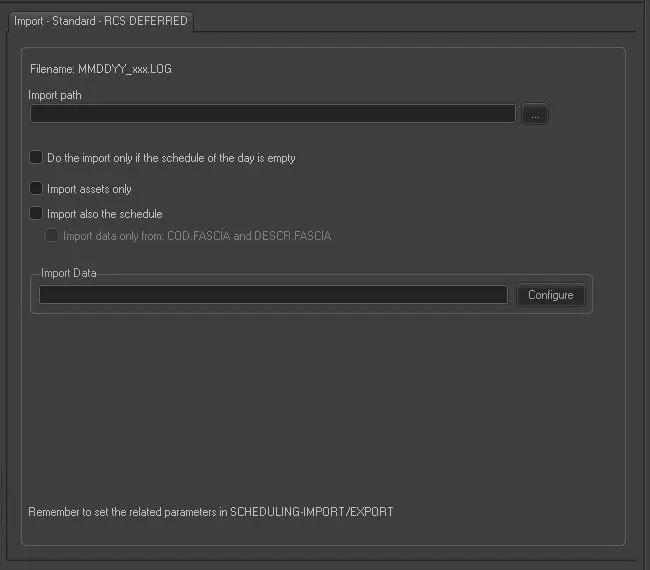
Import - Standard - RCS DEFERRED
Import path: Specify the path location of the Log file. You can use the browse button to locate the path in the drives.
The file name format is “MMDDYY_xxx.log”
Do the import only if the schedule of the day is empty: Enable this option to perform the import only upon completion of the current day import. Only those commercials that missed the first import instance would be imported.
Import assets only: If enabled, only the asset material sheets would be imported.
Import also the schedule: If enabled, the asset schedule would be imported as well.
Import data only from: COD.FASCIA and DESCR.FASCIA: If enabled, the import would only import data from data field COD.FASCIA and DESCR.FASCIA.
Import data: Opens the Configure Import window to specify the days and the frequency to be imported.
Scheduling related import
Set the required parameters in Etere Scheduling > Import/Export > IMPORT\STANDARD\RCS > Import deferred commercials tab, then click <APPLY> to confirm the changes.
 Import_-_Standard_-_RCS_DEFERRED