72.2.2.3 Properties
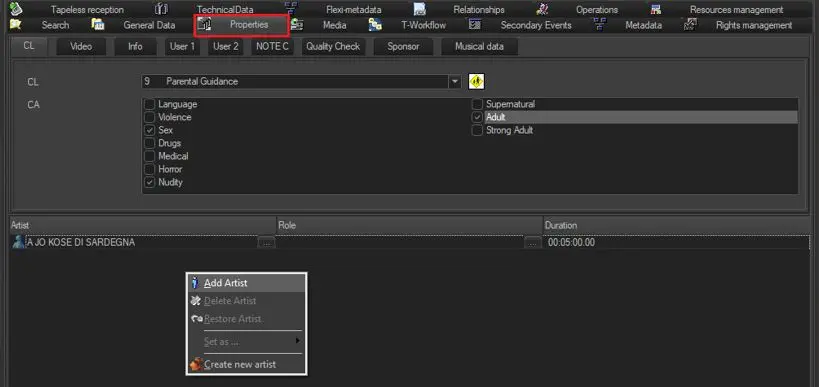
The Properties tab allows to define all the asset general information including parental classification, video format, quality, etc. This tab contains eight sections, described in the next chapters, on which it will be possible to detail most relevant asset properties:
Properties tab
Classification
Video
Info
User 1,2,3
Quality check
Sponsor
Music Details
On-click functions
Moreover, in the bottom part, it will be possible to use the following features:
Add Artist - Assign the artist(s) involved in the asset by selecting them from the Artists Database.
It's worth mentioning that it's also possible to set/change the role that played by artists as well as the duration of their performance by pressing the related [...] button.
NB: Artists are created in Etereweb > System > Artists, roles are defined in Etereweb > System > Roles.
Delete Artist - Removes the selected artist from the list.
Restore Artist - Reset the role and duration values to zero.
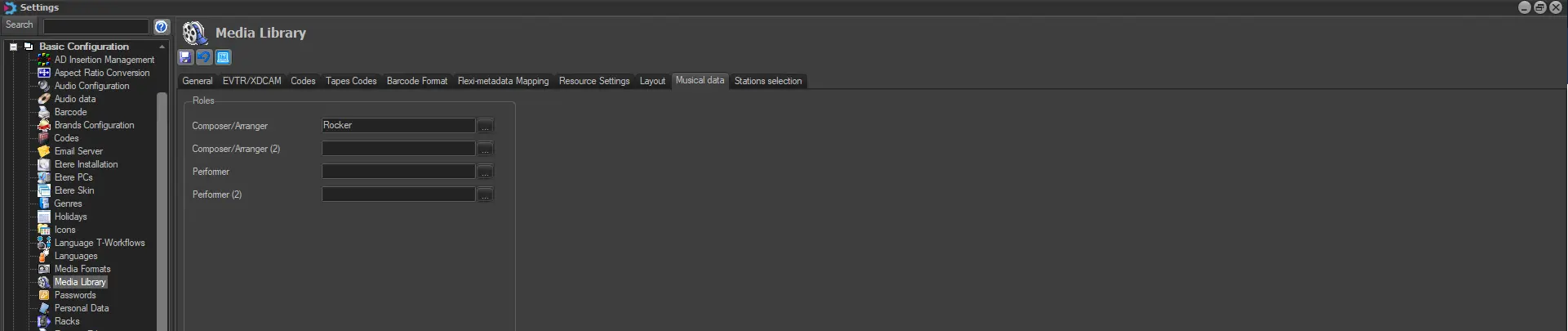
Set as ... - Indicate if a certain artist is the performer 1, composer 1, performer 2 or the composer 2. Under Etere Configuration, in Settings > Basic > Media Library > Musical data section, it is possible to set the role that will be assigned to the artist each time the 'set as...' function is used:
Media_Library
Create New artist - Creates a new artist that will be able to be subsequently associated to the asset. Creation of artists requires special rights.
Note:
In case the asset belongs to a season, "inherited artists" (i.e. set in the Season Manager) will be protected against deletions and role changes.
 Properties_tab
 Media_Library