52.2.5.2 Audio Mapping / DTMF Tone
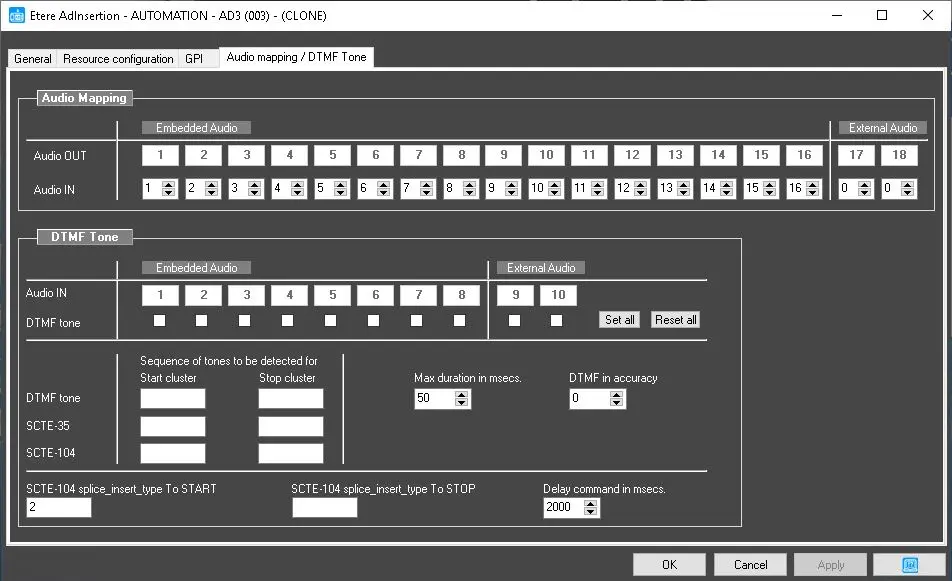
This section allows you to configure audio mapping settings and manage the DTMF tone.
audio_channels
NB: The "Audio Mapping / DTMF Tone" tab would not be visible if AD Insertion is in SPLIT mode.
Audio Mapping
Audio Out: Set the channels used for embedded audio and external audio.
Audio In: Set the channels for the incoming audio signal. Unused audio channels are set to "0."
The channel is zero (0) based. For example, if you want to use the first two live audio channels, set them to 0 and 1. If you need the following two channels, put them to 2 and 3, etc., and set all unused channels to "0".
The Audio Mapping tab is only valid with Ad Insertion, ETX and Passthrough.
Note: Audio is not mapped during Passthrough when all "Audio Out" is set to "0".
DTMF Tone
You can manage DTMF tone and different insertion tones in the Ad Insertion panel.
Audio IN - Originated from the audio track. You can monitor more than two audio channels to distinguish the incoming sources.
DTMF Tone - Originated from the DTMF cue tones for Analog broadcasting. Set the sequence of tones to be detected for "Start cluster" and "Stop cluster". Use the <Set all> button to select all the DTMF tone channels or <Reset all> to undo the selection.
• Max. Duration in ms.: Specify the maximum duration (in milliseconds) of the buffer on which DTMF detection is attempted. When the duration is set too long or too short, it will lead to incorrect detection. Setting the maximum duration of "25" milliseconds would give consistent results in detecting the complete DTMF tones.
• DTMF in accuracy: Specify a value to be used as DTMF tone. It is a corrective parameter to compensate for possible inaccuracies in received DTMF tones amplitude.
SCTE-35 – Originated from SCTE-35 standard cue tone for digital broadcasting. Set the sequence of tones to be detected for "Start cluster" and "Stop cluster".
SCTE-104 - Originated from SCTE-104 standard cue tone for digital broadcasting. Set the sequence of tones to be detected for "Start cluster" and "Stop cluster".
 audio_channels