59.5.8.22 SIAE Export
Report Description
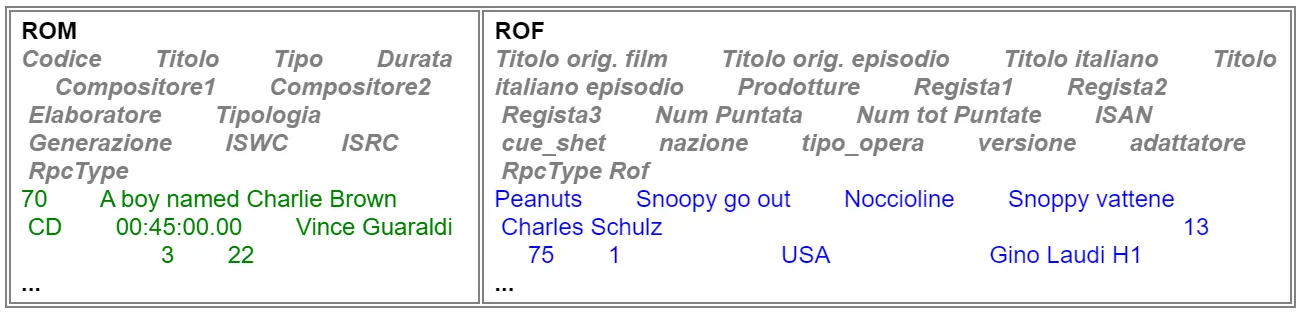
The "SIAE Export" module allows stations to export a file (.csv) containing a custom report of all the SIAE information (ROM and ROF) related to the events scheduled within a specific time range.
Report Filters
All the parameters that permit detailed report generation have been spread across seven different tabs to allow for a more straightforward configuration. By default, all filters are disabled (i.e., either blank or unselected); to enable them, it is enough to configure at least one parameter inside. Available filters include:
•Station
Channel: Specify the station from which data will be retrieved in which events have been scheduled.
•Code and ID
Code: Indicate the string with which asset codes must start to be retrieved.
ID: Indicate the string with which assets ID must start to be retrieved.
•ROM - ROF
Indicate if only those assets marked as ROM material, ROF material, or both will be retrieved.
•Description
Description: Indicate the string with which the asset description must start to be retrieved.
•Period
From - To Specify the period in which the assets to be retrieved have been scheduled. Please note that assets are inserted only once into the report, even if they are scheduled at various times within the period.
Report Preview
The [Export] button will allow you to generate the. CSV document containing the requested information. Please note that the preview is not available due to the extensive nature of the report.
SIAE_Export
Once the [Export] button has been pressed, a file will be created within the Etere installation folder (e.g. c:\program files\etere\docSIAE\channel 1\'), and its name will have the format '[year][month][day]-[year][month][day].csv' (e.g. 20121703-20123003.csv).
A link to the exported file will be displayed in the report form.
NB: The separator character in the exported file is the comma (;).
 SIAE_Export