85.2.12.2 How to use it
The Parental Guidance properties type defined in the Configuration > Settings > Type Editor must be enabled to activate this feature.
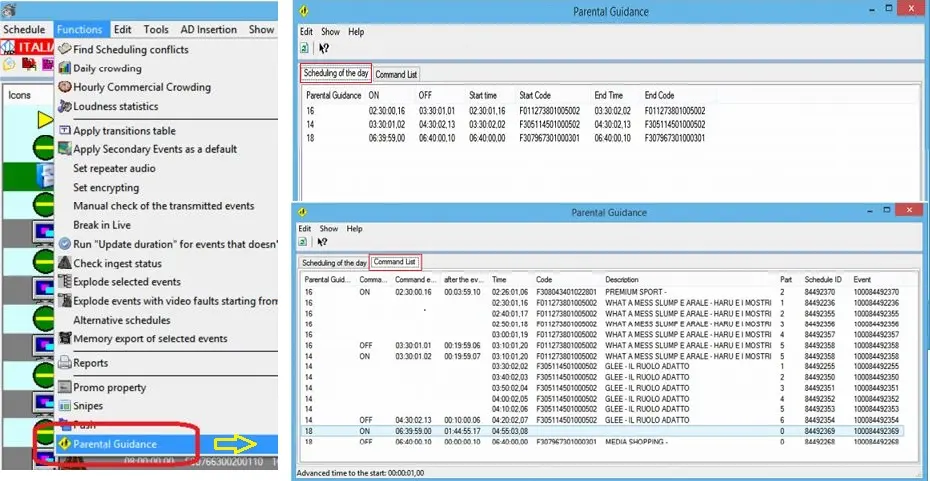
Upon activation, the Parental Rating (PR) command is sent by STMan via a pair of Web services to the PR management each time a program is started. You can use the Functions tool in the Executive Editor’s functions menu and select "Parental Guidance" to display the PR programs scheduled in the day and the commands list used by STMan to manage the Web services.
The parental rating “0” is sent only once to the program, all ratings must be sent at the starts of the program without executing the “Stop” command.
Parental Guidance
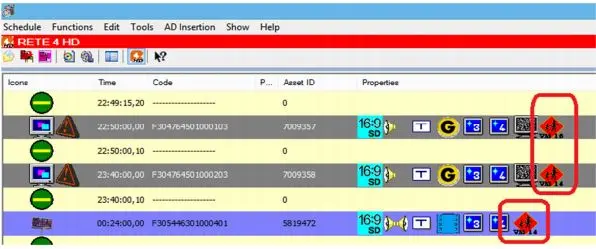
The PR programs are displayed in the Properties column of Executive Editor indicated by an icon.
stman_ee_parental_guidance
 Parental_Guidance
 stman_ee_parental_guidance