84.4.6.11 LogoGenerator1
Import/export a logo (LogoGenerator1) directly without using the <SECONDARY_EVENT> section, in order to do this, you must include the following fields in the XML file to be imported:
TITLER_IN - Logo number composed by 9 numbers indicating (from left to right) the 3 Logos to be imported (e.g. 1).
Please note that zeros at the left are not significant.
DSK1 - A fixed value that is composed by two characters which stands by:
Y/N - Activate DSK? Yes/No
Y/N - Is the logo a commercial? Yes/No
For example 'YN' will mean that the DSK will be activated for a not-commercial logo.
DSK1_IN - SOM indicates the frames AFTER the start of the event (e.g. 250).
DSK1_DUR - Duration of the event in frames (e.g.: 100), insert it just if you want to import more than one Logo (e.g. Logo1 and Logo2).
Importing 1 Logo
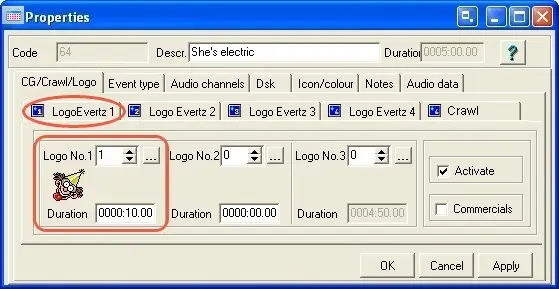
If you wish to import just one Logo, which number is 1 you can define TITLER_IN in two ways (both are correct), '1' or '000000001' since as previously explained, TITLER_IN is composed by nine numbers but zeros at the left are not significant. For example, by inserting the following parameters the import result will be as shown below:
<?xml version="1.0" encoding="UTF-8" standalone="yes" ?>
<data datetime="2009-05-20 15:47">
<TPALINSE lastrevision="2009-05-20 15:47" description="Station=Channel 1, Date Exported=20/05/2009 User=1">
<row>
<EXTERSTRID>CICCOL</EXTERSTRID>
<DATA>21/05/2007</DATA>
<ORA>617425</ORA>
<COD_PROGRA>A0020</COD_PROGRA>
<TIMECODE_I>100</TIMECODE_I>
<TIMECODE_O>400</TIMECODE_O>
<DURATION>300</DURATION>
<NEWTYPE>SP</NEWTYPE>
<TITLE>MAIN ID POP TV 2</TITLE>
<TITLER_IN>000000001</TITLER_IN> <!-- One Logo will be imported: 1 -->
<DSK1>YN</DSK1> <!-- Fixed value -->
<DSK1_IN>250</DSK1_IN> <!-- Duration of the first Logo (in frames) -->
<DSK1_DUR>0</DSK1_IN> <!-- Duration of other Logos (in frames) -->
<row>
</TPALINSE>
</data>
result in:
Importing_1_logo
Importing 2 Logos (Method A)
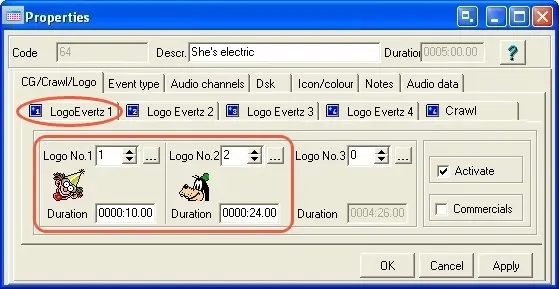
Instead, if you want to import two logos (Logo number 1 and Logo number 2), you MUST set TITLER_IN in two ways, '2001' or '000002001' as shown in the following example:
<?xml version="1.0" encoding="UTF-8" standalone="yes" ?>
<data datetime="2009-05-20 15:47">
<TPALINSE lastrevision="2009-05-20 15:47" description="Station=Channel 1, Date Exported=20/05/2009 User=1">
<row>
<EXTERSTRID>CICCOL</EXTERSTRID>
<DATA>21/05/2007</DATA>
<ORA>617425</ORA>
<COD_PROGRA>A0020</COD_PROGRA>
<TIMECODE_I>100</TIMECODE_I>
<TIMECODE_O>400</TIMECODE_O>
<DURATION>300</DURATION>
<NEWTYPE>SP</NEWTYPE>
<TITLE>MAIN ID POP TV 2</TITLE>
<TITLER_IN>2001</TITLER_IN> <!-- Two Logos will be imported: 1 and 2 -->
<DSK1>YN</DSK1> <!-- Fixed value -->
<DSK1_IN>250</DSK1_IN> <!-- Duration of the first Logo (in frames) -->
<DSK1_DUR>600</DSK1_DUR> <!-- Duration of the second Logo (in frames) -->
<row>
</TPALINSE>
</data>
result in:
Importing_2_logo
Importing 3 Logos (Method B)
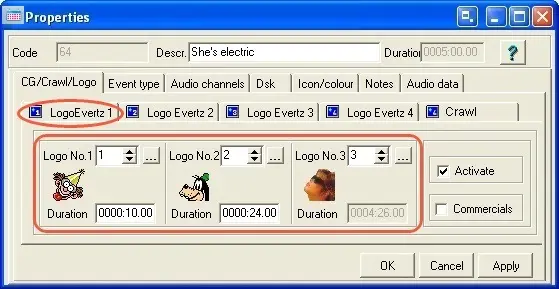
In case you wish to import three Logos (Logo number 1, Logo number 2 and Logo number 3), you MUST set TITLER_IN as follows, '3002001' or '003002001'. In the example below, where three Logos will be imported, is illustrated the XML used to import them, lines regarding the Logo import are marked with red:
<?xml version="1.0" encoding="UTF-8" standalone="yes" ?>
<data datetime="2009-05-20 15:47">
<TPALINSE lastrevision="2009-05-20 15:47" description="Station=Channel 1, Date Exported=20/05/2009 User=1">
<row>
<EXTERSTRID>CICCOL</EXTERSTRID>
<DATA>21/05/2007</DATA>
<ORA>617425</ORA>
<COD_PROGRA>A0020</COD_PROGRA>
<TIMECODE_I>100</TIMECODE_I>
<TIMECODE_O>400</TIMECODE_O>
<DURATION>300</DURATION>
<NEWTYPE>SP</NEWTYPE>
<TITLE>MAIN ID POP TV 2</TITLE>
<TITLER_IN>3002001</TITLER_IN> <!-- Three Logos will be imported: 1, 2 and 3 -->
<DSK1>YN</DSK1> <!-- Fixed value -->
<DSK1_IN>250</DSK1_IN> <!-- Duration of the second Logo (in frames) (Logo 1 dur) -->
<DSK1_DUR>600</DSK1_DUR> <!-- Duration of the second Logo (in frames) (Logo 2 dur) -->
<!-- Third Logo duration is the remaining time of the event (Logo3Dur=EventDur-Logo1Dur-Logo2Dur) -->
<row>
</TPALINSE>
</data>
result in:
Importing_3_logo
 5312_Importing_2_logo
 5311_Importing_1_logo
 5310_Importing_3_logo