59.5.4.33 Free Event
Report Description
The free event report generates a document containing essential information on the space usage of a specific program type (e.g. spots) within a particular period's schedule structure (i.e. segments). The report detailed for all segments includes the following data:
•Max: It is the maximum total duration of all events (i.e., paid + free + fillers) present within the segment,
•Paid: It's the space of the segment used by paid commercials,
•Free: It is the space used by those events specified by an order to be transmitted without charging any fee,
•Fillers: it indicates the space used by events to fill up remaining segment times,
•% Paid: It represents the percentage of the maximum space duration paid events use.
Moreover, a total line will detail each block and its global information, including space used by paid, free and filler events.
Report Filters
All the parameters that permit a detailed report generation have been spread across seven different tabs to allow a more manageable configuration. By default, all filters are disabled (i.e., either blank or unselected); to enable them, it is enough to configure at least one parameter inside. Available filters include:
•Period (from-to): Indicate the scheduling period the reporting engine will analyze; only commercial space present within this period will be included in the report.
•Type: Specify here the program type (e.g. commercials, promos, programmes, etc) for which the report will be generated.
Report Preview
The [Settings] permits configuring the page layout of the outgoing document; once filters and settings have been set, it will be possible to select between displaying a preview using the related [Preview] button or printing the document directly using the [Report] button. Please note that some reports permit the export of the generated document in the most common formats (PDF, CSV, DOC, XLS, XML, etc) just by using the [Export] button.
Free_Event_preview
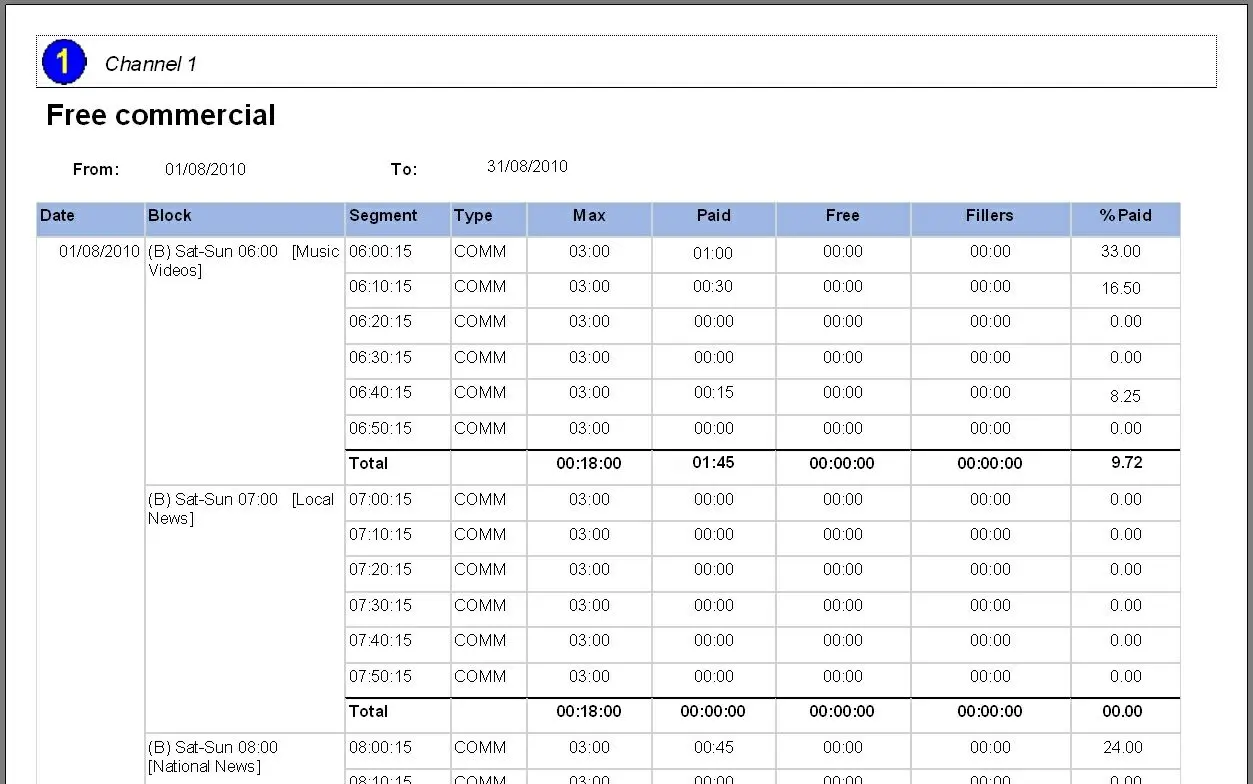 Free_Event_preview