71.12 XDCAM Cart auto ingest
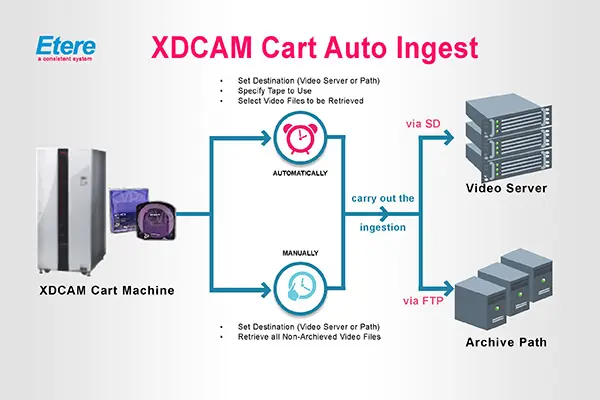
This module allows you to retrieve video files from professional XDCAM discs to video servers or storage paths. The overall functioning of this modulo is illustrated in the figure below:
XDCAM Cart AutoIngest 1
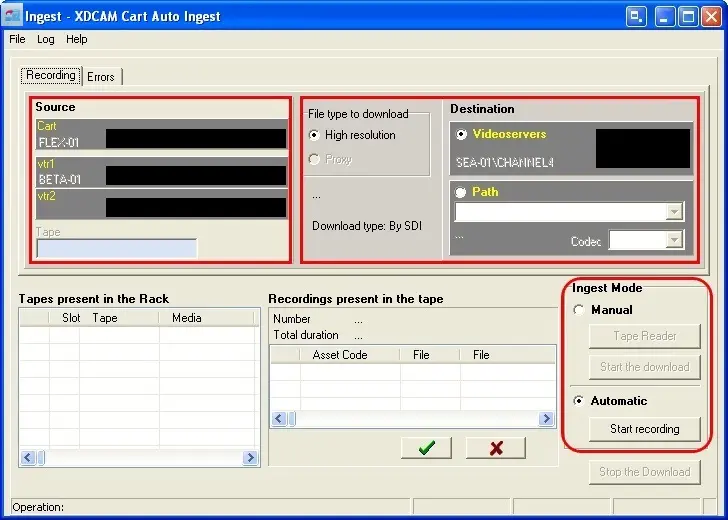
For using this application all the resources you intend to use (i.e.: Cart, VTR, Video Server, etc) must be already set (see Configuring XDCAM Cart AutoIngest), once it is done, just launch the application and its main window will be opened:
XDCAM Cart AutoIngest 2
•Source
In this section are listed both the Cart Machine and the VTR(s) set on the 'Parameters' option, it is from these devices that media will be ingested.
•Destination
Select here the destination device or path on which the media will be stored once ingested. First of all you have to specify if the download type you intend to use is a High-Resolution or Proxy type, after then you have to specify the copy destination:
- Video Servers: Here is shown the Video Server previously set on the 'parameters' option. In this case the download type is by SDI.
- Path: You can choose here between the ingest paths set on 'Etere Configuration | Settings | Web Configuration | Media Folder'. In this case the download type is by FTP.
•Ingest Modes
The XDCAM Ingestion can be performed in two ways, manual (you select the media to be downloaded) and automatic (all the media is automatically downloaded), both modes are following detailed:
•Manual: This option allows you to manually select the assets to be ingested. The steps that must be followed to carry out a Manual Ingestion are:
1.Set the Destination parameter (video server or path),
2.You must indicate the name of the existing Tape, and by pressing the Tape Reader button, the list of media present in the tape is displayed.
3.Select the video files to be retrieved by ticking them off in the 'Media present in the tape' list,
4.After then, enter the asset code for each ingest operation, and press the START the download button to begin the copy.
5.In 'Manual' mode, video files are copied via FTP.
•Automatic: The automatic ingest will automatically retrieve all video files contained in the XDCAM, this, based on their "archived" status (those which have been already archived are skipped). In order to perform this type of ingestion, just follow the steps detailed below:
1.First of all, you must insert all required tapes into the Cart Machine,
2.If the Destination is a Video Server:
- There will be created within it so assets as video files existing in the XDCAM,
- Assets will be named progressively in the format: [TapeName]_C0001 (if the name already exists, it will be overwritten),
- A SDI ingest operation will be performed to copy video files, it means that the VTR will be set in PLAY and the Video Server in REC.
- Asset will be linked to the tape.
3.Instead, if the Destination is a Path, its properties will be retrieved from the 'Media Folder' table, assets will be created (if not existing) and will be progressively named in the format [TapeName]_C0001.
- If the path is a Video Server, the video file will be copied and its support will be updated.
- If the path is not a Video Server, the video file will be copied and the asset's archived video file linked to it.
4.By pressing the [Start recording] button, the application will automatically search for media on the configured Tape(s) and will download them on either the selected Video Server or Path, by using the configured XDCAM Cart.
NB: In both cases (manual or automatic download), it is possible to interrupt immediately the downloading process by pressing the STOP the download button.
 XDCAM_Cart_AutoIngest_1
 XDCAM_Cart_auto_ingest_2