56.1.2 General Tab
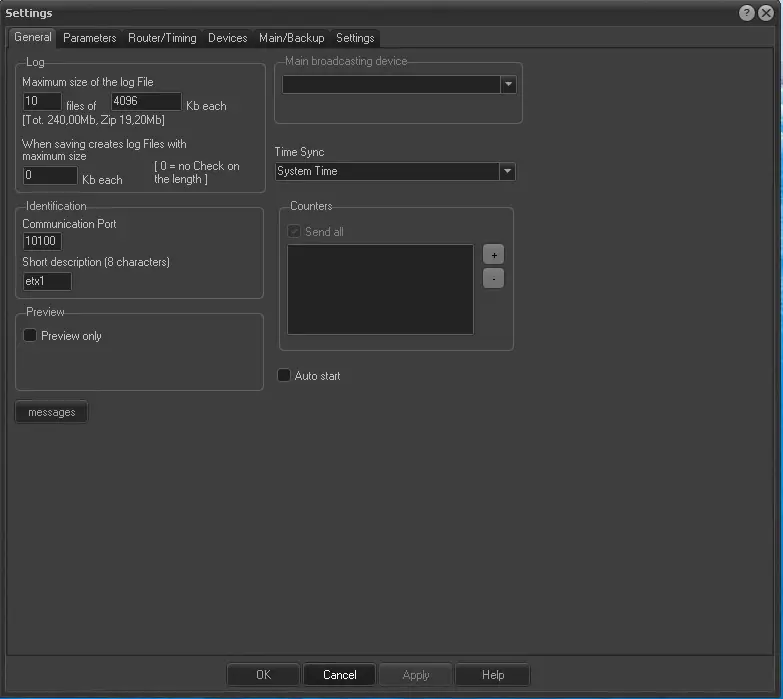
Under the General tab of the Etere Automation settings, it is possible to set the following parameters:
Etere_Automation_general_settings
General
Logs (maximum size of files) - indicates the number of files and their total file size to be used for storing automation logs.
Primary broadcasting devices - If more than one video server channel has been assigned to the current automation PC, select the one to be used as the first option.
Time Sync - Select the time source from which the automation PC will synchronize its clock. Available sources include "system time" (default), "processor time", or 'timecode card generator' (if installed).
Note: Microsoft's system time service must be turned off since Etere used a proper system to synchronize all the automation PC's time.
Communication port - Indicate the local port to be made available for communicating with other automations (e.g. primary, clone).
Short description - Insert a brief descriptive name for the automation PC (e.g. a-master, a-clone). This string has a maximum length of 8 digits.
Counters allow you to send the automation's counters to another PC on your network. You have to add the PC's network address and the UDP port (e.g. 192.168.0.15:42500) of your "target" PC; the counter will be displayed on those PCs on the Counters application (EtCounterDisplay.exe).
Messages - Select the type of messages (i.e. falta error, error, change settings, event status, timeline, warning) that will be automatically sent for events...
Auto start - Enable this option only if you want the automation to start automatically each time Etere Automation is launched (the On-Air module will be automatically created, and the first event in the list will be automatically cued and then played).
Preview only - If enabled, broadcast playlists will be played without flagging played events as "transmitted". Please note that broadcast playlists can be previewed by setting the custom offset time in this section.
During the playout, a "PREVIEW" label will be displayed in the On-Air module to indicate that the broadcast playlist is merely being previewed without altering its AsRun log.
 Etere_Automation_general_settings