59.2.2.11 Scheduler
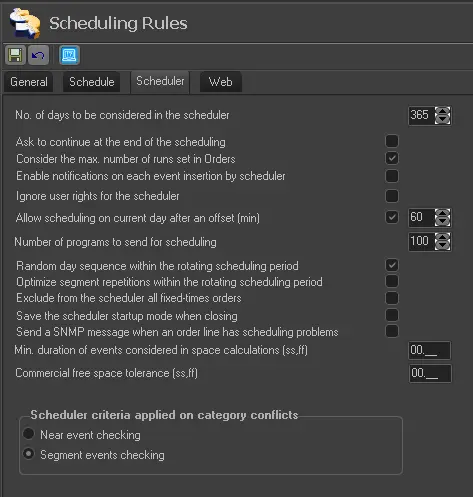
The parameters regarding the behaviour of commercial scheduling are listed below (e.g. Air Sales Scheduler):
schedulingrules_scheduler
SCHEDULING CRITERIA
Number of days to be considered in the Scheduler - Set the number of days to be used (by default) by the Air Sales Scheduler to search for valid orders from the current day onwards.
365 (default)
Ask to continue at the end of the scheduling. If activated, the program would continue scheduling runs even after the number of runs stated in the order has been reached if the period in which the events have been inserted falls short of the period defined in the order.
Disabled (default)
Consider the max. Number of runs set in Orders - If enabled, Air Sales Scheduler would not allow the insertion of runs to exceed the number stated in the order.
Enabled (default)
Enable notifications on each event insertion by scheduler - If enabled, Air Sales Scheduler will send a notification every time it schedules an event, thus allowing all playlists working on the scheduling period to stay updated with the insertions.
Enabling this option will require operators to reload playlists continuously and delay the overall scheduling process performance.
Disabled (default)
Ignore user rights for the scheduler - If enabled, users can use the Air Sales Scheduler to schedule events across all stations (even if the user doesn't have access rights).
Disabled (default)
Allow scheduling on the current day after an offset (in minutes). If enabled, the Etere Booking Server will be allowed to schedule all those commercial events programmed for the current television day after a specific time offset concerning the current system's time. For instance, if the "offset" is set to 60 minutes (01:00:00) and the current system time is 16:30:00; only those events programmed from 17:30:00 on the present-day onwards will be scheduled.
If disabled, the booking server will not schedule any event programmed for the current television day. Please note that in this case, all the events expected for the present day will be automatically placed either on future valid spaces or in the blacklist (if enabled).
NB: Note that the station's television day starts (and ends) at the set rollover time.
Enabled (60) (default)
Number of programs to send for scheduling - Specify the maximum number of events processed on each scheduling batch process. By default, it is set to '400.'
400 (default)
Random day sequence within the rotating scheduling period - If enabled, rotating scheduling processes would be performed across random days (belonging to the scheduling period).
Enabled (default)
Optimize segment repetitions within the rotating scheduling period - If enabled, rotating scheduling processes would be optimized across consecutive days.
Disabled (default)
Exclude from the scheduler all fixed-times orders - If enabled, Air Sales Scheduler won't consider those orders whose scheduling type differs from Priority, Rotation, Optimization and Top/Bottom.
If disabled, these orders (e.g. fixed times) will be prompted as 'orders with scheduling startup problems' to alert the user. Disabled (default)
Save the scheduler startup mode when closing -If enabled, each time the Air Sales Scheduler module is completed, its last scheduling mode (i.e. automatic or manual) will be saved in the database. When the module is re-launched, the last-used mode will be used.
Disabled (default)
Send an SNMP message when a scheduling problem is encountered for an order line. If enabled, the Etere SNMP Console will send an SNMP message (code=14001) each time the Air Sales Scheduler fails to start scheduling an order line (e.g. due to past dates, incongruent blocks, disabled fixed times, etc.).
Disabled (default)
Min. duration of events considered in space calculations (ss,ff) - Set the minimum duration to be included in space calculations performed by scheduling functions (e.g. Fill Segments Tool, Air Sales Scheduler, etc.).
This parameter helps ignore concise events (e.g. non-transmittable markers) that may prevent scheduling within "full segments". For instance, set "01,25" to ignore all events last less than 1 second and 25 frames during scheduling.
NB: Although scheduling functions will ignore events below this duration, all other functions (e.g. SE playlist, Reports, etc.) will include them in their calculations.
Disabled (default)
Schedule criteria applied to category conflicts
Near event checking - If enabled, it won't be possible to schedule events with the same product category contiguously (i.e. immediately before or immediately after). Still, it will be possible to schedule them in the same segment.
Disabled (default)
Segment events checking - If enabled, scheduling events with the same product category in the same segment won't be possible.
Enabled (default)
 schedulingrules_scheduler