59.2.42.5 VAT Codes (Codes GST)
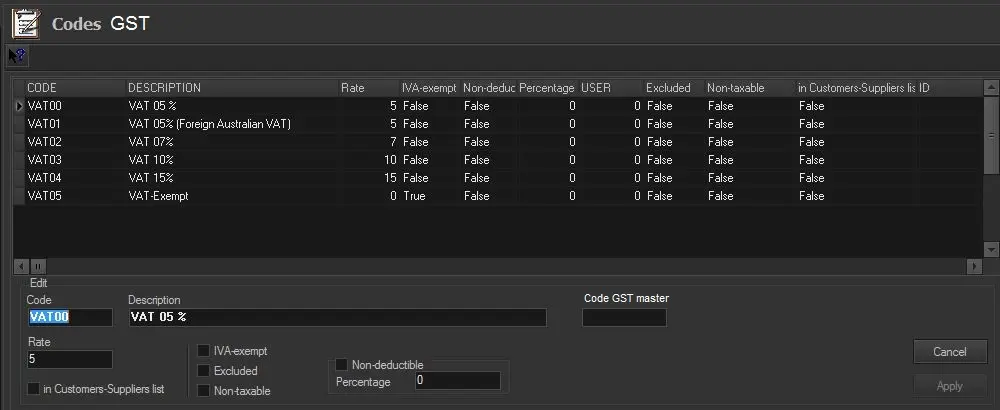
VAT codes specify the value-added tax (VAT) applied to an invoice or bill where the tax is applicable. In this section, VAT codes are configured in commercial orders. Besides the user-defined code and description, specific information about the VAT code needs to be specified.
VAT_Codes
You can right-click on each line of data and select "Edit" to edit the settings:
•Code: Give a unique identification code to the VAT code.
•Description: Enter a text description to describe the VAT code.
•Code VAT Master: If the VAT code is related to an existing code (e.g. a foreign VAT code linked to a local code), specify the master code.
•Rate: Indicate the VAT rate applied to invoices featuring this VAT code.
•In customers-suppliers list: If enabled, transactions performed using this VAT code will be included in the Etere Air Sales > Journal Entries > Customers-Suppliers List report.
•VAT-Exempt: Enable this option if the VAT code will be used for goods/services tax-exempted by law.
•Excluded: Enable this option if the VAT code will be used for paying goods/services without including taxes in the invoice.
•Non-taxable: Enable this option if the VAT code will be used for goods/services where VAT is not applicable.
•Non-deductible: Indicate the non-deductible percentage of the VAT code.
Pressing the [Apply] button will save the 'new bank' in the database.
NB: The 'Consumption tax' changes its name according to the regional settings specified on Etere's Configuration > System section; it's called VAT for England, IVA for Italy, GST for Australia, etc.
 VAT_Codes