93.2.1.26 MMS - TMDB Integration
MMS - TMDB Integration is the action used by the ETERE system to integrate The Movie Database (TMDb) API into the ETERE system. This action makes HTTP requests and, based on the JSON responses, imports MOVIE metadata into the asset.
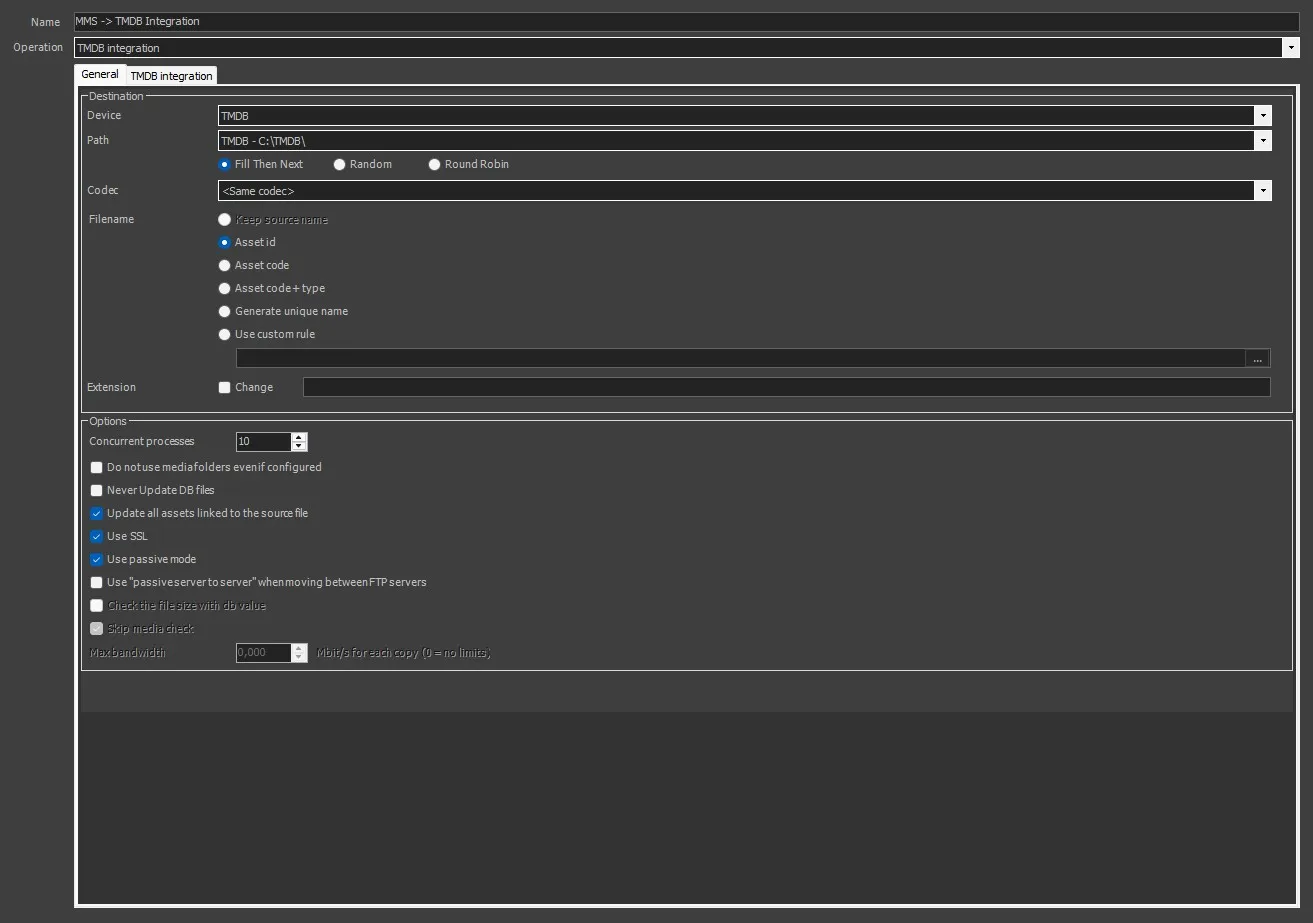
MMS - TMDB - General
MMS - TMDB Integration
To create this action, the following fields must be filled.
GENERAL TAB
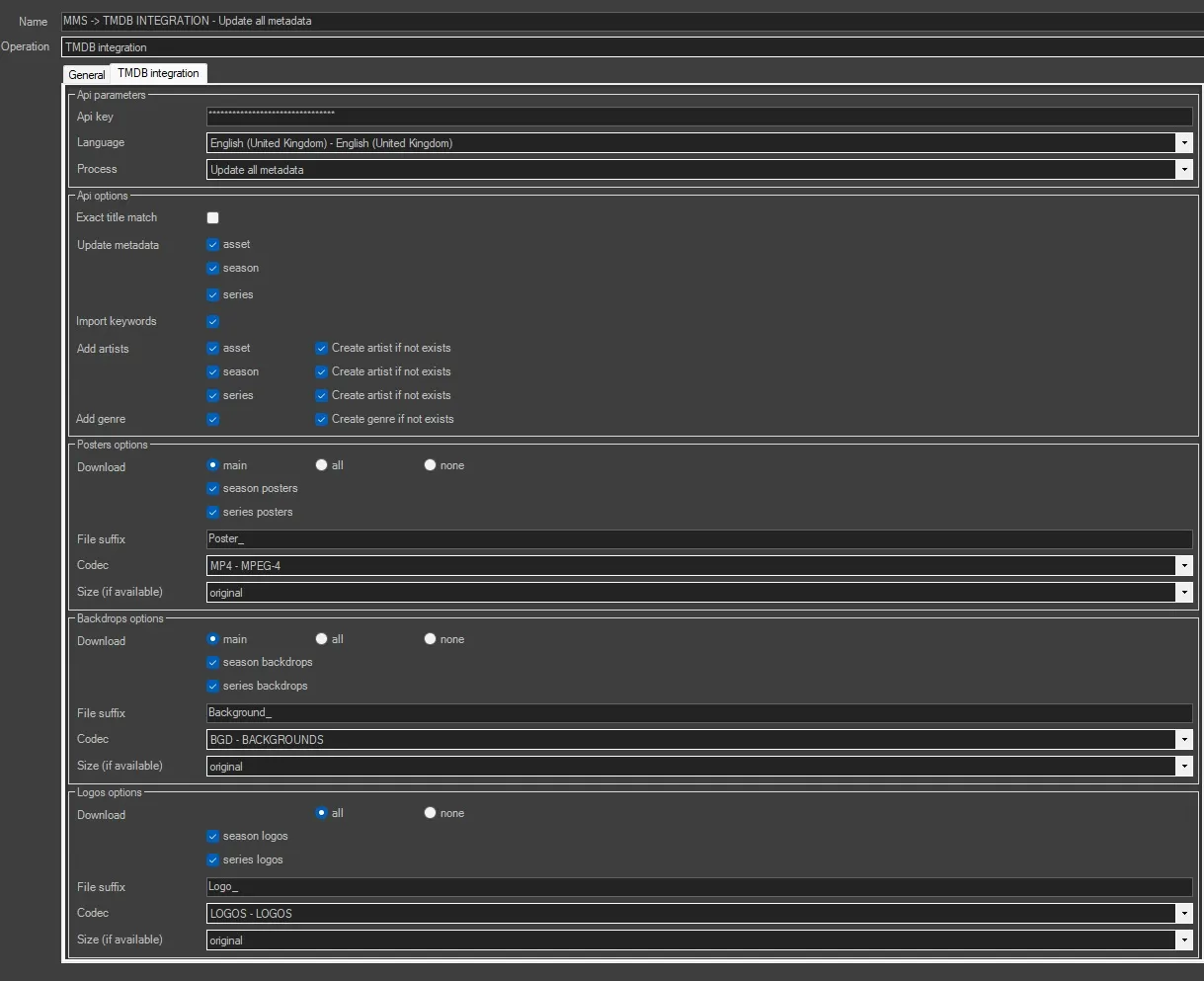
API PARAMETERS
In this section, the correct TMDB API credentials must be entered in order to allow ETERE to perform the appropriate API calls and receive the corresponding responses.
Api Key: digit the correct API Key obtained from https://www.themoviedb.org/settings/api after registering and logging in.
Language: select the language to be used for metadata insertion.
Process:
Update metadata: select whether you want to update or create metadata only for the single asset, for the season, for the series, or for all levels.
Update revenue only: select this option if you want to update only the flexi metadata revenue.
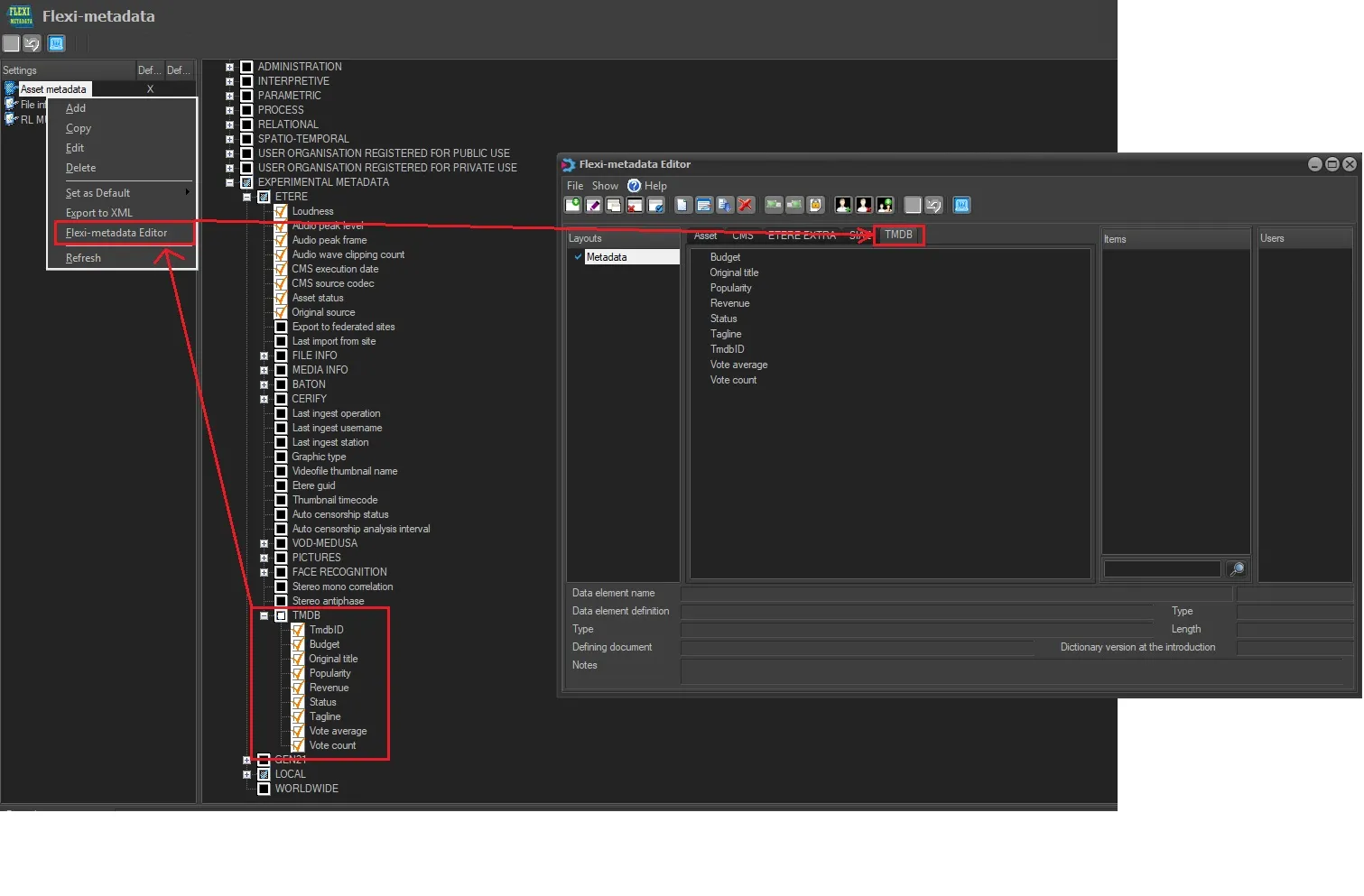
NB: ETERE creates TMDB's flexies by default. You have to enable them to be used for the actions and users.
API OPTIONS
Exact title match: If enabled, the system searches content on TMDB using an exact title match. This reduces the risk of incorrect matches but may limit results if titles differ due to variations or translations.
Update metadata: If enabled, existing metadata in ETERE will be updated with data retrieved from TMDB. If disabled, metadata will only be created if not already present, avoiding overwriting existing data.
Import Keywords: Select this option to import keywords associated with the content from TMDB. Keywords can be used for classification, advanced search, and content organization.
Add Artist: select whether you want to update or create artists related to the single asset, the season, the series, or all levels. This option enriches metadata with information about actors, directors, and other contributors. The "Limit number of artists" option allows you to choose how many artists to import or update from the TMDB website.
Add Genre: Select this option to update or create genres at all levels of the series. Genres are imported from TMDB and automatically assigned to the content, improving categorization.
POSTER OPTIONS
In this section, the settings related to posters to be downloaded from the TMDB website must be configured. The files will be downloaded to the path specified in the GENERAL tab.
Download: set the values to download posters by selecting MAIN only, ALL, or NONE, choosing whether the operation applies to series and/or seasons.
File suffix: specify a suffix to be added to the metafile created by ETERE. For example, if _POSTER is specified, each linked poster will be renamed as ID_POSTER.
Codec: set the correct codec to be assigned to each poster. Is Advisable to create a codec related to the Posters.
Size (If available): specify the size value used to download the image from the website. It is recommended to leave the value set to Original.
BACKDROPS OPTIONS
In this section, the settings related to Backdrops to be downloaded from the TMDB website must be configured. The files will be downloaded to the path specified in the GENERAL tab.
Download: set the values to download Backdrops by selecting MAIN only, ALL, or NONE, choosing whether the operation applies to series and/or seasons.
File suffix: specify a suffix to be added to the metafile created by ETERE. For example, if _BACKDROP is specified, each linked backdrop will be renamed as ID_BACKDROP.
Codec: set the correct codec to be assigned to each logo. Is Advisable to create a codec related to the Backdrops.
Size (If available): specify the size value used to download the image from the website. It is recommended to leave the value set to Original.
LOGOS OPTIONS
In this section, the settings related to Logos to be downloaded from the TMDB website must be configured. The files will be downloaded to the path specified in the GENERAL tab.
Download: set the values to download Logos by selecting ALL or NONE, choosing whether the operation applies to series and/or seasons.
File suffix: specify a suffix to be added to the metafile created by ETERE. For example, if _LOGO is specified, each linked backdrop will be renamed as ID_LOGO.
Codec: set the correct codec to be assigned to each Logo. Is Advisable to create a codec related to the Logos.
Size (If available): specify the size value used to download the image from the website. It is recommended to leave the value set to Original.
It is always advisable to follow this procedure to avoid any issues:
1- Create the MASTER SERIES
2- Create the SEASON
3- Link the SEASON to the MASTER SERIES
4- Add the episodes
5- Run the workflow for TMDB integration on all episodes
ABOUT:
Multiple results handling: If multiple results are found on TMDB, the action will return a message indicating that multiple matches have been detected, including the corresponding unique TMDB IDs.
To update an asset in case of multiple results:
- Open the asset in ETERE.
- Go to the Metadata tab.
- Select the TMDB Flexies page.
- Enter the correct TMDB ID in the TMDB ID flexi field.
- Save the changes.
Once completed, run the TMDB workflow again. Based on the manually entered TMDB ID, the system will retrieve the correct information from TMDB and update the metadata according to the configured settings.
If the asset is an episode of a season linked to the corresponding series, the TMDB ID must be set in the MASTER SERIES, and this will be applied during TMDB operations for each asset linked to it.
Master Serie: If a season is not linked to any Master Series, the system will create one for each season.
Since there are no validation checks, duplicate entries may be created. For this reason, it is recommended to first create the Master Series and then link the corresponding seasons to it.
Season Title: The season title will be renamed based on the series name and the season name itself. For example, if the operator creates the series ETERE and links the season ETERE S1 to it, the system will query the TMDB APIs and perform cross-checks such as the series name and the creation year.
If the API response indicates that the correct season name is FIRST ACT, the system will rename the season using the format MASTER SERIES + SEASON NAME.
In this example, the resulting name will be: ETERE - FIRST ACT.
Asset Title: The asset title will always be renamed using the correct title provided by the TMDB website, based on the API response.
Trailer: when launched on an episode, the ETERE workflow will always create the series trailer and the season trailer - if not present - linking to them the available posters, backdrops, and logos.
Artist: Based on the API response and the ETERE rules, artists will be updated and/or created (if they do not already exist and if the option is enabled) for each series, season, and episode. Artists will be visible depending on the level they belong to: series, season, or asset. Note that an artist appearing in a single episode may not necessarily appear in another episode; however, the artist will still be associated with the series.
Thumbnail Update:After successful execution of the action, the asset thumbnail is automatically updated using the first poster retrieved from TMDb.
 MMS_-_TMDB_-_General
 TMDB_INTEGRATION
 TMDB_FLEXI-METADATA