93.2.1.22 MMS - Baton Integration
MMS - ETERE BATON Quality Check is the action used by ETERE system to Perform an advanced audio\video quality check from Etere re-calling an API of BATON.
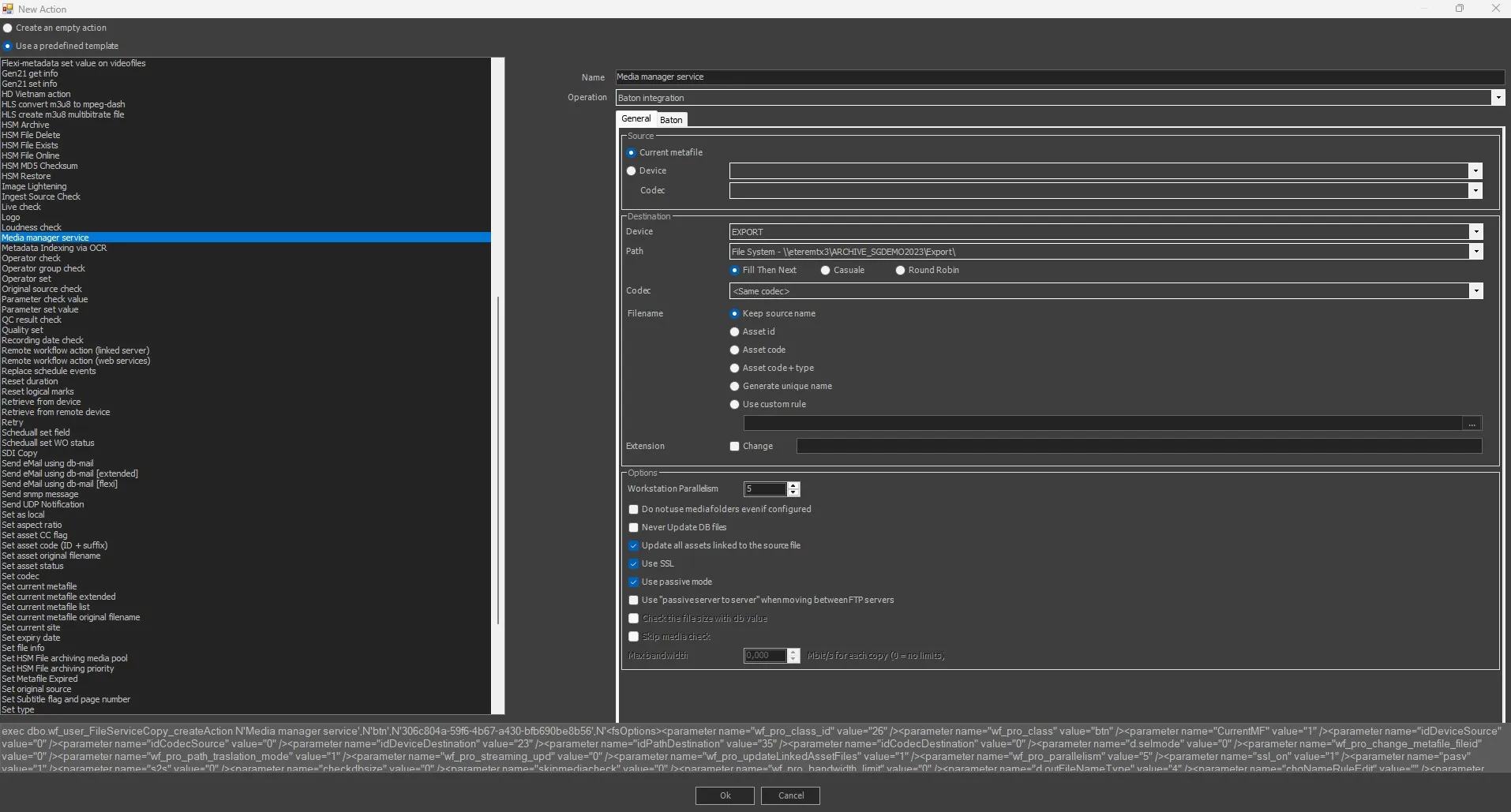
MMS - BATON - General
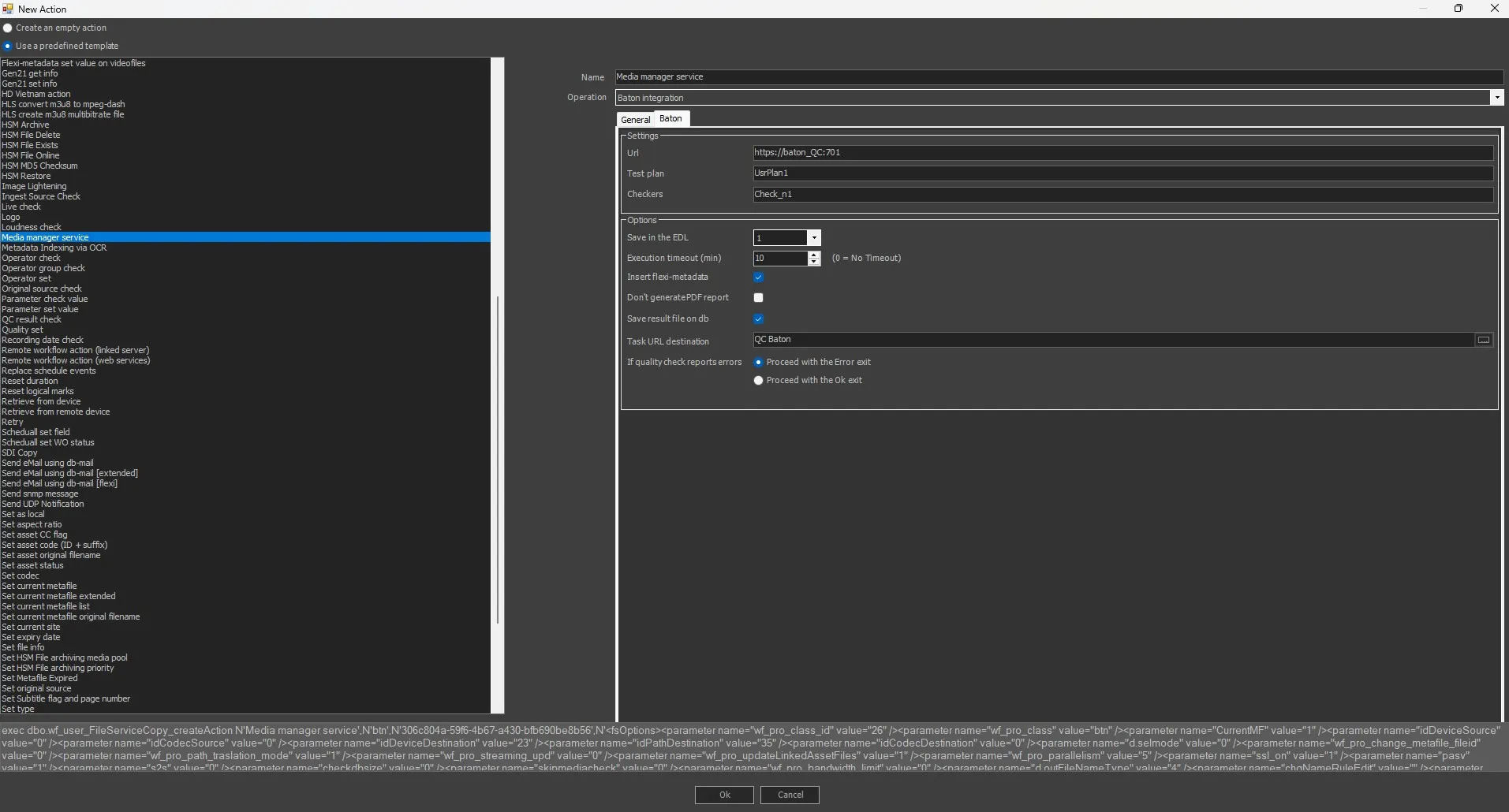
MMS - BATON - Baton
To create this action, the following fields must be filled.
NB: to use BATON action you need the licence "EA6767-> Etere Interra Baton driver (price every process)".
GENERAL TAB
Name: Give it a short name to identify the action.
Operation: Select "Baton Integration" option.
SOURCE
Current metafile: Select this option to use the current metafile previously set.
Device/Codec: Select the source device and codec. If the metadevice contains multiple versions (codecs) of the file, select the codec you wish to copy or delete.
DESTINATION
Device: Select the destination device to which the files would be copied.
Path: If the selected cloud device contains more than one path, this parameter allows one to choose one of them as the destination path.
Codec: Select the destination codec where the files would be copied to.
Filename: Choose, among the following options, how the destination filename should be managed.
• Keep source name - Enable this option to maintain the file source file name in the destination. This option is enabled by default. Not available for Rename file action.
• Asset ID - Rename the file as the ID of the asset to which the wf is attached.
• Asset code - Rename the file as the asset code to which the wf is attached.
• Asset code + type - Rename the file as the code and the type of the asset to which the wf is attached.
• Generate a unique name - The physical file will be named using a unique identification (UID) automatically generated by a system algorithm.
By default, one unique name is generated for each metafile; therefore, in case the file is formed by multiple physical files (e.g. mpg, pd, vix), Etere DataMover will use the same UID for all files but different extensions; for instance, the files 2143.mpg, 2143. vix and 2143.pd will become 02BD0000000000000075.mpg, 02BD0000000000000075.vix, 02BD0000000000000075.PD.
If the metafile name is changed, Etere DataMover will use the same UID for both the file and the metafile, thus allowing the support of video servers on which video files are managed, maintaining a relationship between the name of metafiles and physical files.
• Use custom rules - The file will be named with a custom filename based on database references (e.g. Flexi-metadata, asset data...) and free text.
Note: If in the RENAME action, a rule is used that must take the value from a flexi that contains characters not supported by the operating system (such as | \ / : * ") ETERE automatically replaces them with the character - (hyphen)
Extension: This parameter allows modification of the extension of the destination file, activating the "Change" flag and typing it in the field.
OPTIONS
Do not use media folders even if configured: Enable this option to ignore the translated path, even if it's configured.
Concurrent processes: Indicate the maximum number of actions that can be taken at the workstation simultaneously.
Never update DB files: The file won't be updated in the database.
Update all assets linked to the source file: If enabled (default), the copied file will be associated with all the asset forms linked to the source file.
Enabling this option is useful, for instance, when a single file is used by multiple assets (e.g. which transmit it overlaid with different logos); in this case, every time the file is copied, the new copy will be updated across all linked assets.
If disabled, the copied file will be associated only with the asset form for which the T-workflow has been launched.
Disabling this option is useful, for instance, when a single big file (e.g. a live feed recording) is used by multiple assets which partially retrieve a smaller file; in this case, only the support from which the partial retrieve has been executed will be updated.
Use SSL: Enable this option to use SSL (Secure Socket Layer) when saving the file in a destination path over the network. If enabled, the service media manager would attempt to complete the action using the following authentication steps in sequential order:
- FTP over TLS (Transport Layer Security)
- FTP over SSL (Secure Socket Layer)
- Plain FTP (without encryption)
If the FTP server supports SSL encryption, the Media Manager service will use a new set of libraries for copying files. Else, Plain FTP would be used.
Use passive mode: If checked, the FTP client will try to use passive mode for all file transfers (upload/download/move); otherwise (if disabled), the standard active way will be used.
Use "passive server to server" when moving between FTP servers: Enable this option if both source and destination devices use the FTP protocol and support 'passive mode'.
Check the file size with db value: If enabled, an additional check would be performed to compare the size of the copied physical file and the file size stored on db. This is useful to signal if the file has not been copied entirely into the destination folder. In this case, its file size differs from the original one, and this check can alert the operator by signalling an error in the wf. Not available for this kind of action.
Skip media check: Allow to avoid checking if the source file's device and codec match with the ones defined in the action. This is mandatory in the case of the Memory cut action because the Memory cut wf is attached to a new empty asset with no meta file, so the action would end in error if this parameter is disabled. Not available for this kind of action.
Maximum Bandwidth: The maximum bandwidth option is only supported for copies to limit the bandwidth used for data transfers.
BATON TAB
CONNECTION PARAMETERS
Url: URL on which the Baton web services is available (i.e. where test plans and tasks status are managed), it must be specified in the following format: http://username:password@BatonServer:port/Baton or For instance: http://user:user@w7baton:8080/Baton
Test plan: The Baton test plan to be used to verify the media file. For instance: HDMXF Test Plan
NB: The test plan must be entered exactly as set in the Baton server (Planner/Test plans).
Checkers: Comma-separated list of the indexes of Checker Services (CS) to be used to execute media analysis and verification tasks. Baton systems can have one or more CS running on either independent servers or on the same server hosting the Verification Manager (VM), the application that schedules files for verification on CS. For instance, to analyze and verify media using two checkers (1 and 2), specify: 1,2.
NB: The checkers must be entered exactly as set in the Baton server (Setup/Checkers).
OPTIONS
Save in the asset's EDL: Choose in which EDL the segments containing the video faults should be saved.
Save result on db: Choose to save on asset DOMA the resulting pdf.
Execution timeout (min.): Set the timeout threshold for the automatic abort of long operations.
Inserting flexi-metadata: If enabled, it allow to insert flexi-metadata already compiled in Media Library module.
Don't generate PDF report: If enabled, the generation of PDF report would be skipped. However, the PDF report can be viewed through the URL link defined in the “Task URL destination” field.
Save result on DB: if enabled, any virtual documents uploaded to the workflow action would be saved into database when saving the workflow action.
Task URL destionation: This field stored the URL link to locate the PDF report. Use the button to select the customized flexi-metadata compiled in Media Library to input the URL destination into this field.
Depending on the success of the operation, the action will return one of the following results:
OK The w eb service w as connected, the file w as found and the verification w as positive.
ERROR The w eb server w as not connected, the file w as not found or the verification w as negative. In case Baton determines that a file verification is negative, a message w ill be included in the asset's w orkflow log
(Error: Result parsed file: This stream has "n" errors and "n" warnings).
The integration between Etere and Baton is based on the Etere.WF.Baton.exe executable, which allow performing custom verifications against files stored in Etere. The executable has the following implemented parameters:
Etere.WF.Baton.exe -cfgfile:<val1> [-url:<val2> -tp:<val3> -mf:<val4> -cl:<val5> -lf:<val6> -ipc:<val7> -pr:<val8> -rppdf:<val9> -rpxml:val10> ]
Available parameters
The configuration file from which parameters will be retrieved. The configuration file is mandatory and can contain the following parameters:
BatonWSURL (mandatory) -> URL on which the Baton web services is available (i.e. where test plans and tasks status are managed), it must be specified in the following format:http://username:password@BatonServer:port/Baton or For instance: http://user:user@w7baton:8080/Baton
MediaFile (mandatory) Full URL path to the media file to be verified
TestPlan (mandatory) The Baton test plan to be used to verify the media file
Checkers (mandatory / optional) List of the indexes of baton checkers to be used to verify the media file. indexes must be comma separated. For instance: 1,2
NB: Checkers are mandatory for the Baton enterprise edition, but optional for Baton standard.
WSTimeout Maximum timeout for the communication with Baton's web service. This value is expressed in ms (default is 60000)
DataMoverLogFile (optional) Etere log file
IPCHandle (optional) IPC window handle (if not 0 IPC will be used)
ReportPDFPath (optional) PDF report file including path (if not present report will not be saved)
ReportXMLPath (optional) XML report file including path (if not present report will not be saved)
ProgressRefresh (optional) IPC status refresh period in ms (defaults is 10000)
The configuration file must be structured in the following format:
Configuration file structure
[CONFIG]
BatonWSURL=http://user:user@w7baton:8080/Baton
MediaFile=\\massimow8\VideoIn1\1010.mxf
TestPlan=HDMXF Test Plan
;MediaFile=\\massimow8\VideoIn1\1009.mxf
;TestPlan=SD-testplan
Checkers=1,2
DataMoverLogFile=c:\Etere\Etere.WF.Baton.DM.log
IPCHandle=
ReportPDFPath=c:\Etere\Reports\PDF
ReportXMLPath=c:\Etere\Reports\XML
ProgressRefresh=1000
Command line parameters:
URL If included, overrides BatonWSURL of configuration file
TP If included, overrides TestPlan of configuration file
MF If included, overrides MediaFile of configuration file
CL If included, overrides Checkers of configuration file
LF If included, overrides DataMoverLogFile of configuration file
IPC If included, overrides IPCHandle of configuration file
PR If included, overrides ProgressRefresh of configuration file
RPPDF If included, overrides ReportPDFPath of configuration file
RPXML If included, overrides ReportXMLPath of configuration file1270 ETERE User Guide
WSTO If included, overrides WSTimeout of configuration file
Here below is illustrated an example on the command used for the integration with Baton:
Etere.WF.Baton.exe -cfgfile=c:\etere\cfg.txt -url=http://user:user@w 7baton:8080/Baton -tp=SD-testplan -mf=\\massimow 8\VideoIn1\1010.mxf -cl=1,2 -lf=c:\etere\Etere.WF.Baton.DM.log -ipc=0 -pr=1000 -rppdf=E:\Etere\Reports\PDF -rpxml=E:\Etere\Reports\XML
 MMS_-_BATON_-_General
 MMS_-_BATON_-_Baton