71.4.6 Auto Ingest
The Auto-ingest module, available only with a special license, allows the ingest of clusters stored on tapes, they will be downloaded through a VTR to the Videoserver. Before using this function, you need to define the resources to be used in the 'Parameters' section of Etere Ingest.
To be able to use this option, the tape should be enabled and equipped with a UserBit (that automatically input the timecode). There should also be a DBF file which contains the position of a cluster on tape, that file must have an 8 character long name, the first letter must be the 'C', followed by zeros (e.g.: 'C0000125.DBF'), and it must be located in the directory specified in the 'parameters'. Tape UserBit must correspond, as in the case of the example, with 125.
Ingest - Auto Ingest
Tape Reader: After inserting the tape in the VTR, press this button to read UserBit, and load directly the corresponding file. If the tape doesn't have the UserBit, insert manually the tape number and press Tape Reader. If the corresponding file can't be found, all tape indexes will be listed, their total duration will be calculated, and the [Record] button will be activated.
Record: Starts ingest, and it can be stopped in any moment by pressing the Stop key.
At the end of the ingest process of each index, an asset form will be created, having a code which is exactly the same as the name of the index.
NB: For further information about the structure of these files please contact the Etere Support Service.
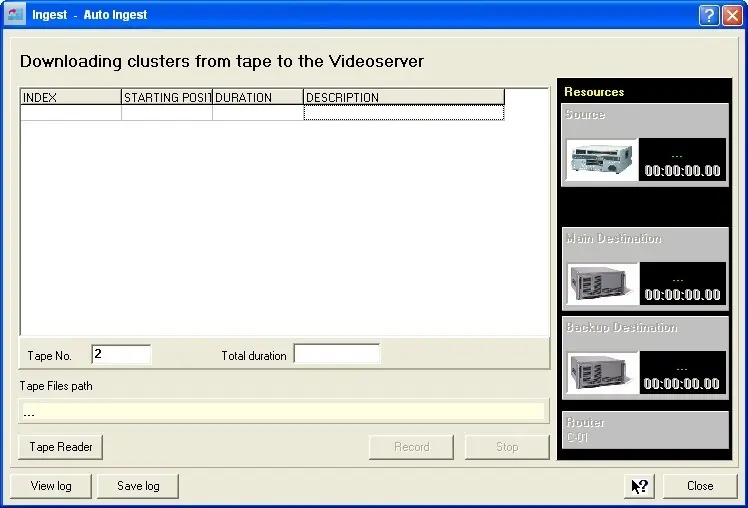 Ingest_-_Auto_Ingest