84.4.4.51 CUSTOM > ASSET CATCH-UP > ORANGE XML
Export Scope
The Orange export allows you to create a file in XML format, containing the data asset.
Export Parameters
The first step is to create the sweeps 'Rating CSA Number', where you can enter the rating event.
The only fields smpte used in this export are:
smpte asset name = 'ParentalGuidance' x TAG <ParentalGuidance>
smpte asset name = 'Seasons name French' x TAG <Title>
smpte asset name = 'VO Language' x TAG <voLanguage>
smpte asset name = 'Audio Language' x TAG <AudioLanguage>
smpte asset name = 'color' x TAG <color>
smpte asset name = 'Genre_editorial' x TAG <genre_editorial>
smpte asset name = 'Tx scheduled dates' x TAG <LiveDateProgramStart> E <LiveDateProgramEnd>
The data in the following tags are exported with leading zero, for example:
<SeasonNumber> 02 </ SeasonNumber>
<EpisodeNumber> 0223 </ EpisodeNumber>
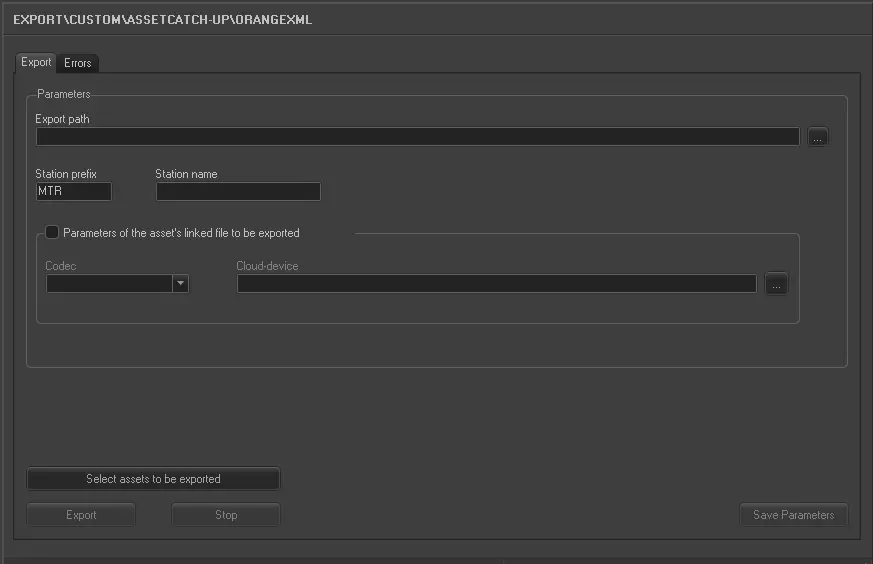
This export allows the following parameters to be set:
Export_custom_orange_xml
•Export path: Use the browse button to select a path in local or network drive to park the exported file.
•Station prefix and Station name: Set a prefix to identify the station and provide the name of the station.
Parameters of the asset’s linked file to be exported:
•Codec: Select the codec related to the exported file.
•Cloud-device: Select the cloud-device related to the exported file.
Select assets to be exported: Click on it to open an Asset Search form where you can filter assets and select the asset linked files to be exported.
Launch the export
Once the export has been configured, it can be started just by pressing the <Export> button.
 5111_Export_custom_orange_xml