59.4.14.19 Avid create OP-Atom
OP1-Atom files coming from Avid systems can be directly integrated into Etere without using the Avid Transfer Manager; this by consolidating them into MXF OP-Atom files (Avid's preset format) ready to be uploaded in Etere to be transcoded into MXF IMX30 files (playable by all most common video servers such as MCL6000).
Here below is the procedure to create an OP1-Atom file from Avid:
1. Go to the Avid Bin and right-click on a clip or a Sequence, and select the Consolidate/Transcode function:
2. In the new displayed form set the following parameters:
Consolidate-Transcode
Consolidate - Enable this option to take all media used in a sequence plus handles and make new clips of only that length.
NB: This option creates multiple clips; it does not fuse the entire sequence timeline into a single clip.
Target Drive(s) - Select the Drive (e.g. C) in which consolidated video/data will be stored.
3. Click on the [Consolidate] button; one or more MXF OP-Atom clips will be immediately created in the selected hard drive.
NB: The MXF OP-Atom clips are usually located in the \Avid MediaFiles\MXF\1\ folder.
4. At this point, consolidated files can be uploaded in Etere to be subsequently transcoded through a Rhozet RZCP Transcoder action.
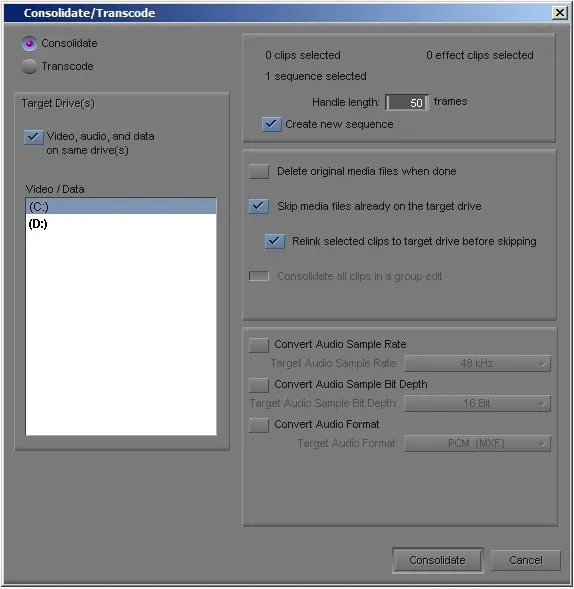 Consolidate-Transcode