Rundown Playout Panel
79.3.2.1 Functions Menu
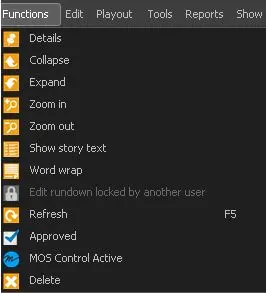
The Functions menu contains all the available operations that can be performed on a Nunzio Rundown.
Functions
- Details: Display / Hide the name and duration of the Rundown and segment.
- Collapse: Minimize the segment.
- Expand: Expand the segment.
- Zoom in: Zoom in to view the segment.
- Zoom out: Exit from zoomed in segment.
- Move to recycle bin: move the opened rundown to the recycle bin. It can be retrieved by selecting "recycle bin" from the rundown search form
- Restore from recycle bin: option avaiable only on deleted rundowns, restore the selected rundown
- Show story text: Show the story text in the Description column.
- Word wrap: Perform word wrap for long story text.
- Edit rundown locked by another user: Unlock the rundown for editing.
- Refresh: Force Rundown refresh.
- Newsroom Studio: allows to select the studio on where to send the Etere Rundown;
- Template Rules: allows the defining of a set of rules to automatically create an Etere Rundown;
- Approved: Set the rundown ready to be aired.
- MOS Control Active: Activate the communication with MOS Gateway and MOS objects.
- Delete: Delete the rundown.
 Functions