84.4.5.12 STANDARD > GENERIC > XML
Import Scope
The XML import allows to import from an XML file the broadcast schedule for one or more television days. Values are identified by the name of the tag specified in the XML file, which are the same as the fields present in the Etere's asset repository and broadcast playlists tables.
NB: If the import is launched by F90, you can stop the import process without interfere the currently running process. Instead, the stop command would prevent subsequent import/export processes to be triggered automatically when the current import process ends.
This import module requires the following parameters to be set in order to be correctly used:
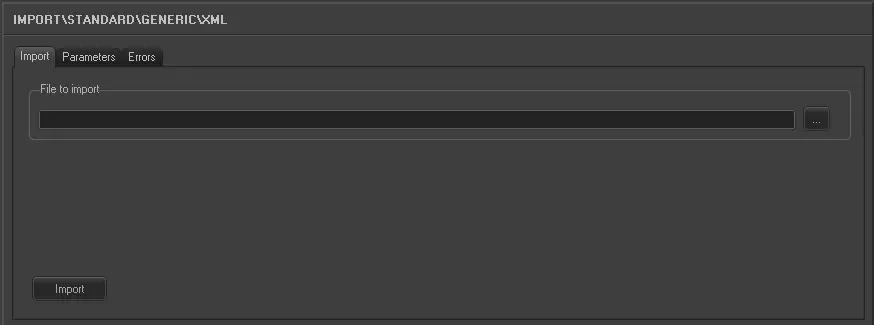
Import tab
Import_standard_generic_xml
• File to import: Select the file to be imported and its file path,
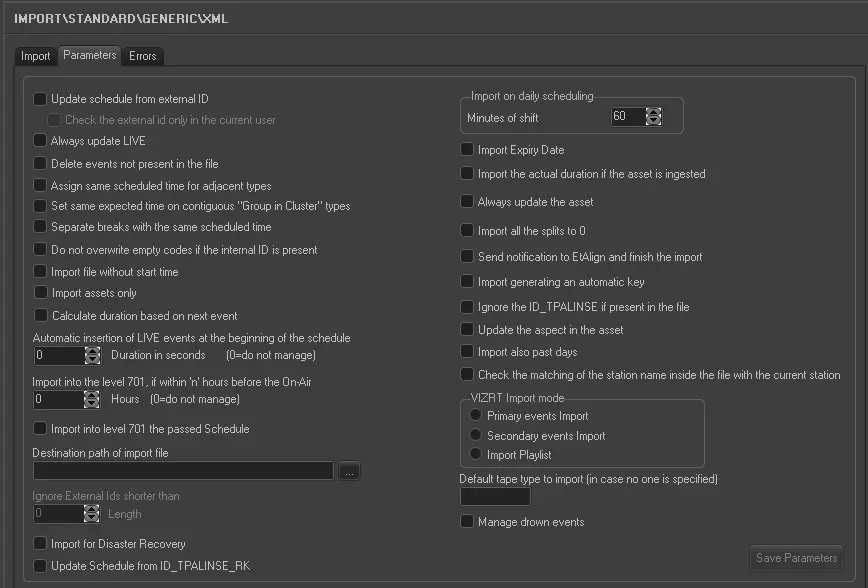
Parameters
Import_standard_generic_xml_1
• Update schedule from external ID: If among the imported events, there is an External ID, it is possible to update the schedule using it, by ticking off this parameter this operation will be performed. If this option is enabled, asset level 666, 667 and 668 would not be considered during import.
• Check the external ID only in the current user: If this option is enabled, only external ID of the current station would be checked.
• Always update Live: Allows you to always update the Live events, even if they already exist in the archive. Please note that when this option is enabled:
oIf the NEWTYPE tag in the XML file is empty, the event would be imported as type “0000” (Unknown).
oIf the DESCRIPTION tag is not present, the description of the event would be imported as blank.
• Delete events not present in the file: Allows to delete all events already scheduled on the destination day but not present in the xml file. Events present in both the xml file and schedule will be updated according to the tags in the xml. It basically allow to overwrite the existing schedule with the events in the xml file.
• Assign same scheduled time for adjacent types: For events that have the same typology and fall adjacent to each other in the schedule (e.g. commercials in a cluster) this parameter allows you to assign the same scheduled time to these events. In the 'Data' to import under the previous tab the field HOUR must not be activated for this parameter to work.
• Set same expected time on contiguous "Group in Cluster" types: For event types with contiguous scheduled time grouped into same cluster, set the hour time to be identical.
• Separate breaks with the same scheduled time: If in the import file, more than one cluster has the same scheduled time, by setting this parameter the start time of the clusters are shifted by one minute based on the property 'Group in Cluster'.
• Do not overwrite empty codes if the internal ID is present: If in the import file you have lines without a code, but with an internal ID, by checking this parameter the code will be read from the schedule according to the internal ID. Set this parameter only if in your import file you have lines without a code by with an internal ID.
• Import file without start time: If the import file lacks the starting time, by activating this parameter, the time will start from the broadcast rollover time.
• Import the asset only: If enabled, there will be imported only the asset forms related to the scheduled events ignoring the scheduled events.
• Calculate duration based on next event: If enabled, the asset duration would be imported based on the duration of next event.
• Automatically insert a LIVE event at the start of the schedule: This parameter allows you to insert a Live event with specific duration at the start of the schedule. Leave the duration as "0" when no Live event needs to be inserted.
• Import into the level 701*, if within x hours before the on-air: If enabled, data imported 'x' hours before the on-air time will be directly imported into the level 701 (i.e.: the real schedule), thus avoiding the manual confirmation of changes that could result on an undesired loss of time. Leave the value as “0” to import the playlist into real schedule.
• Import into level 701 the passed Schedule: If enabled, it allows you to import passed schedules into level 701.
• Destination path of import file: Indicate the path on which files will be stored once imported, when the import process ends, the application will ask the operator if the source file should be deleted. \
• Ignore External IDs shorter than: In this parameter specify a minimum length of characters to be accepted when user enter the external ID, e.g. set the value as “7” to prevent entering external ID other than the value of <EXTERSTRID>.
• Import Expiry Date: By default the expiry date of all assets is set as 31/12/2100 however, by activating this parameter, if in the file there is a relative expiry date field, the data will be imported. If there is time present in the expiry date, the time would also be managed.
• Import the actual duration if the asset is ingested: Allows you to import the real duration of the asset form in a situation where it has been recorded, even if the scheduled duration is present and different in the imported file.
• Always update the Asset: Allows you to always update the asset forms even if they already exist in the Archive. Elements that will be updated are Duration, Mark in/Mark out, Type, Description and Insertion points, Quality, Audio. This parameter also refers to LIVE events.
In the import file, if the <QUALITY> tag is not present, the asset QUALITY would be set to “0”.
If the “Import for Disaster Recovery” option is enabled, all data field present in the XML file would be imported to DR site.
• Import all the splits to 0: Allows you to import all events on the SPLIT 0, even if in the file they appear as SPLIT > 0.
• Send notification to EtAlign and finish the import: Allows you to send a notification to EtAlign at the end of the import so that EtAlign can publish the schedule in Automation. Disable this option if you are importing schedules for the past date, else notification error “Unable to notify Aligner with the published schedule” would be prompt.
• Import generating an automatic key: If the key is not present in the imported file (Tag <ESTESTRID>) it is possible to create it automatically with the following rule: YYMMDDHHMMSSFF+id_filmati and import it.
• Ignore the ID_TPALINSE if present in the file: If enabled, eventually available "id_palinse" fields will be ignored during the import. Use this parameter, to for example, avoid checks based on the field in question (e.g. compare the import date against the date derived from the id_palinse).
• Update the aspect in the asset: If enabled, the import would update the aspect ratio in the assets.
• Import also past days: Enable this option to import schedules if the scheduled date is a past date.
• Import on daily scheduling (Minutes of shift): In case the imported schedule is related to the current day, indicates at which time the import should start importing it (i.e.: imported time = current time + time shift). Obviously, events with a 'start time' before the current time will not be imported.
• Check the matching of the station name inside the file with the current station: This option check the integrity of the XML file before import, if enabled, the station name in the XML file must matched the current station. If the name does not matched, the import would be aborted.
• VIZRT Import Mode: This parameter allows (in case the station's license is enabled for importing VIZRT data) to import into the system also the VIZRT graphics data (e.g. external id) associated to primary and/or secondary events. For detailed information on the configuration and functioning of this parameter please refer to the VIZRT Import Mode section of this chapter.
• Default tape type to import (in case no one is specified): Set here the tape type (e.g. XDCM30) to be set by default for imported assets in case this information is missing in the imported <SUPPORTO> tag. For instance:
Missing tape type - <SUPPORTO>0XDCM 2X004001</SUPPORTO>
Specified type tape - <SUPPORTO>0XDCMXDCM30 2X004001</SUPPORTO>
• Manage drowned events: With this option enabled, events consists of consecutive parts (e.g. part 1, part 2) would be managed and grouped during import. This parameter would ensure that all parts of the event are displayed correctly in Executive Editor after the import.
• Import for Disaster Recovery: With this option enabled, , the <TPALINSE.EVENT> data field, as well as asset with empty <cod_progra> and <EXTERNALID> fields would be imported to database. This option is useful for Disaster Recovery where the <cod_progra> and <EXTERNALID> fields would be updated in subsequent import processes. As event fields in asset playlist (TPALINSE) and Automation playlist (TPAL) are different, all fields would be copied to the DR site if this option is enabled.
To prevent asset duplication, if the asset was created manually in destination database, the asset’s INSTALLATION field and EXTERNALID field would based on the existing asset code, as if the asset is imported from the file.
NB: During import, in the event if the program is divided into several parts and having the same EXTERSTRID, ONLY the FIRST “EXTERSTRID” in the program would be imported. New EXTERSTRID(s) would be created for the remaining parts when they are imported into the schedule.
Further Considerations
Dates and Time format
It's important to note that all time related values (Start Time, SOM, EOM, Duration, etc) must be specified in hh:mm:ss,ff for the whole duration. All values related to the date format, must be specified in the same format chosen in the Windows International Settings (Control Panel/ Regional & Language Options).
Importing alternative schedules
The Generic XML import permits to import alternative schedules, each imported file must be related to specific scheduling level and therefore, all the events contained within it must be related to the same level.
The alternative schedule to which a file is related must be specified using the <LIVELLO>n</LIVELLO> tag where 'n' is one of the ten alternative schedules supported by Etere (i.e. 2001*=1st-alternative-schedule, 2002=2nd-alternative-schedule, ..., 2010=10th-alternative-schedule). Moreover, it is important to note in case the <LIVELLO> tag is either empty or not present within the file, the import system will automatically consider the scheduling as 0 (i.e. main scheduling level).
NB: If there is conflict between the two levels (701 and 2001-2010), the latter (2001-2010) would take precedence.
NB: If there is <LEVEL> 703 </LEVEL> tag (e.g. <LIVELLO>703</LIVELLO>) present in the XML file, the schedule would be automatically imported into Level 703 in database.
Importing tapeless reception data
The Generic XML import allows to import schedules including the information related to the tapeless reception data of the events present on them:
- Agency code: It's retrieved from the tag: <COD_CONTO> value </COD_CONTO>
- Agency description: It's retrieved from the tag: <RAG_SOCIAL> value </RAG_SOCIAL>
- Scheduled arrival: It's retrieved from the tag: <DATE_ARRIVAL> value </DATE_ARRIVAL>
- Person in charge code: It's retrieved from the tag: <COD_PERSONINCHARGE> value </COD_PERSONINCHARGE>
- Person in charge description: It's retrieved from the tag: <DES_PERSONINCHARGE> value </DES_PERSONINCHARGE>
Please note that the 'COD_CONTO' and 'RAG_SOCIAL' fields will be stored in the Etere personal data table (i.e. the "ananagraf" table), whereas the other fields will be stored in Etere's asset form table (i.e. the "filmati" table).
Manage import at Disaster Recovery (DR)
When importing assets to Disaster Recovery (DR) site, the import would check the following tags in the import XML file to determine asset’s physical duration:
<INF_DIGIT> (Logical offset for playout)
<DUR_FISICA> (EDL physical media length)
<POS_INI> (Logical SOM)
<POS_FIN> (Logical EOM)
If ALL the above 4 tags are present in the XML file, the values in these tags would be forced update into Asset Repository (FILMATI) table in database to retain the asset’s physical duration upon imported to DR site.
Mandatory tags
In case secondary events (secondary objects) are imported, they can be defined in the xml through the tag <SECONDARY EVENT>. The following tags, written inside <SECONDARY EVENT>, are mandatory:
<SOM></SOM>: Contains the start time (expressed in frames) of the secondary event.
<STR2></STR2>: Define how the previous tag should be interpreted, according to the letter written inside this tag.
A: The frames inside <SOM> fall after the primary event's start.
E.g.:
Primary event SOM = 0 frames (00:00:00.00)
Secondary event SOM = 375 frames (00:00:15.00)
The secondary event will start after 375 frames (00:00:15.00) from the start of the primary event.
B: The frames inside <SOM> fall before the primary event's end.
E.g.:
Primary event EOM = 1000 frames (00:00:40.00)
Secondary event SOM = 250 frames (00:00:10.00)
The secondary event will start at 750 frames (00:00:30.00) from the start of the primary event.
C: The frames inside <SOM> fall after the previous primary event's start.
E.g.:
Previous primary event SOM = 500 frames (00:00:20.00)
Secondary event SOM = 125 frames (00:00:05.00)
The secondary event will start at 125 frames (00:00:05.00) from the start of the previous primary event.
D: The frames inside <SOM> fall before the previous primary event's end.
E.g.:
Previous primary event EOM = 1250 frames (00:00:50.00)
Secondary event SOM = 1000 frames (00:00:40.00)
The secondary event will start at 250 frames (00:00:10.00) from the start of the previous primary event.
Here is an example of the tag <SECONDARY EVENT> and its content:
<SECONDARY_EVENT>
<TSEC>
<NAME>AST</NAME>
<SOM>50</SOM>
<EOM>0</EOM>
<PARAMS>50</PARAMS>
<CODE>1</CODE>
<CODETYPE>C</CODETYPE>
<INT1>0</INT1>
<INT2>0</INT2>
<INT3>0</INT3>
<INT4>0</INT4>
<INT5>0</INT5>
<STR1>N</STR1>
<STR2>A</STR2>
<STR3></STR3>
<STR4></STR4>
<STR5></STR5>
<PROVENIENZA>VIZRT</PROVENIENZA>
<EXTERNALID>1000000</EXTERNALID>
<XMLPARAMS>CICCIO BELLO</XMLPARAMS>
<OUTPUT>
<OUTPUT.INFO>
<VIRTUAL.DEVICE>LOGO6</VIRTUAL.DEVICE>
</OUTPUT.INFO>
</OUTPUT>
</TSEC>
</SECONDARY_EVENT>
Launch the import
Once the import has been configured, it can be started just by pressing the <Import> button, once the import has finished, it will be possible to display the schedule of the related day to verify and/or approve the import operation.
Sample imported file
160212.xml
<?xml version="1.0" encoding="UTF-8" standalone="yes"?>
<data datetime="2012-07-26 12:05">
<TPALINSE lastrevision="2012-07-26 12:05"
description="Station=CHANNEL 1 (Level=0) Date Exported=26/07/2012 User=1">
<row>
<!-- ****************EVENT INFORMATION********************* -->
<ASPECT>4</ASPECT>
<ASRUN_INFO>
</ASRUN_INFO>
<AUDIO>1234</AUDIO>
<AUDIO_TY>S</AUDIO_TY>
<COD_PROGRA>1</COD_PROGRA>
<COD_USER>1</COD_USER> <CODE_PRIMECAST>1</CODE_PRIMECAST>
<COLOR>FF000005</COLOR>
<COSTO>0</COSTO>
<CRAWL_DESC>[Crawl]
LogoEffect=leCustom
[Aspect Conversion]
Code=4P
</CRAWL_DESC>
<CRAWL_IN>
</CRAWL_IN>
<CRAWL_SPEE>
</CRAWL_SPEE>
<CRAWL_VOL>
</CRAWL_VOL>
<CRYPTATO>
</CRYPTATO>
<DATA>26/07/2012</DATA>
<DATA_P>26/07/2012</DATA_P>
<DATA_PREV>01/01/1900</DATA_PREV>
<DSK1>NN</DSK1>
<DSK1_DUR>
</DSK1_DUR>
<DSK1_IN>1</DSK1_IN>
<DSK2>NN</DSK2>
<DSK2_DUR>
</DSK2_DUR>
<DSK2_IN>
</DSK2_IN>
<DSK3>NN</DSK3>
<DSK3_DUR>
</DSK3_DUR>
<DSK3_IN>
</DSK3_IN>
<DSKA>NA 0000000000000000</DSKA>
<DSKB>NA 0000000000000000</DSKB>
<DSKC>NA 0000000000000000</DSKC>
<DURATION>5884</DURATION>
<DURATION_P>5250</DURATION_P>
<ERRORCODE>
</ERRORCODE>
<EVENT>100000031780</EVENT>
<EVENT_P>100000031780</EVENT_P>
<EVENT_TYPE>T</EVENT_TYPE>
<EXPECTEDDURATION>
</EXPECTEDDURATION>
<EXTERNALID>
</EXTERNALID>
<EXTERSTRID>
</EXTERSTRID>
<GPI>000000000</GPI>
<GPI2>000000000</GPI2>
<GPID1>
</GPID1>
<GPID2>
</GPID2>
<ICON>TYPE_T</ICON>
<ID_DOCUMENT>
</ID_DOCUMENT>
<ID_FATTURAAGENZIA>
</ID_FATTURAAGENZIA>
<ID_FATTURAEMITTENTE>
</ID_FATTURAEMITTENTE>
<ID_FILMATI>1</ID_FILMATI>
<ID_SPLIT_START>
</ID_SPLIT_START>
<ID_SUPPORT>
</ID_SUPPORT>
<ID_TPALINSE>31780</ID_TPALINSE>
<ID_TPALINSE_APP>
</ID_TPALINSE_APP>
<LASTUPDATE>26/07/2012 12:05:40</LASTUPDATE>
<LASTUPDATETIME>26/07/2012 12:05:39</LASTUPDATETIME>
<LIVELLO>
</LIVELLO>
<MEDIA_ID>
</MEDIA_ID>
<MEDIA_TY>
</MEDIA_TY>
<NEWTYPE>CLIP</NEWTYPE>
<NOTE>
</NOTE>
<ORA>540000</ORA>
<ORA_P>540000</ORA_P>
<ORA_PREV>
</ORA_PREV>
<ORDINALE>
</ORDINALE>
<OUTPUT_M>
</OUTPUT_M>
<PART>
</PART>
<PROVENIENZA>
</PROVENIENZA>
<RECORDABLE>
</RECORDABLE>
<RIMAND>
</RIMAND>
<RIMAND_IN>
</RIMAND_IN>
<RIMAND_VOL>
</RIMAND_VOL> <SCHEDULE_CHECKSUM>284688464</SCHEDULE_CHECKSUM>
<SPLIT>
</SPLIT>
<SPLIT_LENGTH>
</SPLIT_LENGTH>
<STATUS>I</STATUS>
<STATUS_CA>
</STATUS_CA>
<STATUS_MM>
</STATUS_MM>
<STATUS_RC>
</STATUS_RC>
<SUBTITLE>
</SUBTITLE>
<SUPPORTO>0MTX 1</SUPPORTO>
<SUPPORTOB>
</SUPPORTOB>
<SUPPORTORC>
</SUPPORTORC>
<TIMECODE_I>125</TIMECODE_I>
<TIMECODE_O>6008</TIMECODE_O>
<TIPO_TC>C</TIPO_TC>
<TITLE>Wonderwall</TITLE>
<TITLER>
</TITLER>
<TITLER_DUR>
</TITLER_DUR>
<TITLER_IN>1</TITLER_IN>
<TRAFFICID>31780</TRAFFICID>
<TRANS>CT</TRANS>
<TRANS_DUR>
</TRANS_DUR>
<TRF_EVENTLEVEL>
</TRF_EVENTLEVEL>
<TVGUIDE>NN000</TVGUIDE>
<TYPE>T</TYPE>
<VISIONATO>
</VISIONATO>
<VOICEOVR_A>
</VOICEOVR_A>
<VOICEOVR_B>
</VOICEOVR_B>
<VOICEOVR_C>
</VOICEOVR_C>
<VOICEOVR_D>
</VOICEOVR_D>
<XORDER>
</XORDER>
<!-- ****************ASSET INFORMATION********************* -->
<ANNO_P>
</ANNO_P>
<ANNULLATO>
</ANNULLATO>
<ARCHIVIATO>
</ARCHIVIATO>
<ASPECT>4</ASPECT>
<AUDIO>UUUU</AUDIO>
<AUDIO_LANGUAGE>
</AUDIO_LANGUAGE>
<BIANCONERO>
</BIANCONERO>
<BITRATE>
</BITRATE>
<BPM>113</BPM> <CAD_APPROVAL>CAD00056</CAD_APPROVAL>
<CLIP_SIZE>
</CLIP_SIZE>
<CLOCK>
</CLOCK>
<COD_PROGRA>1</COD_PROGRA>
<COMUN_GRAT>
</COMUN_GRAT>
<COMUN_PREV>
</COMUN_PREV>
<CONTROL_CODE>
</CONTROL_CODE>
<COPIA_ANAL>
</COPIA_ANAL>
<COPIA_DIGI>
</COPIA_DIGI>
<CREATIONDATE>31/03/2009 09:52:22</CREATIONDATE>
<CRYPTATO>
</CRYPTATO>
<CTL_LQ>-59</CTL_LQ>
<DATA_ACQUI>
</DATA_ACQUI>
<DATA_ANNULL>
</DATA_ANNULL> <DATA_ARRIVO>04/07/2010</DATA_ARRIVO>
<DATA_DIGIT>14/06/2012 10:58:58</DATA_DIGIT> <DATA_INIZIO_VALIDITA>01/01/2008</DATA_INIZIO_VALIDITA> <DATA_MISU>01/01/1900</DATA_MISU> <DATA_PROD>01/12/1994</DATA_PROD>
<DATA_QUALITA>07/06/2012 17:42:59</DATA_QUALITA>
<DATA_SCAD>31/12/2012</DATA_SCAD>
<DATA_TRASM>
</DATA_TRASM>
<DESCRIZIO>Wonderwall</DESCRIZIO>
<DESCRIZIO_1>Oasis - Wonderwall (Live at MTV Unplugged 1996).</DESCRIZIO_1>
<DESCRIZIO_2>testing EPG of wonderwall !!</DESCRIZIO_2>
<DUR_FISICA>6009</DUR_FISICA>
<DURATA>5884</DURATA>
<DURATA_PUB>5250</DURATA_PUB> <ENABLEDDAYS>1111111</ENABLEDDAYS>
<EXPORT>
</EXPORT>
<EXTERNALID>
</EXTERNALID>
<FADEIN>
</FADEIN>
<FADEOUT>
</FADEOUT>
<FILELQ>
</FILELQ> <FLAG_NON_UDENTI>1</FLAG_NON_UDENTI>
<FLAGS>BC</FLAGS>
<HIDDEN>
</HIDDEN> <ID_ASPECTRATIOCONV>1</ID_ASPECTRATIOCONV>
<ID_FILMATI>1</ID_FILMATI>
<ID_FORNITORE>
</ID_FORNITORE>
<ID_PROG_COLLE>
</ID_PROG_COLLE>
<ID_PROG_RIFERI>
</ID_PROG_RIFERI>
<ID_PROMOSOURCE>
</ID_PROMOSOURCE>
<ID_REGMASTER>12</ID_REGMASTER>
<ID_RESPONSABILE>
</ID_RESPONSABILE>
<ID_SERIE>2983</ID_SERIE>
<ID_TRAFFICDEPRECIATION>
</ID_TRAFFICDEPRECIATION> <ID_VIRTUALDOCUMENT>11</ID_VIRTUALDOCUMENT>
<INF_DIGIT>0</INF_DIGIT>
<INF_LQ>502</INF_LQ>
<INFO_PROGR>
</INFO_PROGR>
<INSTALLATION>701</INSTALLATION>
<INTRO>
</INTRO>
<JINGLEIN>
</JINGLEIN>
<LASTUPDATE>23/07/2012 16:09:27</LASTUPDATE>
<LINGUA>eng</LINGUA>
<LIVE_ID>
</LIVE_ID>
<LOC_NAZ>
</LOC_NAZ>
<MAGAZZINO>
</MAGAZZINO>
<MESI>
</MESI>
<NEWTYPE>CLIP</NEWTYPE>
<NIELSEN>
</NIELSEN>
<NONTRASMISSIBILE>
</NONTRASMISSIBILE>
<NOTE_A>EPG1 sample information.</NOTE_A>
<NOTE_AMM>
</NOTE_AMM>
<NOTE_B>EPG2 sample information</NOTE_B>
<NOTE_C>EPG3 sample information</NOTE_C>
<NOTE_COMM>[Crawl]
LogoEffect=leCustom
[Titler]
Inizio=1
[Dsk1]
Inizio=1
[Evento]
Icona=TYPE_T
</NOTE_COMM>
<OPENER>1</OPENER>
<OPERATORE>sa@</OPERATORE> <OPERATORE_REC>sa/EMANUELA</OPERATORE_REC>
<ORDER_REFERENCE>AO-CUY0081</ORDER_REFERENCE>
<OUTRO>
</OUTRO>
<PARENT_RATE>G</PARENT_RATE>
<PERC_AUTOP>
</PERC_AUTOP>
<POS_FIN>6008</POS_FIN>
<POS_INI>125</POS_INI>
<PRIORITA>
</PRIORITA>
<PROD_INDIPENDENTE>
</PROD_INDIPENDENTE>
<PRODUZIONE>
</PRODUZIONE>
<PUNTATA>1</PUNTATA>
<QUALITA>
</QUALITA>
<RECFLAG>5</RECFLAG>
<ROTAZIONE>
</ROTAZIONE>
<SCH_DAYS>
</SCH_DAYS>
<SCH_HOURS>
</SCH_HOURS>
<SCH_MONTHS>
</SCH_MONTHS> <SCHEDULE_CHECKSUM>284688464</SCHEDULE_CHECKSUM>
<SETT>
</SETT>
<SOSPESO>
</SOSPESO>
<SPLITS>
</SPLITS>
<SPONS_DES>
</SPONS_DES>
<SPONS_DUR>7500</SPONS_DUR> <SPONS_FROMBEGIN>S</SPONS_FROMBEGIN>
<STATUS_MM>
</STATUS_MM>
<STATUS_RC>
</STATUS_RC>
<TEMPO_INT>
</TEMPO_INT>
<TIPO>T</TIPO>
<TIPO_TC>C</TIPO_TC>
<TRAMA>Oasis, according to the fans, is the best rock band in the world!</TRAMA>
<TRASCODING_FLAG>
</TRASCODING_FLAG>
<VIDEOAPPROVAL>VA-00062</VIDEOAPPROVAL>
<VIRTUAL>
</VIRTUAL>
<COD_CONTO>
</COD_CONTO>
<RAG_SOCIAL>
</RAG_SOCIAL>
</row>
</TPALINSE>
</data>
 5214_Import_standard_generic_xml
 5213_Import_standard_generic_xml_1