59.5.8.9 Manual Emerency
Report Description
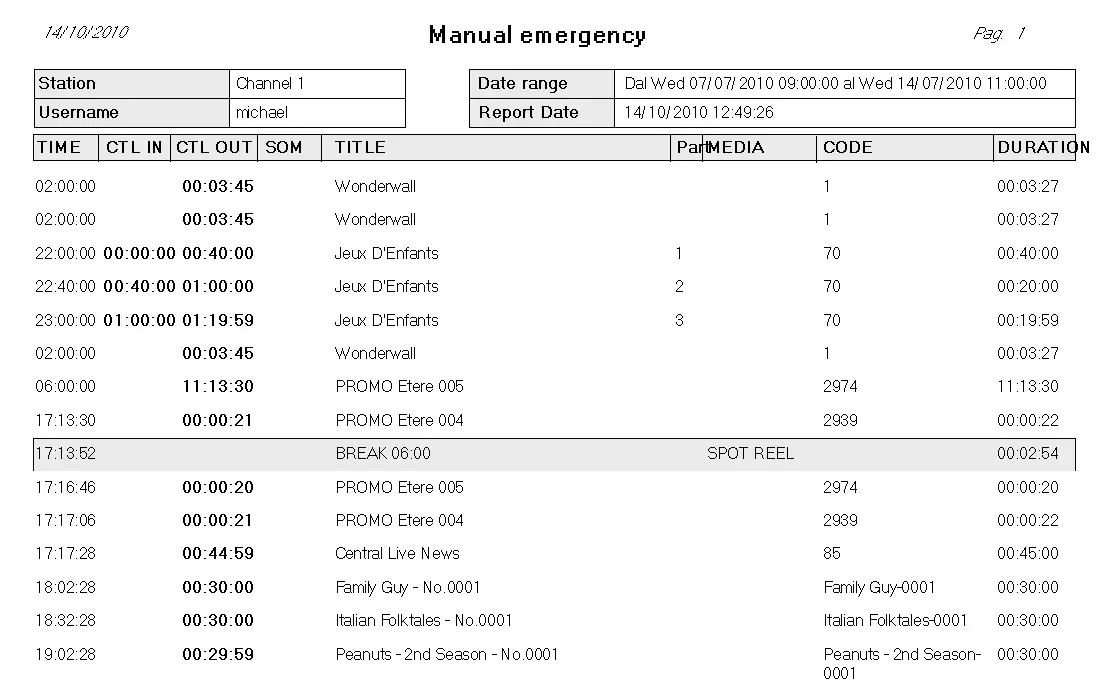
The Manual Emergency report allows printing of the automation playlist, including all the information necessary for a manual on-air transmission (i.e. from tape). The report will provide the operator with the same automation playlist as Etere produced and some extra information related to a taped asset that allows the manual On-air broadcasting (tape code, SOM, EOM, etc.).
This report is extremely important since operators use it to go on-air in case the automation is unavailable manually; this report will contain a list indicating the media(s) from which scheduled assets have been recorded such in a way that the operator will be able to search for the tapes that contain this media and play it in the VTR.
NB: Please note that the "media" column will display only those used for ingesting media; tapes manually linked to assets won't be shown.
Report Filters
All the parameters that permit a detailed report generation have been spread across seven different tabs to allow a more manageable configuration. By default, all filters are disabled (i.e., either blank or unselected); to enable them, it is enough to configure at least one parameter inside. Available filters include:
•Date range: Set days that will be included in the report,
•Time range: Indicate the range of hours to be covered in the report,
•Station: Select the station from which the schedule will be retrieved,
•CTL timecode format: Enable this option to use the CTL timecode (used for embedding or stripping reference SMPTE timecode onto a videotape) instead of the SOM/EOM values,
•Networks: If you need to print a schedule for a specific regional network, indicate it here.
Please note that if an asset counts with more than one video file linked, all media files will be displayed in different lines.
Report Preview
The [Settings] permits configuring the page layout of the outgoing document; once filters and settings have been set, it will be possible to select between displaying a preview using the related [Preview] button or printing the document directly using the [Report] button. Please note that some reports permit the export of the generated document in the most common formats (pdf, CSV, doc, xls, XML, etc) just by using the [Export] button.
Manual_Emerency
NB: Usually, this report is necessary just in case you have problems with accessing the videoserver or any other On-air device, but you can access the ETERE archive to, for example, broadcast directly from a VTR device (see the Backup VTR chapter for further info).
 Manual_Emerency