6.3.8 Custom Vianeos Delivery
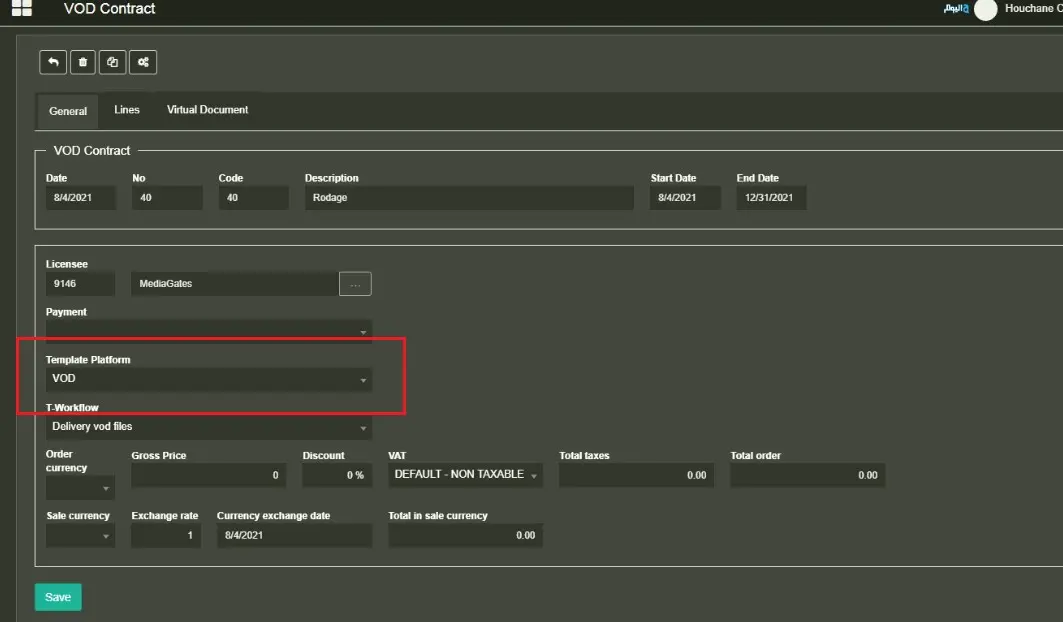
Delivery of media to the VOD platform “Vianeos.” The workflow must be triggered from the VOD contract (so the VOD workflow must be configured for the VOD template linked to VOD contracts).
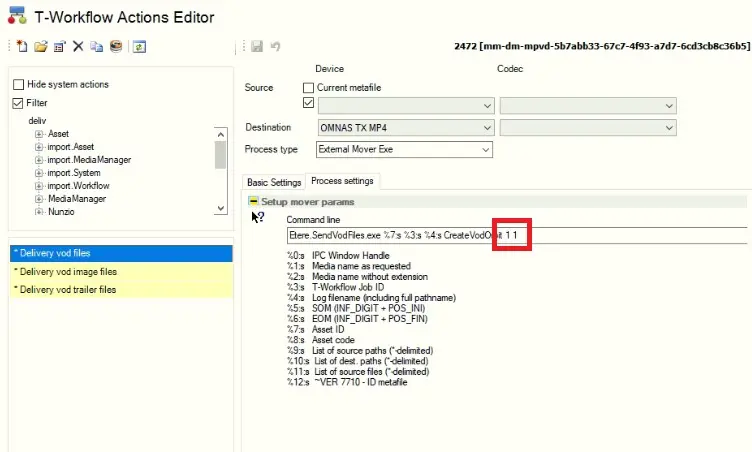
The specific action “Delivery of VOD files” is created automatically by System Maintenance and has only two parameters to be managed in the “WF Action” section:
8423_workflow_action
The first is for the “Encryption”=true, and the second 1 is for the “FTP upload”=true. If set to 0, it will turn off the encryption and the FTP upload.
GENERAL PARAMETERS
From Etere Configurations > Configuration Editor > Web, it is possible to set parameters for:
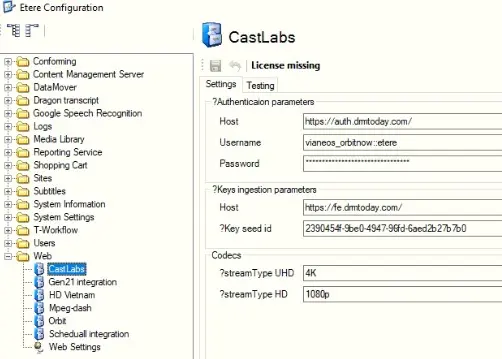
- CASTLAB
This is related to the ENCRYPTION of media; currently, they’re fixed as we’re already using production parameters:
“Authentication parameters” are the username and password for the login step
“Key ingestion parameters” are host and KEY SEED ID used to encrypt files
8424_CastLabs
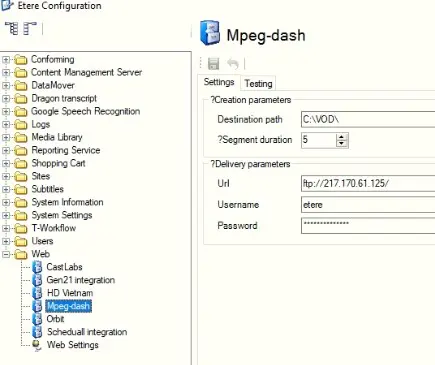
- MPEG-DASH
This is related to the BATCH file that transcodes media:
“Creation Parameters” is for the local path to use when creating project subdirectories and the duration of each segment for the mpd
“Delivery parameters” is for the FTP destination (everything that is created locally on C:\VOD\ will be uploaded to the FTP)
8429_Mpeg-dash
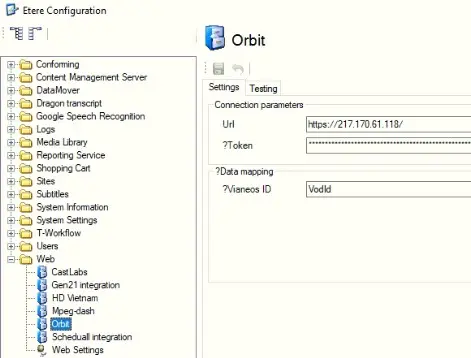
- ORBIT
This is related to the Vianeos platform, where metadata are pushed.
“Connection Parameters” is for the platform URL to contact specified TOKEN to exchange information with the platform.
“Data Mapping” is to specify in which etere flexi will be stored the VIANEOS ID (VODID)
8426_Orbit
WHAT DOES IT DO?
First, the action starts communicating with the Vianeos platform to receive the VODID of the content to be created/updated.
Once the ID is received, it is saved on the Flexi “VODID,” and the action will create on:
C:\VOD\ all the project folders for SERIE (“Master Serie” in Etere),
SEASON (“Serie” in Etere) and EPISODE(“asset” in Etere). During this process, it sends the metadata structure to the platform.
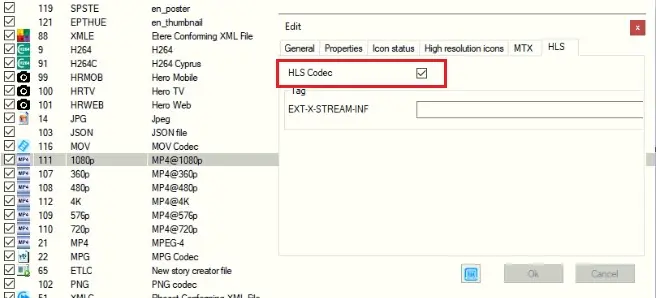
Then, the action starts a batch that creates a .mpd (mpeg-dash) file based on codecs linked to the asset with the property “HLS.”
8427_Codecs
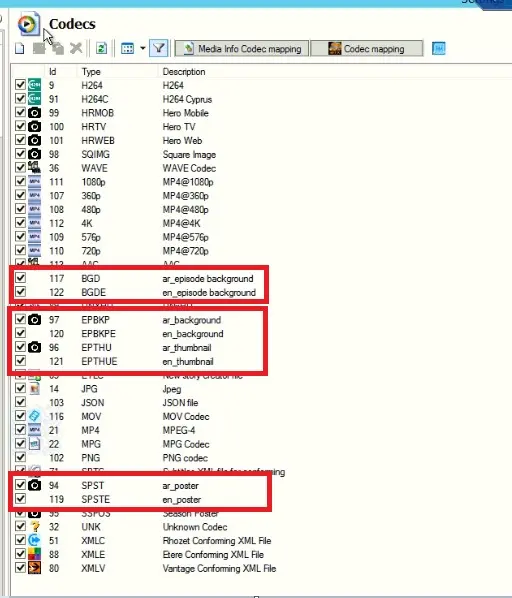
It also will retrieve all pictures linked to the asset with codecs with the type “IMAGE.” In this case, the delivery will rename the picture with the description of the CODEC.
8425_Codecs_2
All those files will be put locally (on the Datamover Server) in the folder c:\vod\, creating a subdirectory for each.
SERIE, SEASON, and EPISODE content. Then they will be uploaded into FTP for the final delivery (the whole directory structure created locally will be kept for the FTP upload)
Delivery of a MOVIE:
For MOVIE, the action will manage the metafile linked to the asset. If it has a Trailer, the action will manage metafile from the trailer just like it manages metafile from the principal asset.
Delivery of an EPISODE:
In this case, there will be three levels of delivery:
- SERIES (vodType = 1)
Currently, it is Master Series in Etere. It must have Genre and Artists assigned, parental rating, and production year. Pictures related to the SERIES (Background, poster, and thumbnail) will be retrieved from the TRAILER linked to the SERIE (on the relationship tab). So, a Trailer for a SERIES must always exist. The Images will then be exported into the subfolder IMAGES, and the trailer video will be exported into the subfolder TRAILER.
- SEASON (vodType = 2)
Currently, it is a Series in Etere. It must have Genre and Artists assigned, as well as parental rating and production year. Pictures related to the SEASON (Background, poster, and thumbnail) will be retrieved from the TRAILER linked to the SEASON (on the relationship tab). So, a Trailer for SEASON must always exist. The Images will then be exported into the subfolder IMAGES, and the trailer video will be exported into the subfolder TRAILER.
- EPISODE (vodType = 0)
It is the Asset of the Serie in Etere. The action will manage the metafile linked to the asset. If it has a Trailer, the action will manage metafile from the trailer like it manages metafile from the principal asset. The trailer is optional for the Episode since all images are already linked to the Episode itself.
Subtitles
If subtitles are linked to the asset, the VOD delivery action will extract them into a .vtt file. The action will create a different file for each subtitle language, and the related value will be written on the metadata structure.
Multiple audio tracks
In this case, the WF triggered to create all the mp4 files for the delivery will first check whether flexi related to Audio_language are filled. If none is filled, at least one audio track is created with codec AAC. Otherwise, the original audio will be split into different audio files as many flexi are filled (up to 4).
- AAC – audio 1-2 filename= ID
- AAC2 – audio 3-4 filename= aac2+ID
- AAC3 – audio 5-6 filename= aac3+ID
- AAC4 – audio 7-8 filename= aac4+ID
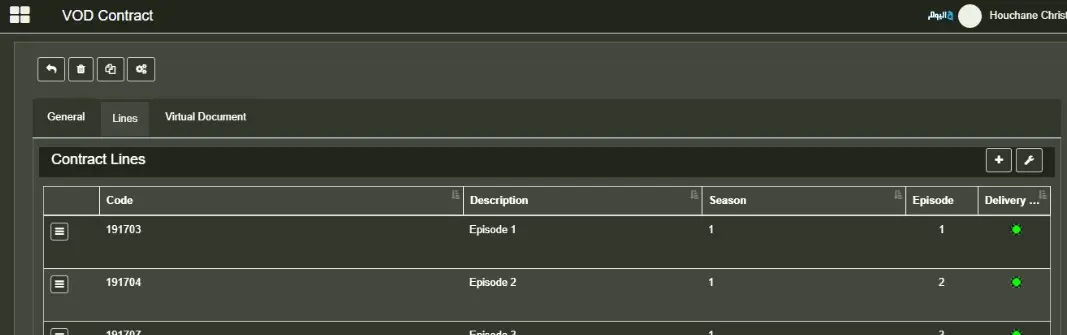
When triggering the WF from the VOD contract, the system is already checking many mandatory fields to let the WF start. If the main information is correct, the status of the delivery order (column “Ready for Delivery) is GREEN.
8428_VOD_Contracts
Otherwise, the RED status will suggest which information is missing to let the WF start.
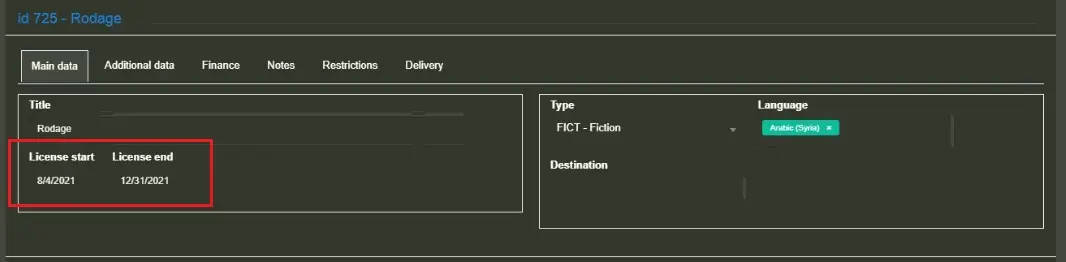
From the CONTRACT LINE, the action will retrieve the LICENSE DATE:
8421_License_Date
While the ALLOWED COUNTRIES are retrieved from the PLATFORM TEMPLATE assigned to the General Contract:
8422_Platform_Template
To assign a Country to a template platform, the country must be first created and linked to a “Territory Group”.
LIST OF ADDITIONAL MANDATORY FIELDS NOT CHECKED BY THE SYSTEM
- FLEXI “Ingest Type”: it must be “EPISODE” in case of an episode of a series, “FILM” in case of a single movie, and “SONG” in case of a video clip.
- License StartDate and EndDate (set and taken from the delivery order)
- COMPANY (taken from the company Flexi)
- foreingCategoryList: in Etere, it is TYPE assigned to the asset. It has multilanguage management, so there will be a TYPE_EN and a TYPE_AR.
- foreignGenreList: in Etere, they’re GENRE (genre without any type specified). They must be inserted on the SERIES, SEASON, and EPISODE level
- foreignSubGenreList: in Etere, they’re SUBGENRE (a genre with the selected type SUBGENRE). They must be inserted on the SERIES, SEASON, and EPISODE level
- foreignCastList: in Etere, they’re ARTISTS. They must be inserted on the SERIES, SEASON, and EPISODE level
- RatingID: in Etere, it is the Parental Rate value set on the Classification section of the asset.
- Accessibility: Country allowed on the platform template
- foreignId: Etere Asset ID
- Title_EN/Title_AR: Etere Asset description with multilanguage management.
- Episode Number (sitComNum): Number of the Episode on the Season on Etere.
- Season Number (seasonNumber): Number of Season on the series on Etere.
- Audio Language: retrieved from fleximetadata Audio_Language_# on the asset.
- Audio Dialect: retrieved from fleximetadata Audio_Dialect_# on the asset.
- Produced: Production date on Etere asset properties
- Country: Country set on asset general data tab (country code)
- General Synopsis (EN/AR): Synopsis on Etere EPG tab for Season with multilanguage management.
- Episode Synopsis (EN/AR): Synopsis is on the Etere EPG tab for episodes with multilanguage management.
- DurationMinutes: Physical duration from asset
- Director (EN/AR): Artist Stage Name with Director role (multilanguage management)
- Actors (EN/AR): Artist Stage Name with Actor role (multilanguage management)
 workflow_action
 CastLabs
 Mpeg-dash
 Orbit
Orbit
 Codecs
 Codecs_2
 VOD_Contracts
 License_Date
 Platform_Template