59.3.9.71 Remote Workflow Action (linked server)
Action Description
Remote Workflow Action (linked server) allows remote management, from a local site, T-workflows of assets stored on a remote site, thus allowing, for example, the execution of remote assets directly on their remote systems.
The remote execution (e.g. attach and start) of a given T-workflow for an asset is performed by Etere DataMover, which sends a request for the execution of the T-workflow in the remote site's linked server. Moreover, the execution is performed on remote assets associated with the "Remote asset synchronization" action.
Note
For detailed information on the remote management of T-workflows using MS SQL Linked Servers, please refer to the "Remote Linked Server Management" section of the Federated Management chapter.
Action Parameters
To create an action of this type, the following fields must be compiled:
Parameters
Name - Insert a short descriptive name for the action.
Site - Select the external site installation on which the T-workflow will be executed.
Select workflow - Indicate the T-workflow that will be launched on the remote site.
NB: Here are listed the T-workflows enabled for the user configured in the Sites section, displaying for each T-workflow a prefix related to the belonging site (e.g. "MyTv Miami - Copy hires on ftp3").
Select operation - Choose the exact action to be performed; available actions are listed and explained below:
Attach and start workflow instance - The selected remote T-workflow will be called and immediately started; the action will return an output based on its result ('started', 'not started', 'asset not exist').
How to use it
Once created to be used, the action for triggering a remote workflow (e.g. put a video file on a shared location) needs to be included in a local workflow under the T-Workflow designer, then attached and launched for the desired asset(s)
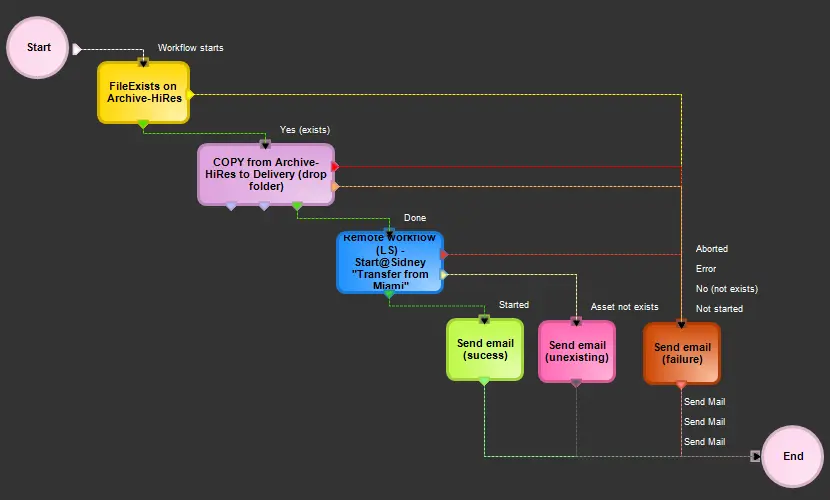 Remote_Workflow_Action