85.2.14.2 How to use it
In Executive Editor
playlist, select an event and with right click choose secondary events.
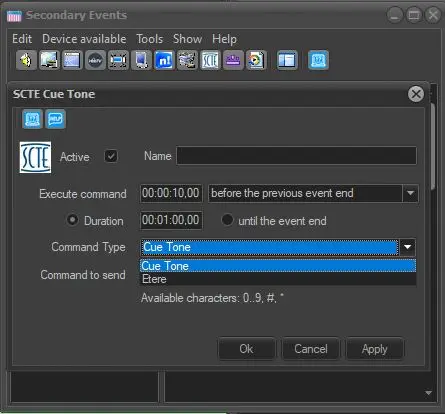
Insert a SCTE type secondary event.
Choose Cue Tone (Etere type as in the image is for custom commands)
Indicate a name for the event (not mandatory, just for editor info) the time
of execution and the command to send .
NB: The maximum number of characters of a single tone accepted is 7. You can set to
execute the command before the start of the event (or commercial cluster) where
you want to send the cuetone. The cuetone will start in advance providing
automatic informations such as PTS_time and Duration of the event or cluster.
The PTS time is automatic and is the start time
where the scte sits in the playlist.
Duration is set by the operator manually.
Once everything is set up properly and ready, you should have a situation like this, where Stman writes the command ordered by EE and the SCTE Inserter streams it via UDP to the Url previously set. Eventually will be received by a MUX or SCTe104 Server.
 scte_cue_tone_secondary_event