84.4.4.44 STANDARD > XMLTV SAMSUNG 2
Export scope
The export creates an XML file which contains the playlist data regarding multiple scheduling days.
Assets data can be taken either from Flexi Metadata or from the Multilanguage.
1. The process checks the presence of the files in the destination folder
2. If the needed files are not there and they have to be delivered by workflow, the check will be repeated once the workflows are completed or when the maximum waiting time set in the parameters has been reached.
Export parameters
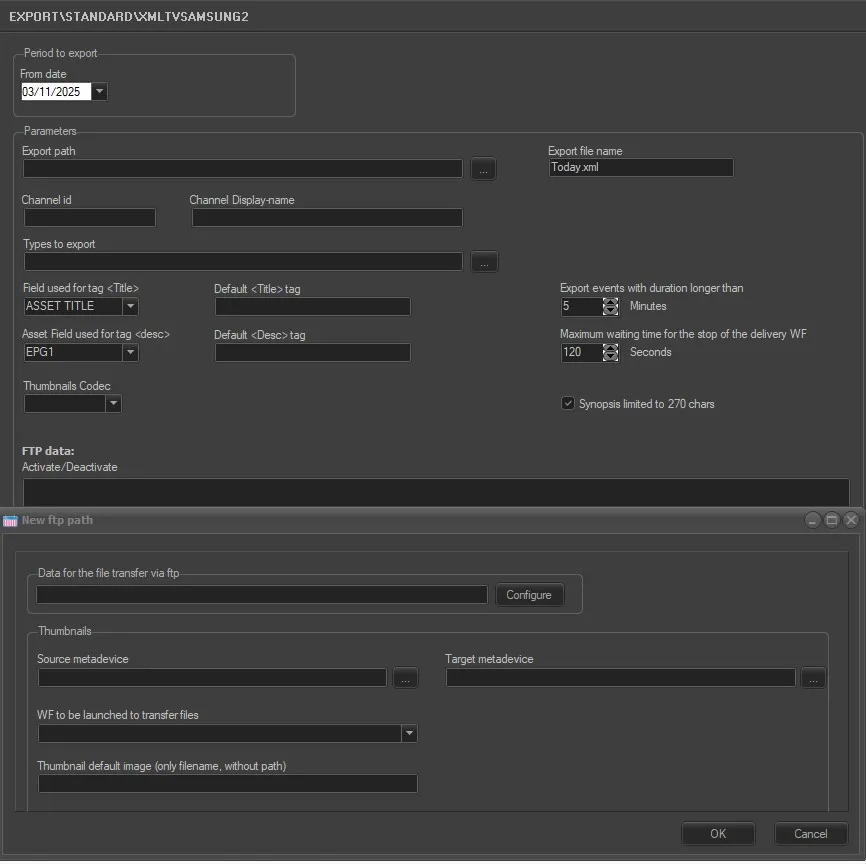
xmltv_samsung2_params
• Period to export (from date): Specify which scheduling day the export should start from.
• And for next n. of days: Indicate how many days ahead of the one set in the previous parameter, should be exported in the same file.
• Export path: Insert the path where to save the XML file exported.
• Channel ID: ID of the station to export.
• Channel Display-name: Choose the channel name to be shown on the exported XML.
• Export Filename: Type here the name of the exported file (including the extension).
• Types to export: Filter the asset types to export.
• Field used for tag <Title>: It's possible to choose the database field where the content of the tag <title> should be taken from. Available fields are: ASSET TITLE, STORY, EPG1, EPG2.
• Default <Title> tag: It's possible to choose a default value for the title tag, in case it is not found on the asset.
• Asset Field used for tag <desc>: It's possible to choose the database field where the content of the tag <desc> should be taken from. Available fields are: ASSET TITLE, STORY, EPG1, EPG2.
• Default <Desc> tag: It's possible to choose a default value for the desc tag, in case it is not found on the asset.
• Thumbnails codec: Select the codec assigned to the thumbnails to be exported, in order to recognize them among the other metafiles.
• Export events with duration longer than: As the name suggests, it allows to further filter the events to export by selecting only those which last more than the specified duration (in minutes).
• Maximum waiting time for the stop of the delivery WF: Define here the maximum amount of time (in seconds) the export should wait before repeating the checks of the step 1.
• Synopsis limited to 270 chars: If enabled, only a text of 270 characters will be exported for the synopsis.
FTP data
Right-clicking on this form, it's possible to add an ftp path as destination of the export, as well as modify or delete it.
When adding or modifying a new path, a form containing the following parameters is displayed:
• Data for the file transfer via ftp: Set the file transfer parameters to execute the transmission via ftp. See chapter 69.1.4.0 Configure Data File Transfer via FTP for more detailed information.
Thumbnails
• Source metadevice: Set the device where the thumbnails to send have to be retrieved from.
• Target metadevice: Set the device where the thumbnails have to be delivered.
• WF to be launched to transfer files: In case the thumbnails are not found in the target metadevice (during the step 1), this is the wf that will be launched to send them to the set target metadevice (step 2).
• Thumbnail default image (only filename, without path): In case the thumbnails to send are not found either in the target metadevice or in the source metadevice, the process will deliver the default image file set here. It's enough to set just the filename, as it will be taken from the source path by default.
Notes:
- The program start and stop times are exported in UTC format.
- The exported value in the tag <rating> will contain the same value set in the classification tab of the related asset. If not present, the <rating> tag will be filled with the value 3 by default.
 xmltv_samsung2_params