69.1.2.2 AGB RF
Export Scope
The Export_Custom_AGB_RF export to an XML file containing playlists for the scheduling period. In the exported file, each line represents an event, separated by a comma.
Export Parameters
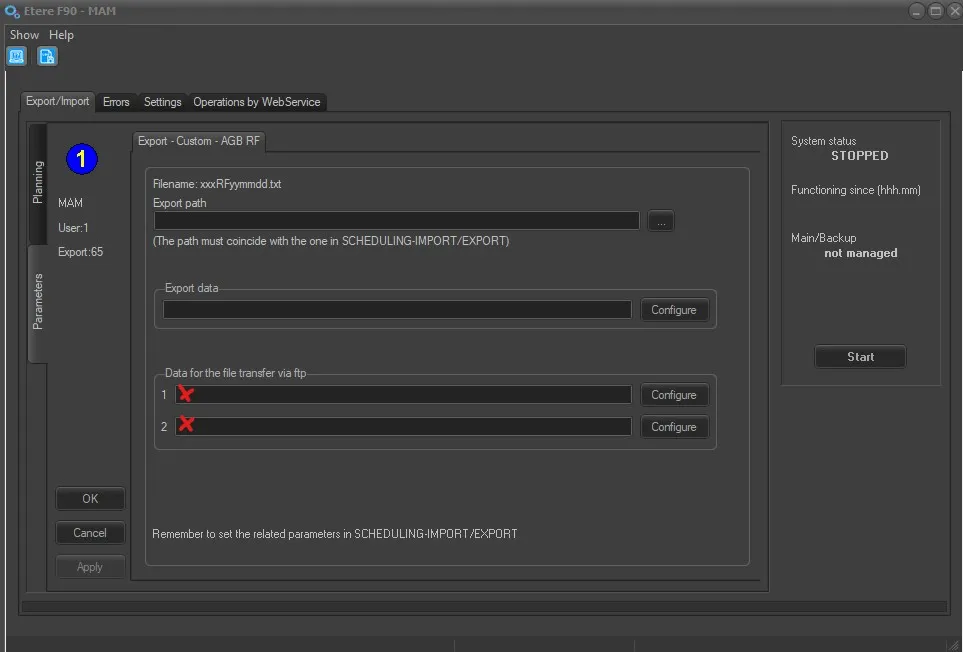
Export - Custom - AGB RF
Export path - Specify the location path to create the exported text file. You can use the browse button to select the path in the network drive or local drive. The path must coincide with the path specified in the Etere Scheduling > Import/Export module.
The filename format of the exported file is: xxxRFyyyymmdd.XML, where 'xxx' is a custom prefix defined in manual export (it must be the same), 'RF' is a fixed string and 'yyyymmdd' is the exported schedule date.
Data for the file transfer via FTP - Click on the Configure button and define the FTP parameters described in the Configure Data File Transfer via FTP chapter. From EtereInstall_35.1.76.8221.zip the export can run on two ftp paths at the same time.
Export data - Click on <Configure> to open the Configure Export window to specify the days to be exported and the frequency for the export.
Scheduling related import
Set the Etere Scheduling > Export > EXPORT\CUSTOM\AGBRF parameters, and click <APPLY> to confirm the changes.
 F90_AGB_RF