74.3 Etere CC MOS Gateway
Main Interface
Etere Closed Captions (CC) MOS Gateway create a connection to NCS (Newsroom) Server, retrieve rundown from NCS Server and send to Live Subtitling Tools for importing the subtitles.
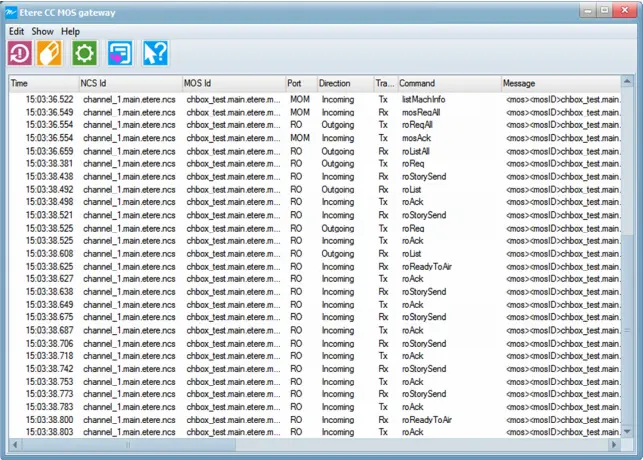
Execute "Etere MOS Connector" application to launch the Etere CC MOS Gateway to connect to NCS Server and start receiving rundown from the Server. The main interface of Etere CC MOS Gateway is displayed.
Etere_cc_mos_gateway
The Toolbar menu of Etere CC MOS Gateway provide the following functions:
Menu Icon -
Function Description : This icon reset the connection to NCS Server.
Menu Icon -
Function Description : This icon clear the list of commands in the ListView.
Menu Icon -
Function Description : This icon allow to change the settings of the MOS gateway.
Menu Icon -
Function Description : This icon sent a “roReqAll” command to request for a description of all Running Order known by NCS Server. Refer to MOS Protocol documentation for more information on commands.
Menu Icon -
Function Description : This icon launch the Etere User Guide.
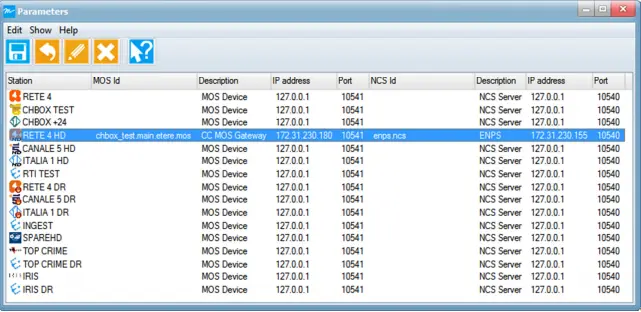
A quick glance at the Etere CC MOS Gateway configuration settings and its functioning toolbar menu is described below.
Etere_cc_mos_gateway_parameter
Menu Icon -
Function Description :This icon save the settings after making changes.
Menu Icon -
Function Description :This icon allows to rollback changes made to the MOS gateway.
Menu Icon -
Function Description :Click this icon to edit the configuration settings of selected object.
Menu Icon -
Function Description :This icon delete the selected configuration object.
Menu Icon -
Function Description :This icon launch the Etere User Guide.
Edit Configuration
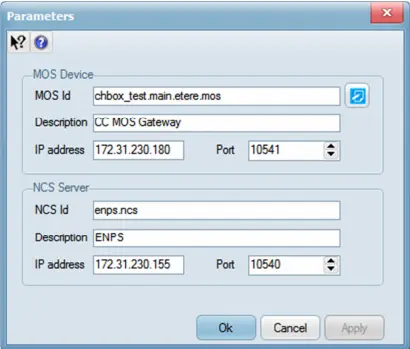
When editing the Etere CC MOS Gateway configuration, the following parameters needs to be fulfilled:
Etere_cc_mos_gateway_config_para MOS Device
Parameter - MOS ID
Description : Indicate the MOS ID. You can use the "Generate MOS ID" to generate a default ID based on workstation.
Parameter - Description
Description : The description of the MOS Server.
Parameter - IP Address
Description : The IP address of the MOS Server.
Parameter - Port
Description : The port number used by MOS Server. Default port number is acceptable.
NCS Server
Parameter - NCS ID
Description : Indicate the ID of the NCS Server.
Parameter - Description
Description : The description of the NCS Server.
Parameter - IP Address
Description : The IP address of the NCS Server.
Parameter - Port
Description : The port number used by NCS Server. Default port number is acceptable.
Import Subtitles from Rundown
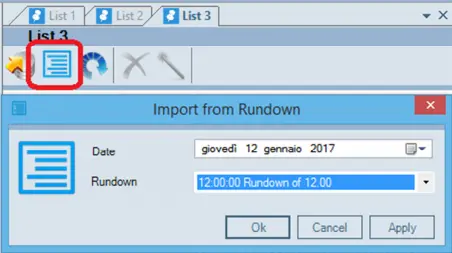
The rundown received from NCS Server are stored in SQL Database. Use the Live Subtitling Tools to import subtitles from rundown. From the main interface of Live Subtitling Tools click on <Import from Rundown> menu bar to launch the import dialogue box.
Etere_cc_mos_gateway_import_rundown
From the import dialogue box select the date, and name of the Rundown to import all the stories of rundown selected into the workstation.
 Etere_cc_mos_gateway_parameter
 Etere_cc_mos_gateway_config_para
 Etere_cc_mos_gateway
 Etere_cc_mos_gateway_import_rundown