59.2.24.2 Using a Recovery Database
What is DB Disaster Recovery?
The DB Disaster Recovery tool is a simple and easy-to-use application that permits to make available (with just one click away) a disaster recovery database which is a replica (either using mirroring or log shipping) of the main production database.
DB Disaster Recovery allows stations to increase the database reliability and fault resilience; this application provides stations with the possibility of performing the following actions:
Set a recovery database (mirrored to the main one) as primary.
Activate the service broker on the recovery database if required.
Copy scheduling playlists from one station to another.
How to use it
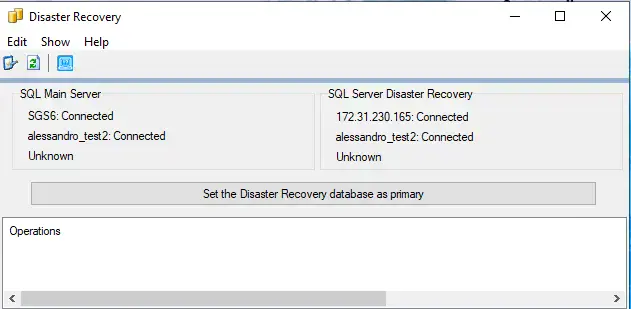
Once all the preliminary considerations have been accomplished, the DB Disaster Recovery application (EtDisasterRecovery.exe) can be launched; it is composed of a user-friendly interface featuring the following information and functions:
DB-disaster recovery
Information panels
SQL Main server - Shows the main database SQL server, the main database name (connected/not connected) and the mirroring status.
SQL Recovery server - If the recovery database has been correctly set and connected, this section will display the SQL server, database name (connected/not connected) and mirroring status.
Available functions panels
Parameters - Set the stations from/to which the scheduling playlist will be copied, as detailed in the preliminary considerations section.
Refresh - Use it to refresh the main and recovery databases information (i.e. server, name, status).
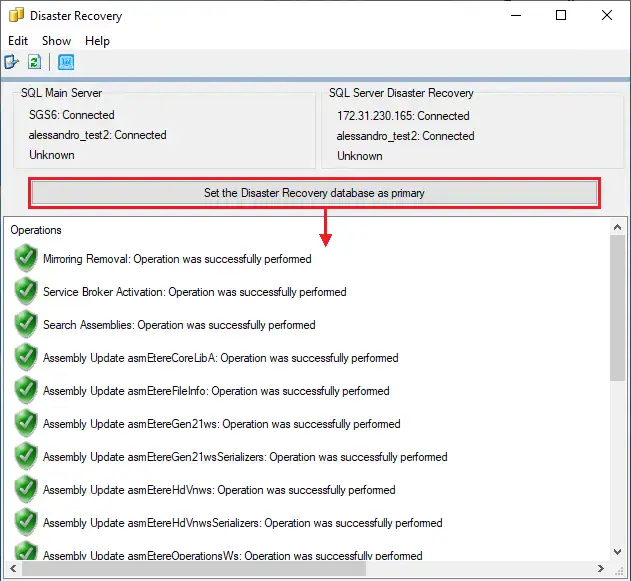
Set the disaster recovery database as primary - Once activated, this button will perform the following actions:
•Switch from the main database to the recovery database.
•Launch the query for activating the mirrored database.
•Copy the scheduling playlist (i.e. tpalinse) between stations according to the set parameters.
set_db-disasterrecovery
Using Virtual Machine (VM) Replication
Etere supports Virtual Machine replication without expensive hardware or complexity with its support for Microsoft Hyper-V Replication. Hyper-V Replication creates a copy of a live virtual machine to a replica offline virtual machine. This approach of replicating virtual machines from one Hyper-V host server to another ensures consistent workload availability. Etere enables users to designate a specific location to store the virtual machine files for recovery via a SAN storage, SMB file server or a storage device that is directly attached.
 db-disasterrecovery
 set_db-disasterrecovery