59.4.7.10 MassTechMover
The MassTech Mover process type allows transferring video files between Masstech devices using MMP (Media Management Protocol).
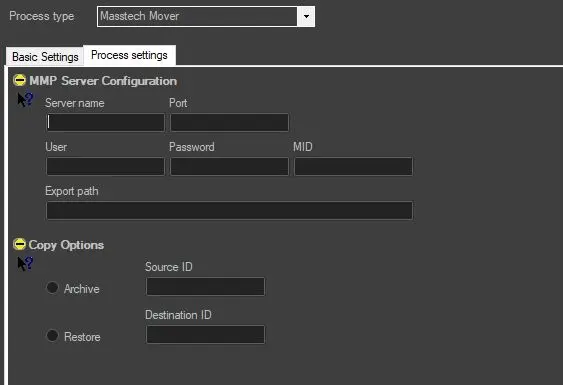
Once saved, MassTech Mover actions will be available as action blocks ready to be included within T-workflows. To configure it, just set the following parameters:
MMP Server Configuration:
Compile some relevant information regarding the MMP connection.
• Server name: if the communication type is TCP/IP, insert the IP on which the MMP Server is running; otherwise, if the communication type is 'Serial', leave it blank,
• Port: Specify the COM number (if Serial) or the Port number (if TCP/IP) on which the MMP Server will 'listen' for requests,
• User & Password: Insert the login information to access the MMP Server,
• MID: Indicate the Mass Storage Identifier to be used.
Copy Options:
Specify if the action will be used for either archive or restore video files:
• Archive: Indicate the Source ID (external device ID) and the Group (Archive group) from which video files will be archived. The 'Group' value is the same specified in the Server.
• Restore: insert the Destination ID (external device ID) on which video files will be restored.
Copy_Options
 Copy_Options