Settings
71.16.1 Preliminary Parameters
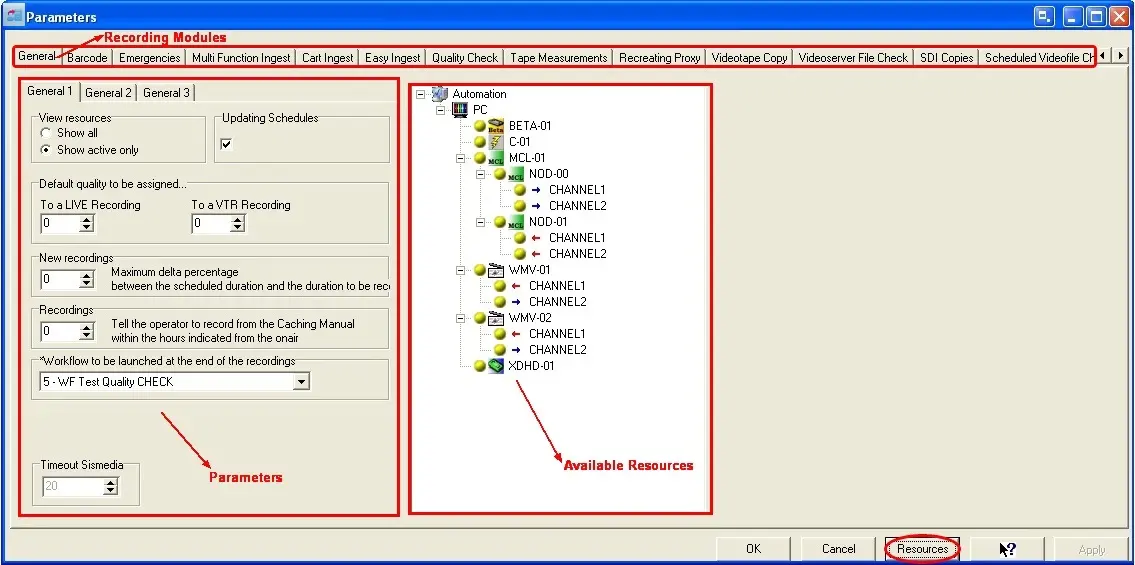
If you intend to use Etere Ingest, you MUST first set up the relative options and resources to be used in all Etere Ingest modules, you can do it by double-clicking on the Settings icon within the Etere Ingest menu. All configuration tabs located here mainly refer to the devices to be used along the various ingestion modes, the picture below show the main window of the Parameters section:
On the left side are located the fields to be defined using either parameters or resources (which are available on the right side); for viewing all the resources (devices) currently available for the Etere Client whose running Etere Ingest, just click on the 'Resources' button.
Parameters
 Parameters