59.3.10.12 Testing T-Workflows
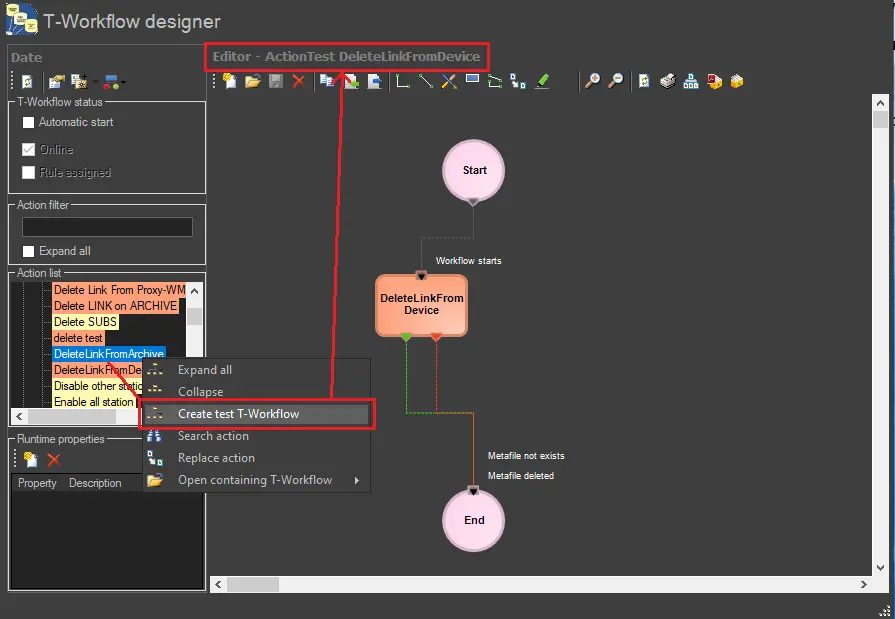
Under the T-Workflow Designer area, it is possible to create a T-workflow containing a selected action in one click; for example, this option could be helpful if you want to test an action individually to control if it is working correctly. To test the functionality of a specific action, follow the next procedure:
1. Right-click on a specific action that can be located in either the Actions list or the Editor, select the 'Create test T-workflow' option, and a T-workflow will be automatically created:
Testing_T-Workflows
2. The new T-workflow will be named in the format: "ActionTest [ActionName]" (e.g., ActionTest MyAction01); modify the T-workflow according to your needs or leave it as it is,
3. Assign the just-created T-workflow to a particular asset to test its functionality; see the How to Assign a T-workflow chapter for further information regarding how to attach a T-workflow to one or various assets.
 4904_Testing_T-Workflows