201.10.5.10 Inserting and moving events
Strategic Editor allows to manually manage the White and Blacks Lists, allowing to either inserting events or moving events from the lists. This functions are available by right click on event/segment and select one of the following options:
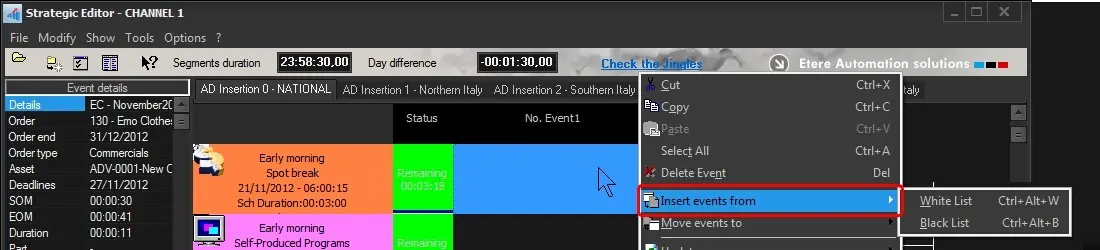
Insert events from...
Airsales_strategiceditor_whiteblacklists01
•Insert from the White list: It allows to schedule event(s) from the white list.
•Insert from the Black list: Use it to schedule event(s) from the black list.
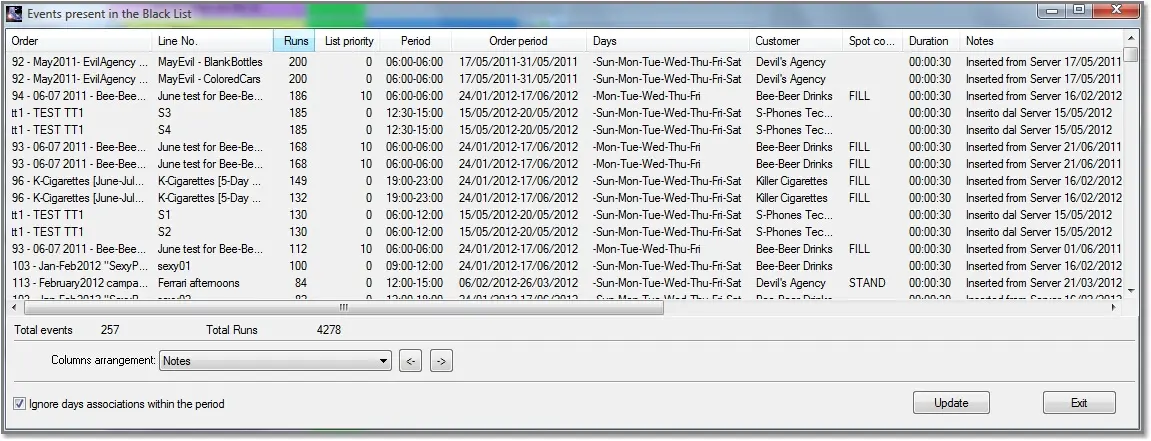
Airsales_strategiceditor_whiteblacklists01_
Columns arrangement - Modify the position of columns by moving the column to the left, or right.
Ignore days associations within the period - Show all black/white listed events without excluding those not belonging for the current day.
Update - List all black/white listed events available for the current day.
Re-schedule! - Right-click on event and select the "insert into schedule" option to re-schedule the event.
Note: Warning message would be prompt if attempt to insert the already-presented event to the same segment.
NB: Please note that displayed events can be sorted according to their columns (e.g. order, line, runs, priority, etc) by clicking on the column (e.g. runs)
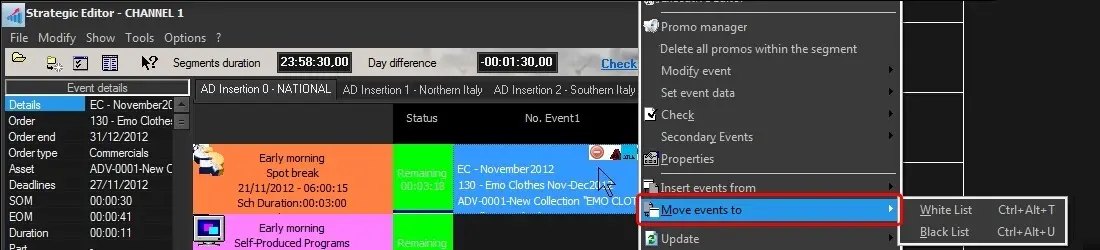
Move events to...
•Move to White list: It allows to insert the selected segment event(s) into the white list.
•Move to Black list: Use it to insert the selected segment events into the black list.
Airsales_strategiceditor_whiteblacklists02
Please note that once an event has been moved into either the White list or Black list, Etere Air Sales keeps track of the assets to which the event was linked such in a way that when the event will be re-inserted into the schedule, this asset will be automatically linked to it.
 Airsales_strategiceditor_whiteblacklists01_
 Airsales_strategiceditor_whiteblacklists01
 Airsales_strategiceditor_whiteblacklists02