70.5.2 Installing Tape Drive for HSM Disaster Recovery
The HSM Disaster Recovery utility doesn't require any special configuration, it only requires a tape drive to be installed in the computer where the disaster recovery utility is running. Follow the steps describe below to install a tape drive in a Windows system.
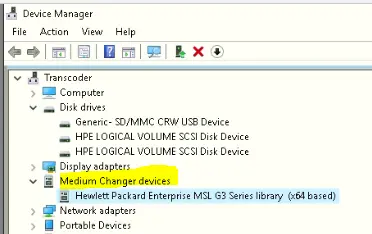
1.Connect the tape drive to the server from which they will be controlled. Once the tape drive is identified by the server, the tape drive would be visible from the Windows Device Manager:
Device Manager
2.If the tape drive could not be identified by Device Manager, a yellow question mark yellow_Question_Mark would be displayed under the Tape Drives category. You need to define the driver to the tape drive in order to manage the tape drive.
3.Right click on the tape drive and select Driver. From the dialogue box, select the model of the tape drive from the list of supported models, or select the driver from an external media (CD / DVD) from the purchase of the tape drive. Click <OK> to update the driver for the tape drive.
4.Once the driver is updated successfully, the tape drive would appeared in Device Manager as shown in step 1.
 Device_Manager