72.6.9 Subtitles
Subtitles
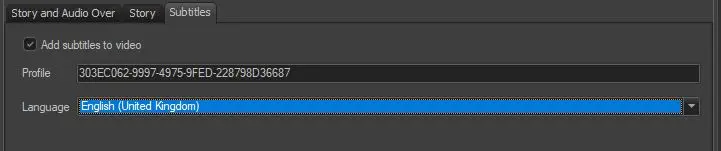
Enable the "add subtitles to video" option to conform video including subtitles, then, configure here the export of the xml file (containing the subtitling text, position and font) to be used by the destination (i.e. Rhozet Transcoder) for generating subtitles.
Profile - Enter the GUID Profile (e.g. {303EC062-...}) of the destination's subtitling filter module to be used for exporting the rhozet xml subltitles file.
Exported files are named as the xml command file (e.g. 2571.xml) but with a .sbt.xml extension (e.g. 2571.sbt.xml).
Language - Select the language (e.g. italian) of the subtitles to be exported in the rhozet xml subltitles file, that is, to be conformed.
Available languages are those enabled in Etere Configuration > Settings > Basic > Languages.
Please note that subtitles can be also included in the conforming using a Rhozet RZCP Transcoding T-workflow action.
NB: In case of conforming a virtual story, subtitles will be supported only for the 1st version of the related asset.
Subtitles created for the conforming are referred in the story's XML as a file in SBTC format (Subtitles XML File for Conforming) which needs to be enabled in the Configuration > Settings > Devices > Codec section.
NB: For information on the XML file exported by the Rhozet RZCP Transcoding action refer to the Exported Rhozet XML chapter.
 Subtitles