72.7.3 How to broadcast subtitles
Subtitling assets in Etere is an easy as following the step-by-step walkthrough provided below:
Preparing the subtitling system
1 - Configure the Subtitling Resource (e.g. ETX) as explained in the Resource configuration chapter.
2 - Configure the Languages to be used for subtitling as explained in the Language configuration chapter.
3 - If you are using a ETX resource, use the CG Editor to create a crawl text subtitles file and give a name to the text file (e.g. 777.ml-cgc). Save the subtitles file in the same folder as other subtitles files. After which, you can import the subtitles file into Closed Captions Server.
It worth mention that the Template File reproduce the structure and the layout of the Subtitles stored in Etere MAM, for the the On-Air process of Etere Automation.
So basically Etere Automation would read the Subitles informations from this Template File.
Some crucial information such as some Subtitles Rows Text properties are stored in the given file, in order to further improve the Subtitles Text formatting into the Etere ecosystem.
For instance the Rows Left Border Padding, Right Border Padding, Bottom Border Padding, Top Border Padding, Row Distance or ignorNRows.
<subtitles borderLeft="0.025" borderRight="0.025" borderTop="0.05" borderBottom="0.05" rowDistance="-0.15" ignoreNRows="-1"/>
About the last 2 parameters:
rowDistance: The more the values increases, the more the space increases aswell.
ignoreNRows behaves as explained here below:
- '1' or a text beginning with 't': Vertical position is not changed. In case text has multiple rows and vertical position is such that some row fall outside visible part of screen, text is not shifted to fit all its rows into visible part of screen.
- Any other value or attribute not present: in case text has multiple rows and vertical position is such that some row does not fit into visible part of screen, then vertical position is shifted, so that all text rows are in the visible part of screen
If other resource is used for subtitling, refer to Adding a New Resource in the Resource Editor for resource configuration. The scripts for sending subtitles should be provided by the hardware vendor.
4 - Configure the Etere STMan module as explained in the "Subtitles by STMan" chapter.
Adding and scheduling subtitles
5 - Insert the produced/imported subtitles in the database as described in the Getting subtitles into the database chapter.
6 - Schedule the asset into a broadcast playlist (e.g. from Executive Editor), a blue icon will indicate the presence of subtitles:
Executive Editor
NB: Previewing subtitled assets is possible through the indications provided in the "Previewing subtitled events" chapter.
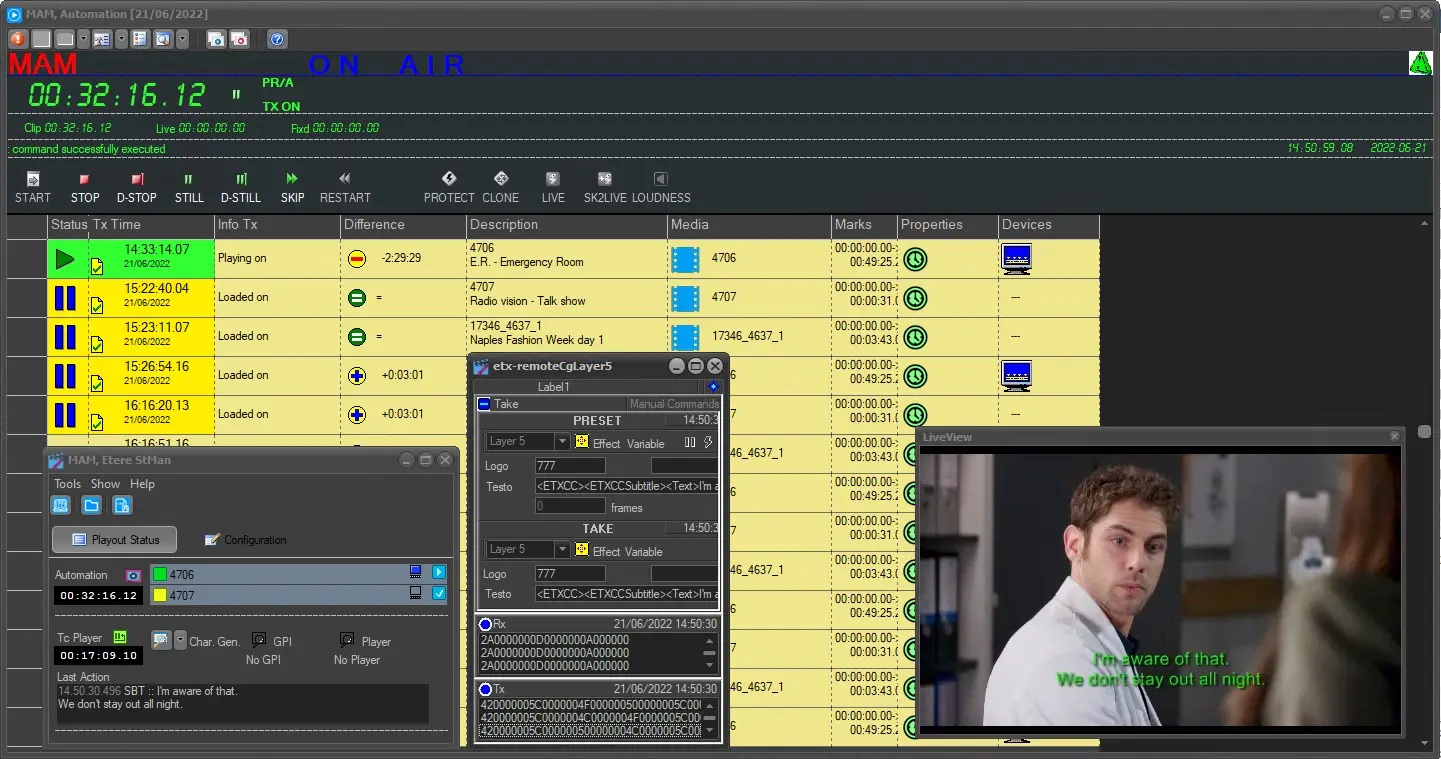
7 - At this point, when Etere Automation plays the subtitled asset, Etere STMan automatically send the related subtitles:
Subtitles
NB: Every time Etere Automation takes a subtitled asset to be sent on-air, Etere STMan points out the presence of subtitles under the "Playout Status" area, retrieving from the database the subtitles to be sent to the subtitling device according to the script commands.
 Subtitles
 Executive_Editor