59.5.4.38 Out of Order Spots
Report Description
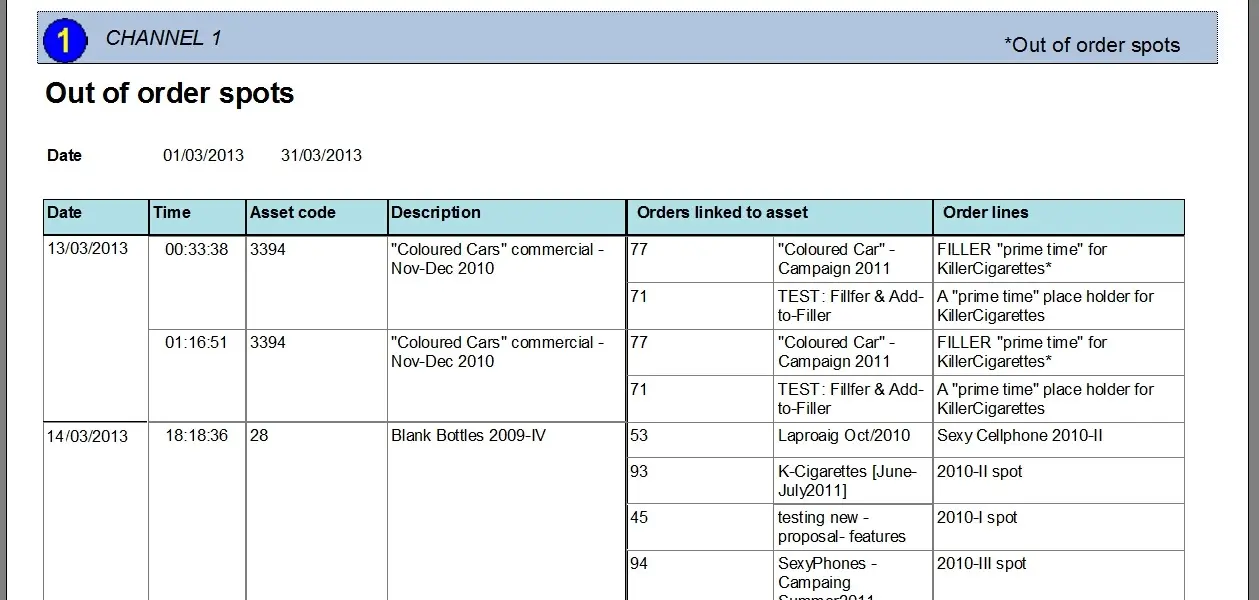
The Out of Order Spots report allows the generation of a document containing all the contractual assets (i.e., assets included in at least one commercial order) scheduled as non-commercial assets without any order association, allowing the billing department to invoice these events.
For each wrongful asset performance (i.e. out of order), the date and time on which the asset was scheduled and all the orders (and lines) associated with it. This report supports narrowing retrieved data to specific date periods.
NB: Please note that only commercial assets will be retrieved, including assets whose type is enabled with the "spot" property.
Report Filters
All the parameters that permit a detailed report generation have been spread across seven different tabs to allow a more manageable configuration. By default, all filters are disabled (i.e., either blank or unselected); to enable them, it is enough to configure at least one parameter inside. Available filters include:
•Period: Indicate the date range from which data to be included in the report will be retrieved.
Report Preview
The [Settings] permits the configuration of the page layout of the outgoing document; once filters and settings have been set, it will be possible to select between displaying a preview using the related [Preview] button or printing the document directly using the [Report] button:
Out_of_Order_Spots_preview
Columns legend
Date - The date on which the asset is scheduled.
Time - the time at which the asset is scheduled.
Asset code - Code of the scheduled asset
Description - Description of the scheduled asset
Orders linked to asset - Order(s) to which the asset is related
Order lines - Order lines to which the asset is associated
Please note that some reports permit the export of the generated document in the most common formats (pdf, CSV, doc, xls, XML, etc) just by using the [Export] button.
 Out_of_Order_Spots_preview