84.4.5.71 CUSTOM > MYPIX
Import Scope
The MYPIX custom import permits to receive a .zip file containing an .XML file (mypix.xml) and various .JPG files; Etere decompress the -zip file into the configured path and copy all .JPG files into the DEKO directory (and/or a FTP path) and import into the Etere database all secondary events present in the .XML file.
Import parameters
This import module requires the following parameters to be set in order to be correctly used:
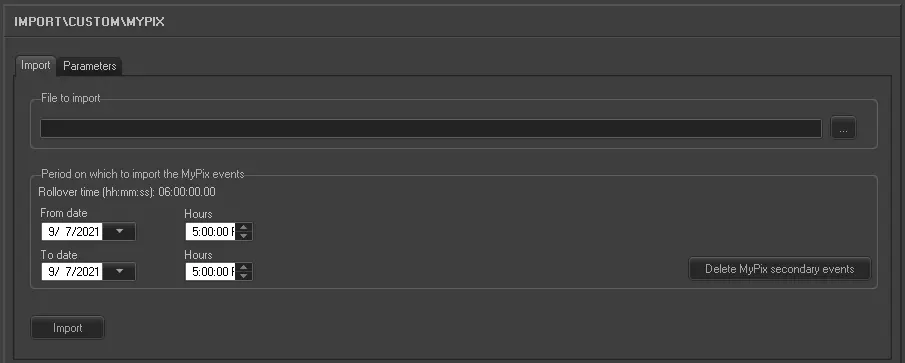
Import
Import_custom_mypix
•File to import: Browse for the .XML file that will be imported
•Period on which to import the MyPix events: Indicate the date-time range on which the MyPix events will be imported, that is, they will be applied to all events scheduled within the selected date-time range. Here will be indicated the rollover time (i.e.: schedules start time) currently set on the system,
By making click on the 'Delete MyPix secondary events' button all MyPix secondary events associated to events scheduled in the selected date-time period will be unassociated.
Please note that MyPix secondary events cannot be imported into past days.
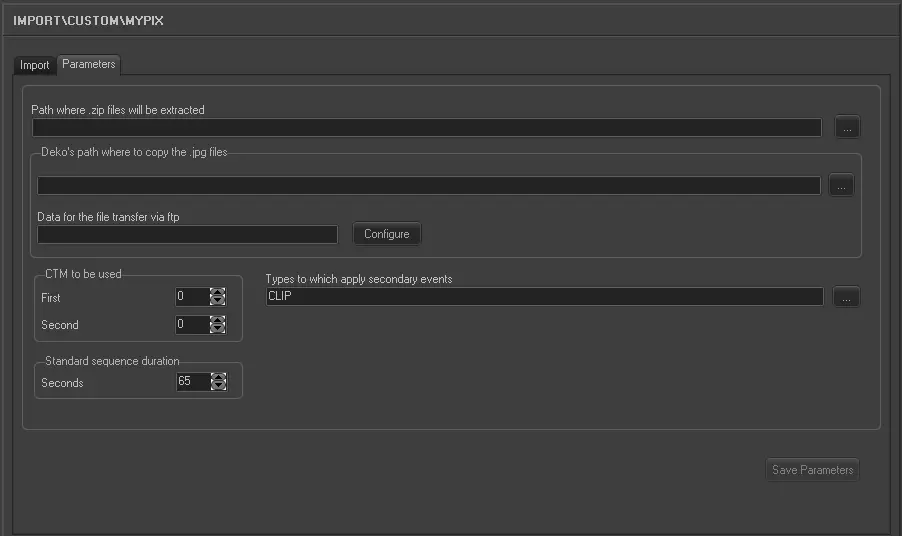
Parameters
Import_custom_mypix_1
•Path where the .zip files will be extracted: Indicate the path on which the contents of the zip file will be decompressed.
•Deko's path where to copy the .jpg files: insert the Deko's machine directory on which the jpg files will be copied.
•Data for the file transfer via FTP: Make click on the 'configure' button to set the ftp connection parameters (i.e.: server, username, password, F90 path and passive-mode-use) to be used to upload the imported file.
•CTM to be used: Indicate the number corresponding to the first CTM (to send the performer, title, nickname, and jpg) and second CTM (to send the nine questions and answers); please note that the second CTM starts 5 seconds after the first one.
The CTM number must correspond to the code of an existing CTM defined in the Etere Configuration | Settings | Devices | Script Files section,
•Standard sequence duration: This value (by default set to 65) indicates the MyPix sequence duration (in seconds). This duration can be used when:
First example: if a video clip last 180 seconds, the titling sequence will be repeated 2 times (because 3 times are excessive):
- The first one 5 sec. after the start of the video clip,
- The second one at 65 sec. before the end of the vide clip.
Second example: If a vide clip last 240 seconds, the titling sequence will be repeated 3 times:
-The fist one 5 sec. after the start of the video clip,
-The second one 65 sec. after the start of the video clip,
-The third one 65 sec. before the end of the vide clip.
•Types to which apply secondary events: Select the event types to which secondary events will be applied, if no type is selected (default), they will be applied to all events.
Launch the import
Once the import has been configured, it can be started just by pressing the <Import> button, once the import has finished, it will be possible to display the schedule of the related day to verify and/or approve the import operation.
 5283_Import_custom_mypix_1
 5282_Import_custom_mypix