54.8.2.1 Creating contacts
Searching existing contacts
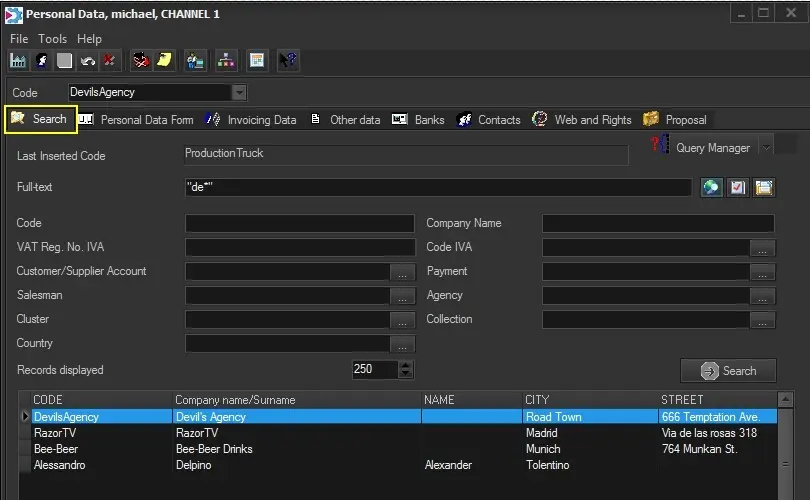
Use the "Search" tab each time you need to browse or edit existing personal data; this window allows you to search for existing companies or persons matching or containing the following filters:
Configuration_personaldata
Filter - Last inserted code
Description: Display the code of the last opened contact.
Filter - Query manager
Description: Search using the Etere Query Wizard utility, which allows using custom SQL queries to search personal data on the Etere database.
Filter - Full-text
Description: If the Etere database has been indexed for full search, this section will allow us to perform a full-text search across all the personal data fields (i.e. code, name, agency, etc.).
Moreover, use the [advanced full-text search] to include boolean operators in the search.
Filter - Code
Description: The identification code (or a part of the code) assigned to the contact.
Filter - Company name / Surname
Description: The name (or a part of the name) of the company or person.
Filter - VAT Reg. No.
Description: The TAX code of the contact.
Filter - Account Executive
Description: The account executive contact's name (or a part of the name).
Filter - Agency
Description: The agency contact's name (or a part of the name).
Filter - Cluster
Description: The name (or a part of the name) of the cluster to which the contact is added.
Filter - Collection
Description: The name (or a part of the name) of the collection to which the contact belongs.
Once the [Search] button is pressed, all contacts matching the inserted parameters will be displayed in the bottom list, from which a double click on the related line will access their various data sections.
Creating new contacts
The "New" function allows to create any of the following contact types:
ENABLED TABS
CONTACT TYPE - Company
Personal data: yes
Invoicing data: yes
Other data: yes
Banks: yes
Contacts: yes
Web rights: yes
Proposals: yes
CONTACT TYPE - Person
Personal data: yes
Invoicing data: no
Other data: yes
Banks: no
Contacts: yes
Web rights: yes
Proposals: yes
CONTACT TYPE - Location
Personal data: yes
Invoicing data: no
Other data: yes
Banks: no
Contacts: yes
Web rights: yes
Proposals: no
CONTACT TYPE - Equipment
Personal data: yes
Invoicing data: no
Other data: yes
Banks: no
Contacts: yes
Web rights: yes
Proposals: no
REQUIRED FIELDS
CONTACT TYPE - Company
Code: yes
Dec.: no
Company name: yes
Surname: no
VAT number: yes
Email: no
CONTACT TYPE - Person
Code: yes
Dec.: no
Company name: no
Surname: yes
VAT number: no
Email: no
CONTACT TYPE - Location
Code: yes
Dec.: yes
Company name: no
Surname: no
VAT number: no
Email: no
CONTACT TYPE - Equipment
Code: yes
Dec.: yes
Company name: no
Surname: no
VAT number: no
Email: no
NB: The administrator can define compulsory fields under the Etere Configuration > Settings > Basic > Personal Data section.
 Configuration_personaldata