59.4.11 Rules Editor
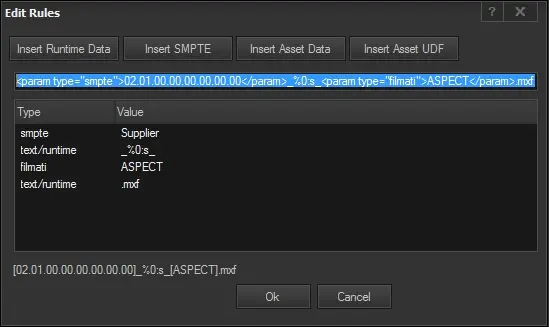
The Rules Editor is a tool that allows defining custom names for naming files on their target destinations; users can freely construct custom names combining database references (e.g. asset table fields, Flexi-metadata) and free text.
To start creating a custom name, just click on one of the following buttons, depending on which data you intend to use:
Rules_Editor
Data: [Insert Runtime Data]
Description: Insert one of the environment variables supported by Etere DataMover.
NB: For a detailed list of available runtime data, refer to the Supported runtime variables. Click here chapter.
Data: [Insert Flexi-metadata]
Description: Insert Flexi-metadata fields which have been compiled in the media library.
NB: This function can be quickly called through the INS key shortcut.
Data: [Insert Asset Data]
Description: Insert asset properties from the asset's database table (e.g. ID, Code, Aspect, Supplier, etc.).
Data: [Insert Asset UDF]
Description: Insert a UDF (user-defined function) to be automatically executed with the ID (e.g. 2355) of the asset for which the job is performed.
NB: User-defined functions must have only one parameter, the asset ID. For an example of using this kind of function, please refer to the chapter: "Use UDF from Power Tools".
You can also insert free text by directly typing it in the editing box.
Once inserted, data will be listed in the middle panel, indicating their type (e.g. Flexi-metadata) and value (e.g. supplier). Inserted data will also be displayed in the editing box, where it will be possible to freely add/combine/delete data to construct custom names. The following table illustrates an example of how data is edited, previewed and generated:
Editing box: - <param type="smpte">02.01.00.00.00.00.00.00</param>_%0:s_<param type="filmati">COD_PROGRA</param>.mxf
Preview box: - [02.01.00.00.00.00.00.00]_%0:s_[COD_PROGRA].mxf
Sample values: - JonesAndJones_6353_Simpsons64.mxf
Once the construction of the custom name has been completed, press the [Ok] button to save changes and put it on the field from which it has been required (e.g. output filename).
 Rules_Editor