New Price List
4.4.1.1 Price List Grid
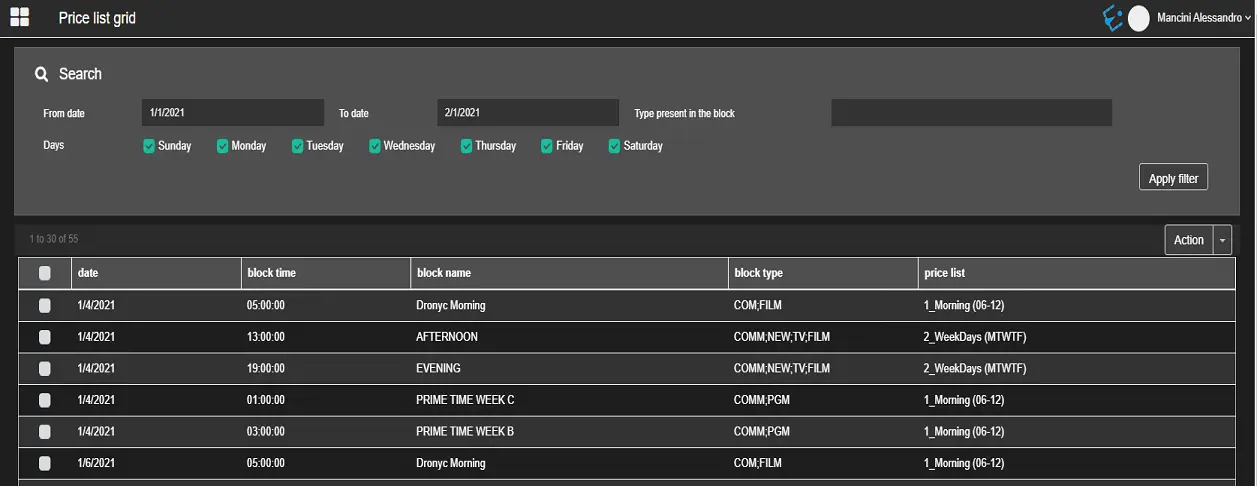
The Price List Grid allows to assign a price list to one or more blocks matching the filters described below.
Price_List_Grid
search_header
From date – To date: Select a date range in which the blocks are scheduled.Type present in the block: Select the types associated to the blocks to search. This list is filled with all the types having a specific property enabled. You can define which property Air Sales has to look for, in Air Sales desktop application > Sales > Parameters > Proposal tab > Property used to identify commercial events.
Days: Filter the blocks search by selecting one or more weekdays in which they're scheduled.Action: Once the blocks are retrieved, select the ones you intend to assign a price list to and use the functions in the action menu on the right:
• Select all results
• Assign price list
• Remove the price list
• Remove all price list
 Price_List_Grid
 search_header