59.8.3.3 Install the Windows SNMP service
The Windows SNMP Service is used to configure remote devices, monitor network performance, audit network usage, and detect network faults or inappropriate access; installing it for the proper functioning of the Etere SNMP services is essential.
To install this function on Windows 10 and Windows 11, follow the steps below:
1. Go to the Windows Start > Settings > Apps
2. Open the Optional Features section
3. On the Search form, write SNMP
4. Navigate and make sure the Simple Network Management Protocol (SNMP) feature is enabled
windows_features
5. Press the [Ok] button to install the SNMP windows feature
6. Windows will start the installation and, at once finished, will require you to press the 'Finish' button
7. Go to "Start > Services" and check the following services:
SNMPServices
SNMP Service - This service must be "started" and set to "automatic". This service allows clients to send SNMP traps to the monitoring console.
SNMP Trap - This service must be set to "manual" (the Etere SNMP Console service starts it). This service allows the monitoring console to receive and interpret SNMP traps.
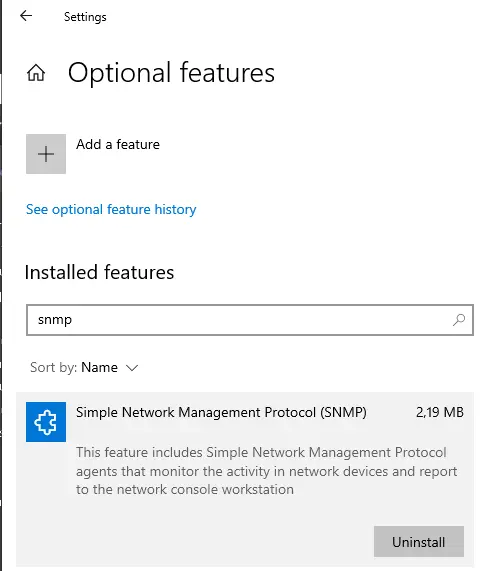 Windows_Features
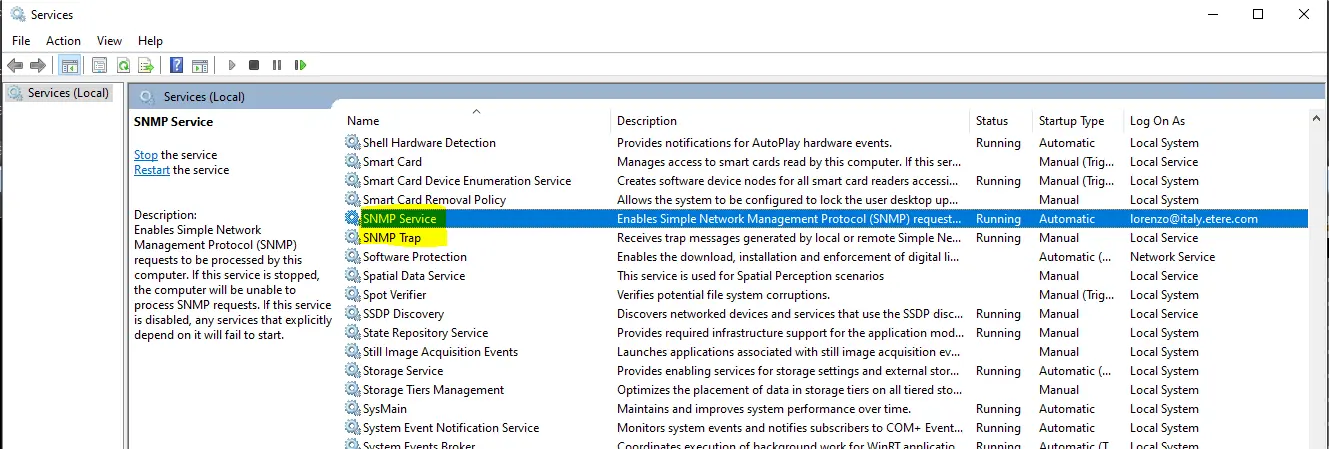 SNMPServices