52.2.5.1 GPI
ad insertion gpi configuration
NB: The "GPI" tab would not be visible if AD Insertion is in Automation mode.
Reminder: All GPIs are zero (0) based.
INPUT
• GPI to start the cluster
When using an external GPI to trigger the start of commercial clusters (i.e. simulate pressing the
- GPI number: If set to "-1", no GPI would be used, whereas "0" means that the first input should be used (1=second, 2=third and so on).
- Delay for a start (ms.): It allows the insert of
• GPI to stop the cluster
In case of using an external GPI to trigger the stop of commercial clusters (i.e. simulate pressing the
• GPI Type
Indicate if the received GPI input signal stops the transmission. This section works the same for the GPI to start the cluster and the one to stop it.
- Falling edge: The "Start GPI" command would be executed each time the received GPI signal switches from 1 to 0.
- Raising edge: The "Start GPI" command would be executed each time the received GPI signal switches from 0 to 1.
NB: During the configuration, trying both types to find the ideal one that meets the requirement is recommended. Moreover, once the type is correctly set, it MUST NOT be changed; otherwise, the transmission will not work as expected (e.g., clusters will start immediately).
NB: It is possible to configure and use the same GPI to start and stop the cluster.
OUTPUT
• ON AIR GPI
Specify the GPI to be activated during on-air.
- GPI to activate during the on-air: Indicate "-1" when no GPI is used, "0" for the first GPI, "1" for the second and so on.
• END GPI
Specify the GPI to be activated at the end of the cluster; remember that the first GPI is "0", the second GPI is "1", and so on.
- GPI to be activated at the end of the cluster: Indicate "-1" when no GPI is used, "0" for the first GPI, "1" for the second and so on.
- At how many msec. From the end: Indicate how many milliseconds before ending the cluster the GPI should be activated.
- Permanence in msec.: Set the permanence time in milliseconds to activate the end of the cluster.
• GPI CLONE->TX
Set the GPI output to be triggered when the clone server becomes TX (i.e. primary).
- GPI to activate when CLONE becomes TX: Indicate "-1" when no GPI is used, "0" for the first GPI, "1" for the second and so on.
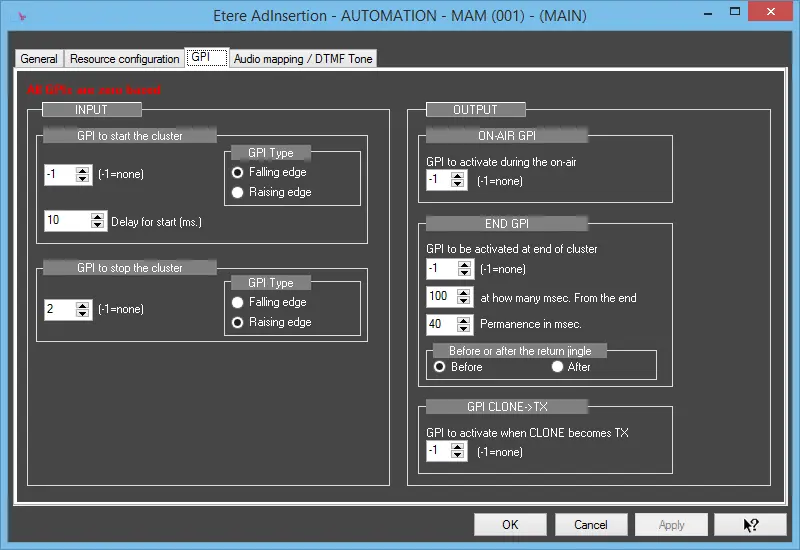 ad insertion gpi configuration