84.2.4.16 SCTE Cue Tone
This function activates the “SCTE Cue Tone” feature in STMan which would enable you to transmit SCTE command (e.g. #123) to the selected secondary event scheduled in the playlist, using a given cue tone.
SCTE_Cue_Tone
When this function is launched, the following parameters are required to be configured:
Active: Enable this option to activate the secondary event.
Name: Assign a name to the secondary event.
Execute command: Indicate the Start Time of the command and specify at which point the command would take place. Possible values are:
➢ After the event start: execute the command when the amount of time specified is passed, after the start time of the current main event (E.g.: If the main event starts at 15:00:00.00 and the time set here is 00:00:30.00, the command will be executed at 15:00:30.00).
➢ Before the event end: execute the command when remains the amount of time specified, before the end of the current main event (E.g.: If the main event ends at 15:00:00.00 and the time set here is 00:00:30.00, the command will be executed at 14:59:30.00).
➢ Before the previous event end: execute the command when remains the amount of time specified, before the end of the previous main event (E.g.: If the previous main event ends at 15:00:00.00 and the time set here is 00:00:30.00, the command will be executed at 14:59:30.00).
➢ After the previous event start: execute the command when the amount of time specified is passed, after the start time of the previous event (E.g.: If the previous main event starts at 15:00:00.00 and the time set here is 00:00:30.00, the command will be executed at 15:00:30.00).
Duration: In this case, since the command sent is a cuetone, there's no need to specify a duration.
Command Type: Select the command type Cue Tone.
Command to send: This parameter is enabled only if the command type is set to Cue Tone. Enter the SCTE command to be sent to the selected secondary event. The maximum number of characters for single cue tone is 7 characters.
Click <Apply> and <Ok> to confirm the transmission of SCTE cue tone.
Example:
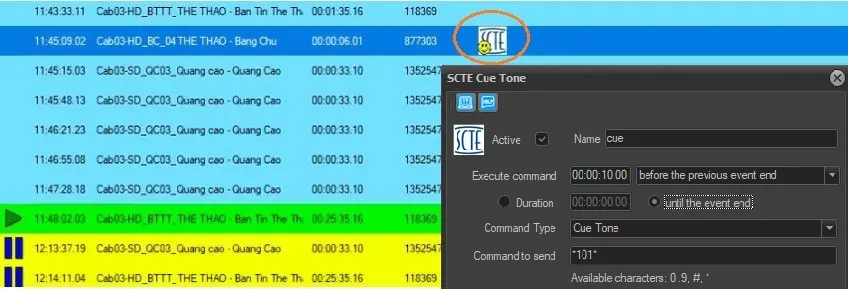
In the following example, SCTE string *101* was sent to the destination URL set in the SCTE-35 configuration page to send cue tone 10 seconds before the end of previous event played at "11:44:59:02".
SCTE-35_configuration
• The PTS Time (Start Time) is automatically set at "11:45:09:02" which is 10 seconds after the previous ends.
• The duration is set by the operator at "00:02:33:00" and matches the cluster duration.
 SCTE-35_configuration
 SCTE_Cue_Tone